Blog

Administration, BizTalk, WMI

Strange BizTalk WMI behavior (curious BizTalk SQL)

This week a co-worker raised an issue with a WMI query where he did a simple query for an orchestrations messages, and for some reason not all of them were returned. This behavior exists on both 2006 R2 and 2009, and thus most likely on 2006 as well. The query was simple:

select    *
from MSBTS_MessageInstance
where ServiceInstanceID = ‘{9DD50CE0-CC9C-478C-B19D-A3AAFD33ACA3}’

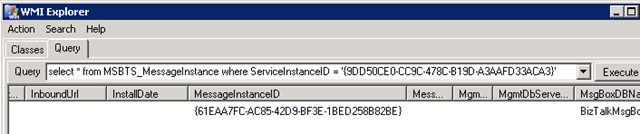
This was supposed to return two messages, but only one was returned, illustrated below in WMIExplorer:

image


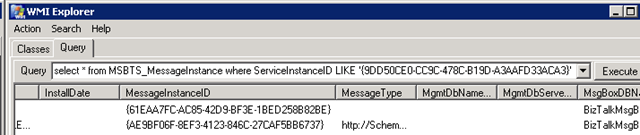
He came up with a solution where he could instead do a LIKE query and get both message instances returned:

select    *
from MSBTS_MessageInstance
where ServiceInstanceID LIKE ‘{9DD50CE0-CC9C-478C-B19D-A3AAFD33ACA3}’
image


Now I was ok with this as a solution, but I wanted to find out a bit about why this happened.


Using SQL Profiler to see what this WMI query meant I found a call that looked like this when I used ‘=’:

exec BOM_LookupMessageReferences
@nvcHost=NULL,@nServiceClass=127,@uidServiceType=NULL
@uidInstanceId=‘9DD50CE0-CC9C-478C-B19D–3AAFD33ACA3’,
@uidMessageId=NULL,@snStatus=63,@nReferenceType=15,
@dtFrom=‘Oct 25 3009 12:06:31:360PM’,@dtUntil=‘Oct 25 1809 12:06:31:360PM’,
@nMaxMatches=200

and like this when using ‘LIKE’:

exec MBOM_LookupMessageReferences
@nvcHost=NULL,@nServiceClass=127,@uidServiceType=NULL,
@uidInstanceId=NULL,
@uidMessageId=NULL,@snStatus=63,@nReferenceType=15,
@dtFrom=‘Oct 25 3009 12:06:42:867PM’,@dtUntil=‘Oct 25 1809 12:06:42:867PM’,
@nMaxMatches=200

Spot the difference?


Sure enough in one case we send in the (service)instanceId and in the latter, we don’t. This in effect, causes the latter query to return all messages matching the other criteria, and filtering on the serviceInstanceId is made elsewhere, presumably in the code executed by the WMI call, although I haven’t investigated that further.


So what makes the first query return only one message? It’s got the service instance Id with it, and nothing else, so what’s causing it to filter out the single message.


Looking further into the call chain in SQL, the method MBOM_LookupMessageReferences uses methods named MBOM_LookupMessageReferences_<host>, for example MBOM_LookupMessageReferences_BizTalkServerApplication.


In this (these) procedures you can find the following code:

if (@uidInstanceId IS NOT NULL)
set ROWCOUNT 1
else if (@nMaxMatches > 0)
set ROWCOUNT @nMaxMatches

So if we send in a serviceInstanceId we will just get a single message instance returned. I’m not sure what the point of this is really, but it seems to be interfering with what we want.


It’s an universal truth that you do best to stay out of the BizTalk databases and their queries. I’m not going to suggest something that I will call a solution in this post, especially not since I haven’t done sufficient testing to see that this doesn’t interfere with something else.


However, from the test I have done, it seems as if the following code change might be what was intended:

if (@uidMessageId IS NOT NULL)
set ROWCOUNT 1
else if (@nMaxMatches > 0)
set ROWCOUNT @nMaxMatches

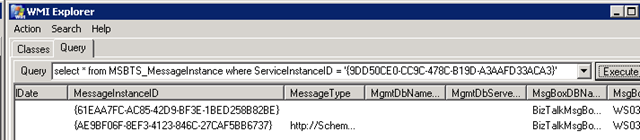
Which gives the result I want for a serviceInstanceId query:

image


as well as for a messageInstanceID query;
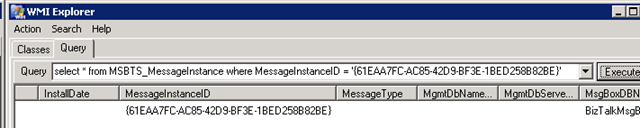

image


We are not likely to use this alteration, since I’m ok with the way that the LIKE query works, even though it takes a wider scope then necessary. But perhaps this might help or enlighten someone that finds themselves with a similar puzzle.

.csharpcode, .csharpcode pre
{
font-size: small;
color: black;
font-family: consolas, “Courier New”, courier, monospace;
background-color: #ffffff;
/*white-space: pre;*/
}
.csharpcode pre { margin: 0em; }
.csharpcode .rem { color: #008000; }
.csharpcode .kwrd { color: #0000ff; }
.csharpcode .str { color: #006080; }
.csharpcode .op { color: #0000c0; }
.csharpcode .preproc { color: #cc6633; }
.csharpcode .asp { background-color: #ffff00; }
.csharpcode .html { color: #800000; }
.csharpcode .attr { color: #ff0000; }
.csharpcode .alt
{
background-color: #f4f4f4;
width: 100%;
margin: 0em;
}
.csharpcode .lnum { color: #606060; }
BizTalk Server 2009, Download, VirtualPC

BizTalk Server 2009 VPC

Available. Usable for demos, Hands-On labs and just getting a peak at BizTalk Server 2009 if you aren’t yet running it. Good news. Get it here.


Update 1 [2009-10-19]: This download is currently corrupt. Fix pending.
Update 2 [2009-10-24]: The download page has been removed. Links to files still work. Files still corrupt AFAIK.
Update 3 [2009-10-25]: Download is live again! Files are still corrupt.
Update 4 [2009-10-30]: I’ve download it 5 times. Still corrupt. Some people in other parts of the world seem to be able to download it ok, while others in the same country gets it corrupt. Cached somewhere?
Update 5 (2009-11-02): Got a question from a blog reader that downloaded the file today and found it corrupt if I had heard when a fix was comming. I haven’t.
Update 6 (2009-11-04): I’ve had multiple reports of people downloading the file, both those finding it corrupt and those who are able to use it ok. Try it if you have the bandwidth to spare. I haven’t been able to pinpoint any determining factor, though I do so hate things that are down to chance.


Update: Here are the links directly to the files, for loading in FDM or similiar.


Part 1
Part 2
Part 3
Part 4
Part 5
Part 6
Part 7
Part 8

.NET 3.5, WCF

Contruct ChannelFactory takes too long with config

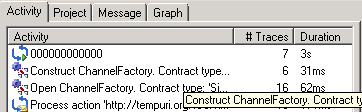
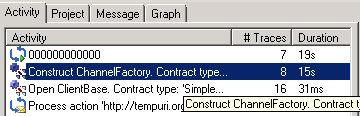
Recently we experienced an issue with a service where the first call took a long time to complete. Subsequent calls would complete fine and fast, but the first call took a long time. Using Service Trace Viewer told us that the problem lay at constructing ChannelFactory.


image


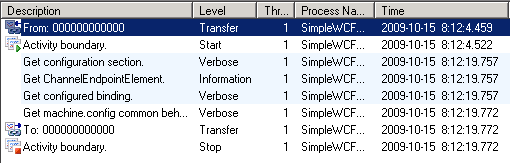
The detailed trace of this activity didn’t give us any more hints to what was causing the problem.


image


All we could see was that the time appeared to all disappear when WCF tries to get the configuration for service.


The code for this (I’m just using the automatically generated Service1 template to illustrate) was as follows:

proxy = new Service1Client();
Console.WriteLine(proxy.GetData(22));

This is strange indeeded. Since loading the config seemed to be the issue, we changed the code to do this programmatically instead.

EndpointAddress address = new EndpointAddress(“net.tcp://localhost/SimpleService/Service1“);
proxy = ChannelFactory<IService1>.CreateChannel(new NetTcpBinding(), address);

Running this and looking at the trace for this revealed that this was a much more performant way of doing this.


image


For the scenario we had this solution was fine – but it’s not really a solution, it’s a workaround.


I’m still at a loss to describe why this happened on these servers, since the same thing worked quite differently on other servers. There, both solutions performed the same. So this is obviously something connected to some setting or circumstance that differs on those servers when compared to others.


If anyone has insight into this, or suggestions, please share.

BAM, Readings

Book Review: Pro BAM in BizTalk 2009

A while back now I got the Pro BAM in BizTalk Server 2009 book. I have always liked BAM and we always try to use it in our solutions, if nothing else then for infrastructural logging purposes. However BAM has never been something that has been described in any detail or highlighted within the BizTalk documentation. There are also a great deal many BizTalk solutions and developers out there that have never used BAM, perhaps in part because they haven’t had a good source to learn about it. When we had a user group meeting and talked about BAM last year we did a short put-your-hand-up poll and, if my memory serves, only about one out of five did put their hand up. And this in a group that to a large part I would judge as pretty progressive. I didn’t ask how many had used BAM outside of BizTalk, but I am pretty sure that if I had the answer might have been one or two, out of the whole group, if that.

If the issue is that it’s hard to find a source that covers BAM, one that is decently complete in its coverage, then that is one issue that is now resolved. Pro BAM in BizTalk Server 2009 succeeds in being that source. It covers both development, administration and business aspects of BAM. And with Business I don’t solely mean the Business Analyst role, but also where BAM fits, where it makes sense, and how you can get your data into the observation model as well as how you can get it out and report and research on it.

Although BAM presently is a BizTalk bundled technology the book approaches BAM from a BizTalk independent way, and talks as much about BAM in relation to other connected system technologies like WCF and WF as it does BizTalk. But that’s in line with the trends of BizTalk in general, where WCF more and more is taking on a very central role. Not everything is 100% up to date, but that’s not to be expected – change happens so fast that yesterday can be old news today, but the book still strives to put things in context of the latest technology and concepts and touches on topics such as Dublin and Oslo.

The book also goes into great detail about how to use the different types of tooling that comes along with BAM aimed for the different roles of Business Analyst, Developer, Administrator, and Information Worker (or Data Consumer as the book calls it). I also like how the book has specific sections on troubleshooting, should everything not work as expected, and tips that goes beyond just configuring it but also living with it.

It’s a really complete book in its coverage of BAM, and pointing out what’s missing is not an easy task, and isn’t really fair to the authors. If anything a discussion on BAM and performance could have been present. Although BAM has a highly performing infrastructure, a performance discussion is always of interest, especially from a BizTalk perspective when comparing it to for example the DTA tracking. The book also doesn’t go into much detail about when different tables are used, or what they contain and what flags have what meaning. Such things are however not need to know for you too call yourself a BAM wiz, something which this book may very well help you become.

Thanks Jeff and Geoff, it’s a great addition to my library. And I’m a better BizTalker for reading it 😉

BAM, BizTalk, Configuration, Installation

BAM and SSIS notes worth repeating

SQL Server Integration Services (SSIS) is not a clustered resource. Connecting to SSIS generally means connecting to any of the SQL Server servers in your cluster environment directly, not to a virtual cluster address. Configuring SSIS for a named BAM instance still involves configuring it against your clustered BAM database instance. The BizTalk install documentation (Multicomputer) also claims that SSIS needs to be installed on the BizTalk Servers. That’s incorrect. You could install SSIS and that’d be good, but I much rather install the management tools, as explained and outlined here.

While talking about BAM I can’t help but to mention an excellent article recently written by Saravana Kumar here.