Blog

BizTalk Server 2009, BizTalk Server 2010, Deployment, Development

Visual Studio (BizTalk Server) 2010 development / BizTalk Server 2009 deployment mix

Can you use the updated development environment for BizTalk Server 2010 with Visual Studio 2010 while still deploying to BizTalk Server 2009?

Can you do it? On a file level, yes. On a project level, yes. On a solution level, doesn’t seem like it. On an assembly level, no.

I tried two scenarios.

  1. A simple messaging only scenario with a transformation on the receive port.
  2. An orchestration scenario picking up the file from the receive location, doing the mapping and delivering it to the send port.

I developed the solution on a BizTalk Server 2010 / Visual Studio 2010 combo and deployed it to BizTalk Server 2009.

So what worked and what didn’t?

Compile and deploy the .NET 4 assembly to BizTalk Server 2009

FAIL!

Why?

Even though I did Add a resource manually selecting the file to be a BizTalkAssembly BizTalk Server 2009 kept on reverting it back to File. Obviously it doesn’t recognize it, or recognizes that it’s an incorrect version of the framework.

image

Re-target the solution to .NET 3.5 or .NET 2.0

FAIL!

Why?

The following is taken from http://msdn.microsoft.com/en-us/library/ff629735(BTS.70).aspx

BizTalk Server 2010 supports building new applications only on .NET Framework version 4 . You can build both BizTalk applications as well as custom applications (such as custom functoids, custom pipeline components) using .NET Framework 4 . However, BizTalk Server 2010 continues to support the BizTalk Server 2006 R2 and BizTalk Server 2009 applications (BizTalk applications and custom applications) built on .NET Framework 3.5 SP2.

If you launch an existing BizTalk project in BizTalk Server 2010 , it automatically gets migrated, changing the .NET Framework version to 4.0. You cannot modify the .NET version number later in the Properties dialog box of the BizTalk project.

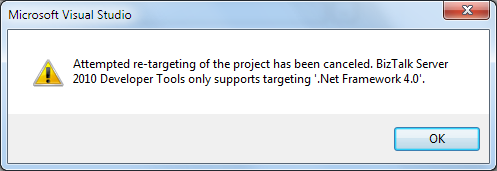
In essence it says that you cannot use the re-targeting functionality within Visual Studio 2010 for BizTalk Server 2010 projects. If you try, because the drop down is still there, you get the following dialog:
image

Using Files created by Visual Studio 2010, like .xsd, .btm or .odx

SUCCESS!

You can copy paste files from one project into another, without any issues I detected.

Open the project file created with Visual Studio 2010 and re-compile using Visual Studio 2008

SUCCESS! But with some issues…

You can open a BizTalk project created in Visual Studio 2010 in Visual Studio 2008 and just re-compile it. Without any issues I detected. However, it does not seem like Visual Studio 2008 wants to open the solution file, which may be an issue in some situations, like for example if you wan’t to create automated builds. The structure of the solution file begins like this:

Microsoft Visual Studio Solution File, Format Version 11.00
# Visual Studio 2010
Project("{FAE04EC0-301F-11D3-BF4B-00C04F79EFBC}") = "BizTalk Server Project1", 
"BizTalk Server Project1BizTalk Server Project1.btproj", "{DE7C19FB-A5BA-46A0-9382-ACFB3EB91409}"

This may very well be what causes Visual Studio to dismiss it.

Hope this helps someone thinking along these lines 🙂

Disclaimer: This is tested with BizTalk Server 2010 Beta. All artifacts used while performing these tests are trivial. It might very well be that in some more complex scenario this might not work.

BizTalk Server 2009, MSMQ

Weird MSMQ issue with an even weirder solution

You may think I am crazy… In fact, it seems so unbelievable I don’t quite believe it myself, but I experienced it, and can’t shrug it off. So, on the off chance that someone else might run into this, I am writing down the experience since I couldn’t find a single reference to it when I searched for a solution (which by all means in turn means it’s unlikely that it has happened to all that many people before).


On one environment I was testing MSMQ connectivity. From my brand new BizTalk Server 2009, windows Server 2008 64-bit, environment I wanted to connect to a Windows Server 2003 remote transactional MSMQ queue. Since I wasn’t doing anything remotely service oriented, quite the opposite – it was all about file transfers, I decided to use the “old” MSMQ adapter.


This didn’t work, and failed with the error message:

The adapter “MSMQ” raised an error message. 
Details “The type initializer for ‘<Module>’ threw an exception.”.

Ok. So faced with this what do I do? I start local. I created a local private transactional queue, a FILE receive and a MSMQ send – to get a message into the queue. This worked fine.


I then wanted to read the message out from the queue and write it back to disk. This did not work, but failed with the same error message.


I created a second queue, non-transactional, and put a message in there and tried to read it from that, to peel away the transactional aspect. Same non-helpful exception.


I was somewhat at a loss. As I expressed my disgust a colleague asked why I didn’t use the WCF-NetMsmq, and though I had no intention of using it in the final solution that brought on the idea of trying that instead. So I configured a port for that and enabled it.


When I did, I got back the message from the queue. However… as I looked in the Event Log I saw error messages from that adapter and looked to see that I had configured it incorrectly – I had continued to put the queue name as xxxprivate$yyy (in the WCF-NetMsmq adapter you don’t use the $). What had happened? I had not gotten the messages with my WCF-NetMsmq port.


As I enabled the WCF-NetMsmq the old MSMQ ports had sprung to life and begun working!


I could now get messages from the local transactional as well as non-transactional queue.


And when I tried the remote queue I now got another, much more helpful, error message:

The adapter “MSMQ” raised an error message. 
Details “This operation is not supported by the remote Message Queuing service.
For example, MQReceiveMessageByLookupId is not supported by MSMQ 1.0/2.0,
or remote receive of the large mesasage cannot be done by the client below v3.5

As it turns out, I can’t make the connection I wanted, as remote transactional queues are not supported by the BizTalk MSMQ adapter in this scenario, on accounts of it not being available in Message queuing 3.0 (which, if you remember, my target system is running since it’s Windows Server 2003). References are here:
· http://msdn.microsoft.com/en-us/library/aa562010(BTS.10).aspx
· http://blogs.msdn.com/johnbreakwell/archive/2007/12/11/how-do-i-get-transactional-remote-receives.aspx
· http://blogs.msdn.com/johnbreakwell/archive/2008/05/21/remote-transactional-reads-only-work-in-msmq-4-0.aspx


But the real point here is not that, but the strange exception I got up front. Repro you ask? Couldn’t get it to happen on any other environment, in fact, on the ones I tried the MSMQ adapter just works. No weird exceptions.

BizTalk, SOAP, SQL

Send Failures, NACKS and SOAP Faults

(or why my previous post doesn’t apply to all adapters)

In a previous post I identified how if you had the WCF-BasicHttp adapter on the backend send and the WCF-NetTcp adapter on the frontend receive you need a transformation for the client to interpret the backend Fault as a Fault since there is a SOAP version mismatch.

As was evident by a comment, this does not apply to all adapters, but only to the base WCF adapters. for example it does not work with the WCF-SQL adapter.

Why?

In contrast to the base WCF adapters, which when you enable the Propagate fault message treats a SOAP Fault coming from the recipient service as an acceptable message and returns it to the receive port as a valid SOAP Fault message that has Fault as the root element, the WCF-SQL adapter returns a NACK message (if there is an error raised in SQL) as the message. The NACK message has not got the Fault element as it’s root, but instead has Envelope, and looks like this:

<?xml version="1.0" encoding="utf-8"?>
<SOAP:Envelope xmlns:SOAP="http://schemas.xmlsoap.org/soap/envelope/" SOAP:encodingStyle="http://schemas.xmlsoap.org/soap/encoding/">
  <SOAP:Body>
    <SOAP:Fault>
      <faultcode>Microsoft BizTalk Server Negative Acknowledgment </faultcode>
      <faultstring>An error occurred while processing the message, refer to the details section for more information </faultstring>
      <faultactor>C:ProjectsSampleLocationsResponseFM_%MessageID%.xml</faultactor>
      <detail>
        <ns0:NACK Type="NACK" xmlns:ns0="http://schema.microsoft.com/BizTalk/2003/NACKMessage.xsd">
          <NAckID>{FFB1A60B-E593-4620-8897-4E9C7030A937}</NAckID>
          <ErrorCode>0xc0c01658</ErrorCode>
          <ErrorCategory>0</ErrorCategory>
          <ErrorDescription>There was a failure executing the send pipeline: "Microsoft.BizTalk.DefaultPipelines.XMLTransmit, Microsoft.BizTalk.DefaultPipelines, Version=3.0.1.0, Culture=neutral, PublicKeyToken=31bf3856ad364e35" Source: "XML assembler" Send Port: "Failed Message" URI: "C:ProjectsSampleLocationsResponseFM_%MessageID%.xml" Reason: This Assembler cannot retrieve a document specification using this type: "http://Sample#Unknown".  </ErrorDescription>
        </ns0:NACK>
      </detail>
    </SOAP:Fault>
  </SOAP:Body>
</SOAP:Envelope>

Therefore it cannot be mapped by the map presented in that post, although the Fault it contains is a SOAP 1.1 Fault.

Read more about ACK and NACK messages here.

BizTalk, SOAP, WCF

BizTalk and SOAP Fault version issues

A developer in the same team made me aware of an issue they were seeing where if the BizTalk Send Port returned an exception the Client that called the ReceivePort would get a response that was interpreted as null instead of as an exception.


Now this is a synchronous service call without any orchestration, where BizTalk is just a broker of the web service calls. What we want out of it is this:


  1. For exceptions throw by the backend service to get relayed back to the original caller.

  2. For no suspended messages to be visible in BizTalk when an exception occurs with the backend service – so that operations won’t be bothered with removing them.

  3. For operations to get notified of all other exceptions, ie suspended messages.

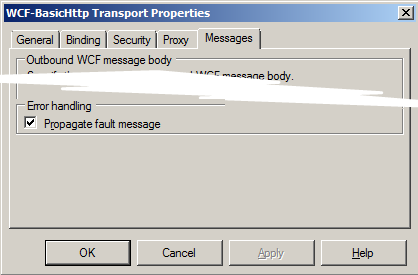
Now this is all quite easy, all you need to do is make sure the propagate fault flag is checked on the send port adapter settings:
image
(somewhat shortened dialog)


What can happen though is that when the SOAP version does not match between what the Send Port receives and relays and what the client that called the Receive Port/Location is expecting is that the Fault ends up not being correctly formatted and thus the client is unable to interpret it.


This happens when you use the BasicHttp adapter or BasicHttpBinding with the Custom Adapter on the Receive Port and NetTcp (or WSHttp or… etc) on the Send Port (or vice versa). It happens because the SOAP version that BasicHttp uses is different than that used by the other WCF Adapters.


A sample SOAP 1.1 Fault look like this:

<s:Fault>
<faultcode>s:Client</faultcode>
<faultstring xml:lang=”sv-SE”>You entered 666</faultstring>
</s:Fault>

(where the namespace s is defined on the envelope and points to xmlns:s=”http://schemas.xmlsoap.org/soap/envelope/&#8221;)


While a sample SOAP 1.2 Fault look like this:

<s:Fault xmlns:s=”http://www.w3.org/2003/05/soap-envelope”>
<s:Code>
<s:Value>s:Sender</s:Value>
</s:Code>
<s:Reason>
<s:Text xml:lang=”sv-SE”>You entered 666</s:Text>
</s:Reason>
</s:Fault>

In our scenario, with the type of metadata that BizTalk exposes for the service, what happens at the client is that what is actually a Fault instead gets interpreted as a valid response, but since the element that represents the response, let’s call it GetDataResponse just for sake of illustration, is missing – the client will interpret it as a null response. Highly unwanted.


The solution is to make sure that the Fault response is valid for the version of SOAP used by the receive side adapter, that is; do a transformation. A transformation can be done in many places: a map, a pipeline component, a WCF Message Inspector. In my case I prefer to place the component resolving the problem as close as possible to the thing causing the problem – which here means I opt for the Message Inspector, but a map might be the easiest for many. I might add the implementation of the message inspector in a later post, but for now, below is some custom xslt you can use in a map (or elsewhere) (if you do not use custom xslt you might get complaints from the client that the namespace prefixes are incorrect for reserved namespaces) – it maps from SOAP 1.1 to SOAP 1.2 (from BasicHttp to others, like NetTcp). You might perhaps also have to map in the other direction.

<xsl:stylesheet xmlns:xsl=”http://www.w3.org/1999/XSL/Transform”
xmlns:msxsl=”urn:schemas-microsoft-com:xslt”
xmlns:var=”http://schemas.microsoft.com/BizTalk/2003/var”
exclude-result-prefixes=”msxsl var s0″ version=”1.0″
xmlns:s0=”http://schemas.xmlsoap.org/soap/envelope/”
xmlns:xml=”http://www.w3.org/XML/1998/namespace”
xmlns:s=”http://www.w3.org/2003/05/soap-envelope”>
<xsl:output omit-xml-declaration=”yes” method=”xml” version=”1.0″ />
<xsl:template match=”/”>
<xsl:apply-templates select=”/s0:Fault” />
</xsl:template>
<xsl:template match=”/s0:Fault”>
<s:Fault>
<s:Code>
<s:Value>
<xsl:value-of select=”faultcode/text()” />
</s:Value>
</s:Code>
<s:Reason>
<s:Text xml:lang=”sv-se”>
<xsl:value-of select=”faultstring/text()” />
</s:Text>
</s:Reason>
<xsl:if test=”faultactor”>
<s:Role>
<xsl:value-of select=”faultactor/text()” />
</s:Role>
</xsl:if>
<xsl:for-each select=”detail”>
<s:Detail>
<xsl:value-of select=”./text()” />
</s:Detail>
</xsl:for-each>
</s:Fault>
</xsl:template>
</xsl:stylesheet>

BizTalk, Presentation, TechDaysSE

TechDays Sweden 2010

techdays-blogg-speaker


That should read… I was a speaker at the Swedish TechDays, since I am writing this post after the fact, although I’m backdating the post a bit to more closely match in time when I was supposed to have published it.


I did a session titled “The Future Roadmap of BizTalk Server” and I’m happy to say I drew a full room (not that the room was all that big, but all the same). Future in this case meant I covered both current and coming technology. The reasoning behind it was that a lot of people probably wouldn’t have BizTalk Server 2009. This turned out to be true since it was a clear minority of the people in the room that raised their hands when asked if they had had previous contact with BizTalk Server 2009. I covered ESB Toolkit 2.0 and Itinerary processing as well as connecting to Windows Azure Platform Service Bus. I was a little surprised here that as I asked for a raise of hands on how many were familiar with the Service Bus only a couple of hands went up. Either it’s a Swedish mentality thing – to not want to stand out – or there simply aren’t all that many people interested in it, yet. I went on to cover some of the news in 2009 R2 (which I learned had gotten renamed to 2010 the evening after my presentation). I couldn’t demo anything, but am quite satisfied with how the Powerpoint “Demo” I was able to do (yes, I know, you can kill a presentation, and other things, with Powerpoint, but I think I did ok). I also related some of the vision given by the team at PDC in November and subsequent WebCasts about vNext. The recorded session should be up soon at the TechDays site, however it will be in Swedish, so for an international audience it will be useless. The presentation will be availble soon as well, as a pdf.


Because I believe in sharing I’ve decided to make the presentation available through the blogical Downloads section, here. I have myself borrowed small parts and ideas from the presentation from elsewhere as you often do, but almost all slides and images are built from scratch. I’m sharing those under a “if you decide to use parts of it please at least tell me that you liked it and that it was useful to you through commenting this blog post” license. I’ve marked it as final, but it’s not copy protected or in pdf format or anything, it’s the pptx file itself. Enjoy.


UPDATE: Recorded session (in swedish) is here.


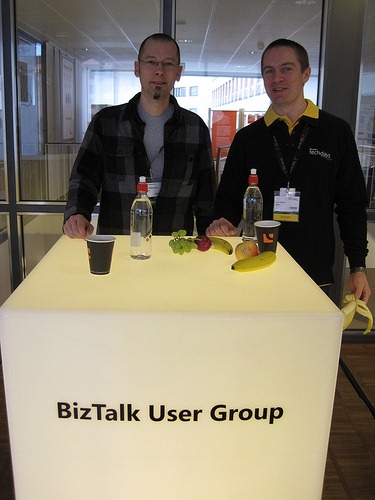
Also BizTalk User Group Sweden was represented at TechDays as well.


(Not the best of pictures, with the backlight and all, but there we are… From MPN Swedens photostream)