Blog

Uncategorized

Truncate BizTalk Servers database log files to clear up space

First: A Disclaimer. Do NOT attempt this in your production environment.You risk loosing data.


We had an issue in a test environment where the Backup BizTalk job was not configured and had caused the log files to fill the disk to it’s limit. The data in the environment wasn’t important and destroying a coherent backup chain and point in time restore was not a big deal. We just needed to get the environment back fast to allow test to continue.


I quickly wrote and ran the script below that does the job of truncating BizTalk Servers log files to make the environment functional again. Be aware that this will break the coherence of the log backup chain. To get a point in time that you can restore to you could opt to take a full backup immediatly following this operation if that is important to you. Before running this script you should stop all services that uses the database and make sure that all connections are closed if you want to make sure that your databases are left in a transactionally coherent state.

USE master
ALTER
DATABASE BizTalkMgmtDb SET RECOVERY SIMPLE WITH NO_WAIT
ALTER DATABASE BizTalkDTADb SET RECOVERY SIMPLE WITH NO_WAIT
ALTER DATABASE BizTalkMsgBoxDb SET RECOVERY SIMPLE WITH NO_WAIT
GO

Use BizTalkMgmtDb
DBCC SHRINKFILE (N’BizTalkMgmtDb_log’ , 0, TRUNCATEONLY)
GO

Use BizTalkDTADb
DBCC SHRINKFILE (N’BizTalkDTADb_log’ , 0, TRUNCATEONLY)
GO

Use BizTalkMsgBoxDb
DBCC SHRINKFILE (N’BizTalkMsgBoxDb_log’ , 0, TRUNCATEONLY)
GO


USE master
ALTER
DATABASE BizTalkMgmtDb SET RECOVERY FULL WITH NO_WAIT
ALTER DATABASE BizTalkDTADb SET RECOVERY FULL WITH NO_WAIT
ALTER DATABASE BizTalkMsgBoxDb SET RECOVERY FULL WITH NO_WAIT
GO


Keep in mind that this is just a sample, add and deduct databases as needed, change the name of log files etc. Once done restart the BizTalk Services and you should be good to go.


You really should, as a first, second and third option, configure the Backup BizTalk job to stop unchecked log file growth. The backup job will make sure that log files don’t grow out of control. You will however need to set something up to clear away the backup files created instead. Here is one option for doing that


There is also something you can do to reduce the size of the log files – enable compression. You can read more about that here.


This log file growth happens because BizTalk Servers databases by default uses the FULL recovery mode. Setting the BizTalk Server databases in SIMPLE mode permanently is a so-so idea. If you really do not need and will never do backups and understand that restore or recover in this case will mean re-install and start from scratch, then ok. If that is not the case, then SIMPLE mode is a bad idea. You can read more about why here. I’ll give a hint though – DTC transactions.


HTH
/Johan
BizTalk, Maintenance, SQL

Used and unused hosts sql script

This is just a log post of a script I put together. When setting up a plattform we are not always certain what hosts and handlers the customer wants. We usually set it up according to common requirements and best practices. In that case it’s also interesting to see what hosts are indeed used and not used once the solution is deployed, so you know which ones can be removed if requested. This is a sql script for that. Although this information can be found out using the Administration Console these kind of reports are not easy to get out and there is no one view for it. It’s much easier to access the database BizTalkMgmtDb directly for these things.


select h1.Name from adm_Host h1 where h1.Name not in(
select distinct h.Name as Host –, a.Name as Adapter, rp.nvcName as Port
from adm_host h
join adm_receivehandler rh on h.id = rh.HostId
join adm_receivelocation rl on rl.ReceiveHandlerId = rh.Id
join bts_receiveport rp on rp.nID = rl.ReceivePortId
join adm_adapter a on a.id = rh.AdapterId
UNION
select
distinct h.Name as Host –, a.Name as Adapter, sp.nvcName as Port
from adm_Host h
join adm_SendHandler sh on h.Id = sh.HostId
join bts_sendport_transport spt on spt.nSendHandlerID = sh.Id
join bts_sendport sp on sp.nID = spt.nSendPortID
join adm_Adapter a on sh.AdapterId = a.Id
UNION
select
distinct h.Name as Host –, ‘*Orchestration’ as Adapter, o.nvcName as Port
from adm_Host h
join bts_orchestration o on h.Id = o.nAdminHostID
–UNION
–select distinct h.Name as Host, * –, ‘*Tracking’ as Adapter, NULL as Port
–from adm_Host h
–where h.HostTracking = 1
)


HTH
/Johan

Administration, BizTalk Server 2010, Maintenance

Updates to bLogical.BizTalkManagement powershell BizTalk Server database restore commandlets

I’ve uploaded a new version of the bLogical.BizTalkManagement restore powershell commandlets originally posted by Mikael. The updates are minor and adress the parsing of filenames and cleanup of the code to get rid of some god intentions that never became more then intentions, aka unused code.


If you have no idea what I am talking about, feel free to read the original article and give them a try. We are using these heavily for customers instead of log shipping and it really makes the whole process of restoring your databases easy.

64-bit, BizTalk Server 2010, HIS, MQ

How I diagnosed en elusive ‘is not a valid Win32 application’ exception

We were using BizTalk Server 2010 and the MQ Client (MQSC) adapter from Host Integration Server 2010 (HIS 2010). We had been getting an exception on and off on servers without really knowing why it appeared on some servers and not on others. We even opened a case with Microsoft, but they are only human like the rest of us and can’t magically diagnose and solve errors remotely based on vague input, so that really didn’t lead anywhere other then things like “Make sure you are running the adapter in a 64-bit process”. The exception message was this:

The adapter "MQSC" raised an error message. 
Details "Could not load file or assembly 'Microsoft.BizTalk.Adapter.Mqsc.ImqWrapper.dll'
or one of its dependencies. is not a valid Win32 application. (Exception from HRESULT: 0x800700C1)".

It’s enough to say that we investigated the error in a number of ways, including making sure that the specific dll mentioned was present. But as we all know the “or one of its dependencies” can hide any number of referenced dlls. So we made sure that the machines that worked and the ones that didn’t had the same assemblies available, which they did. Still no luck in narrowing it down. Luckily the exception happened right when you enabled a receive location so it was easy to identify and therefore to reproduce and troubleshoot.

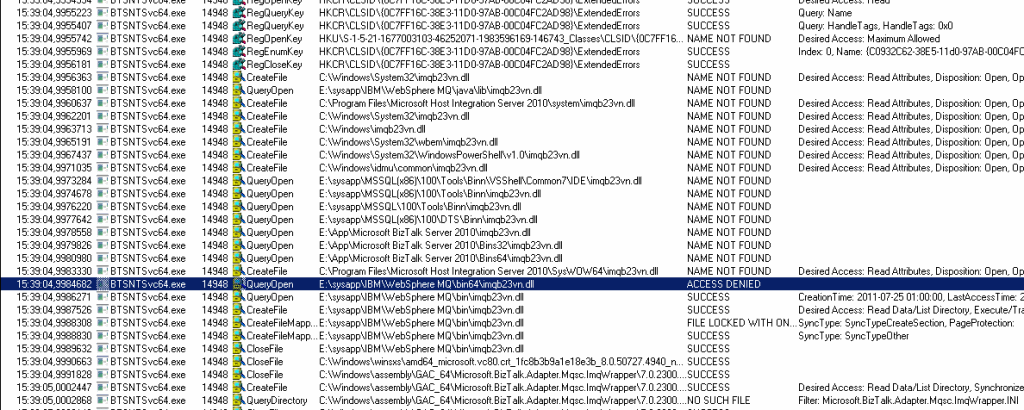
I resorted to using Process Monitor (not to be confused with Process Explorer, although also a great tool not the best in this scenario). I started the tool, found the PID for the process running my MQSC adapter process (see this post for details on identifying the BTSNTSvc process that belong to a certain host and get the PID) and set a filter for just that PID to reduce the noise. Finally I enabled the receive location. That gave me this:

clip_image001

As you can see in the image BizTalk Server is probing for an assembly in different locations, and it’s not the Microsoft.BizTalk.Adapter.Mqsc.ImqWrapper.dll. It’s the imqb23vn.dll from the WebSphere MQ installation. It’s trying to locate the assembly and finding it in the WebSphere MQBin64 folder. However it gets an Access Denied when trying to access it, so it then continues on to the WebSphere MQBin folder, where it locates the 32-bit version, which is does have access to, and so it loads it.

The exception message then is not saying that a 32-bit process is trying to use an assembly meant for a 64-bit process, but the opposite; that the assembly we are trying to load cannot be loaded as the application that is loading it (in this case BTSNTSvc64.exe) is a 64-bit process, aka not a valid win32 application.

Setting the correct permission on the file and hooking onto the process once again to see what it is doing verified the theory. The image below shows how it loads the correct 64-bit version of the imqb23vn.dll and the continues on to the next assembly which has the same issue and causes the exception once again. The exact same exception, but this time caused by another underlying referenced assembly:

clip_image001[4] 

Setting appropriate access permissions on the entire folder made the process complete without exceptions and the adapter able to successfully connect to the MQ queue and pick up the messages on it and deliver them to the messagebox. Why the folders ended up getting different permissions in this way is still a mystery…

HTH,

/Johan

Readings, Review

Book Review: Microsoft BizTalk 2010: Line of Business Systems Integration

If you are looking for more information on understanding the WCF LOB Adapter SDK and how to build adapters with it and how the pre-built adapters available in the BizTalk Server 2010 Adapter Pack can help getting data in or out of SQL Server or with handling IDOCs, RFCs and BAPIs in SAP then this is a book for you. If you are also interested in integrating with Dynamics CRM or Ax, working with Sharepoint Documents, Forms and Lists, and connecting to the cloud in the form of AppFabric and Salesforce then even better.


At first, from the title, I had expected this book to cover the Adapter Pack. It covers the parts in the first paragraph. This means it does not cover the full content of the Adapter Pack, but on the other hand it covers a lot more, which is a good thing.


This book contains detailed walkthroughs and step-by-step instructions. Not only will you learn how and what to do, you will also learn what no to do and share the authors real world experience. The book is sprinkled with tips and tricks from exposure to the technologies and products involved. And the book is just the beginning. Throughout you can find additional references to blog post, msdn pages and other resources.


I love getting that level of detail, especially accompanied with good visualizations and screenshots so there is no mistaking what a textual description means. Perhaps sometimes the level of detail might be unnecessarily high and the books intended target audience shouldn’t need a screenshot of how to deploy a BizTalk project, or the full context menu that you get when you right click a project to get to the Add… menu item, or the welcome screen of the Consume WCF Service wizard. But that only goes to show that nothing is left to chance and the reader wont be left guessing what was intended. I also like how a good mix of text and pictures make you feel that you are doing good progress reading the book.


My experience is, that of the time spent developing an integration, a large part is spent understanding how the systems you need to integrate work. Most BizTalk books don’t capitalize on that. Instead they use all of their space to explain how the BizTalk technology works in some aspect. This books differs in that respect in that it spends a large part explaining how the LOB systems work, and how you go about setting up and developing the integration components needed inside those systems before continuing on to BizTalk and the integration solution developed there. That to me is the real value add of this book. The day that you feel you don’t have to learn that is the day you can’t do integration work on your own but need someone else to do half the work for you.


Overall, the books content is still really fresh, even the chapters on cloud and AppFabric are still valid, which is always a risk when covering that kind of a rapidly evolving technology. Later releases has complemented some of the techniques presented with other options, but not necessarily replaced them.


I can highly recommend this book if the topics and systems it covers are part of your system integration landscape. I learned plenty and I know I’ll return to read parts of it again more closely as additional systems enter my landscape.


HTH
/Johan