Blog

Stuff

Simpler, Smoother, Smarter

We (Enfo) had an internal image contest on the above theme. Unfortunately the images that you could enter was supposed to be of yourself at arms length showing your face. Since I couldn’t quite imagine how I could make myself express those three things by simple face expression I took another picture. And since it wont make the image contest I am instead posting it here.

CloudPower1

I am no graphical designer, though at times I could fool a few, but hail Powerpoint as far as my image processing skills go 😉

AppFabric, BizTalk, Presentation

Integration @ Sommarkollo 2011

So, once again it’s that time of the year. Summer. And with it Microsoft Sweden arranges a series of presentations across the country that goes under what word-by-word translates to summer school – Sommarkollo. I’m happy to be presenting about integration in the broad context of the Microsoft Application Infrastructure aka Middleware platform, aka BizTalk Server, Windows Server AppFabric and Windows Azure AppFabric. A lot of the content will be focused around Azure AppFabric, simply because that’s where most things are happening at the moment (1) (2).

image

Find the signup to my afternoon slot in Gothenburg on Tuesday the 28th of June here, and the same content in a morning slot in Stockholm on Thursday the 30th of June here.

Right now I’m at ~60 slides and 12 demos but I’m hoping to get access to the newly released Application Manager and Composition soon so I have time to incorporate some of that as well. We’ll see.

Also take a look at the pdf that nicely summarizes all available sessions.

See you there.

/Johan

Mapping

BizTalk Mapper – How-to execute xslt statements and use the result as input to other functoids

This post will present a short demonstration of how to use the result of a Scripting functoid doing XSLT to something else then creating a node in the destination document.

This post relies on the following concept, and your familiarity with them:

The sample is simple, and what it does could be solved in a much simpler way. I am not out to show of some complex application – I want to show a very simple example, and let you apply it to whatever complex scenario where you think it may be a fit.

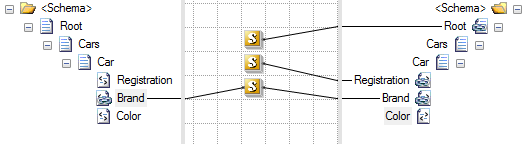
Here is the map:
image

Given this (extremely simple) input:

<ns0:Root xmlns:ns0="http://SwebugMapping.C">
  <Cars>
    <Car>
      <Registration>Registration_0</Registration>
      <Brand>Brand_0</Brand>
      <Color>Color_0</Color>
    </Car>
  </Cars>
</ns0:Root>

It will create the same output (phew!). Nothing fancy by far.

As you might have seen from the screenshot though, the magic of it all, and what I want to show, is how I use xslt to transfer the data via an (for this small scenario) obscure and unneccesarily complex yet (for more demanding scenarios) extremely powerful and dynamic mix in of xslt in an otherwise “normal” map. There are scenarios where this is very useful.

The first functoid uses the global variable conecept to create an global variable. It also holds a method returning a void that allows it to be connected to the root node of the destination without creating an output. Additionally it uses a trick where a scripting functoid will allow you to specify multiple methods within the functoids script, although only the first will be the one triggered to create the functoids output. This second method will be used to update the value of the global variable.

string MyStringValue;

void initglobals ()
{}

void SetMyStringValue(string s)
{
  MyStringValue = s;
}

The second functoid uses and scripting functoid with the xslt call template to transfer the registration node. But it also, in bold and italic below, calls the user defined csharp method we created in the first functoid that updates the global variable. It can perform virtually any type of xslt logic and that pass that in as a parameter, like the keyed cumulative sum – but in this case simply selects the value of the Color node and sets that value. Like I said – I’m not out to present a complex scenario. I’m out to make it simple to understand. Putting it to good use in a complex scenario is your job!

<xsl:template name="MyXsltCallTemplate">
  <xsl:param name="registration" />
  <xsl:variable name="var:u1" select="userCSharp:SetMyStringValue(string(Color/text()))" />
  <xsl:element name="Registration">
    <xsl:value-of select="$registration" />
  </xsl:element>
</xsl:template>

Lastly the third scripting functoid simply outputs the value of the global variable completing the map that creates the same output as it got input.

public string GetMyStringValue()
{
  return MyStringValue;
}

Cool huh? At least I hope I got you thinking about how to combine the power of xslt and the BizTalk Mapper for those complex scenarios where direct usage of xslt just makes so much more sense then trying to get the same result out of mad series of chaining of “regular” functoids which sometime border on bringing about semi-suicidal thinking.

/Johan

Mapping

BizTalk Mapper – How-to create global variables

One of the things that can be fairly useful in BizTalk maps is the ability to create global variables. These can be any .Net class that can be accessed from the map, everything from simple bool or int values to generic classes such as List<string>. You create these from within a c# scripting functoid and can use them from within the same or other scripting functoids.

A good place to create and initialize global variables is in a scripting functoid at the top of the map (or in another standardized location) so you always know where to look for them.

For any functoid to be triggered it needs to be connected to an output node, and it needs to contain (at least) one c# method. Yet the functoid containing your global variable initialization you often do not want creating output. To create a functoid that will initialize your global variables without creating output create a method that return a void. Such a method will not create any output, yet it will – when connected to node in the destination schema – be included in the resulting and called from the xslt. A good practice is to connect this functoid to your Root node, whatever that node might be named.

The following is an example of a map that creates and uses a global variable:

image

The functoids has the following content, from top to bottom:

string myGlobalString = "hello";

void InitGlobals ()
{
// you can do any initialization logic here
}

This code creates a global variable and has an empty method returning void to fulfill requirements yet yield no output. This is really the only snippet needed, the one that shows how to create a global variable, the rest simply show some examples of how to use it.

string GetGlobalString ()
{
  return myGlobalString;
}

This method takes no input, but returns the globally available string that we defined in the first functoid and returns it – just to show that it’s available.

string UpdateAndReturnGlobalString(string s)
{
  myGlobalString = s;
  return myGlobalString;
}

This method takes an input, and then updates the global variable with that input, before returning it. This is just to show that you can do things to your variable – it is not a constant. For example, had this been a collection, you could add items to it.

This post, although something fairly well know within the community of seasoned BizTalk developers, is meant to illustrate how you can think outside the Mapper designer and the xslt box when developing BizTalk maps. I also created it for the purpose of being able to refer to it as I create posts that are more advanced in nature, without having to explain this concept in those posts.

/Johan

Mapping

BizTalk Mapper – resolving decimal sum and separator issues, Keyed Cumulative Sum continued…

As a continuation of my Keyed Cumulative Sum post, where I did a key based summation using an xslt call template in a BizTalk map I got two main points of feedback worth repeating and showing.

Questions

  1. If I use Sum on a decimal number it gives me all sort of weird decimals in the Sum although it shouldn’t; ie a sum of 1.1 and 1.1 could result in 2.199999999999. How do I solve that?
  2. What if I am in Sweden (or Germany or some other country) and I want to use a comma (,) as a decimal separator instead of a period (.). How can I do that?

Answers

  1. You can use the xslt format-number function to remove erroneous decimal digits that are the result of using Sum on a decimal number.
  2. You can use the xpath translate function to replace a period with a comma. However this does not conform to an xsd:decimal, so make sure that the target schema does not have this field defined as a decimal if you wish to be compliant.

This will make the outlook of the xslt instead look like this (code is edited to improve readability):

<xsl:template name="OutputSum">
  <xsl:param name="param1" />
  <xsl:param name="param2" />
  <xsl:element name="Compensation_Amount">
    <xsl:variable name="SumOfNodes" select="//row[Compensation_SubCode=$param1 and   
Compensation_Level=$param2]/Compensation_Amount)"
/> <xsl:variable name="FormattedSum" select="format-number($SumOfNodes,'0.00')"/> <xsl:value-of select="translate($FormattedSum, '.', ',')" /> </xsl:element> </xsl:template>

The use of several variables are for maintainability only, and are not required. You could jam it all into the value-of select statement if you really want to.

/Johan