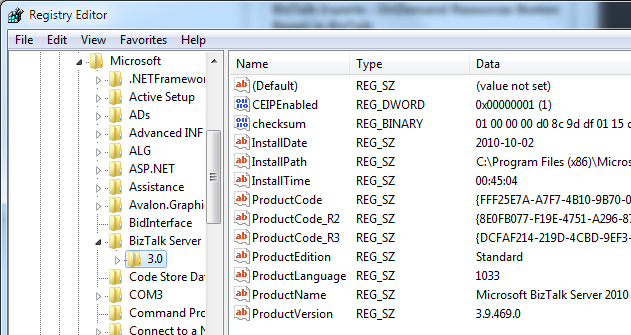
BizTalk Server 2010

BizTalk Standard Edition and the continued tale of 6 applications

Before I uninstall BizTalk Server 2010 Standard Edition and go back to Developer I thought I’d run one additional test that points to a limit with Standard and a peculiarity “discovered” earlier this year that I can’t take any credit for noticing. It’s blogged about here – In essence: BizTalk Server 2009 Standard supports 6 “custom” BizTalk applications, not just the five that the license mentions. Or rather – It supports 5 additional applications on top of the ones created by install/configure by default (for those of you that do not understand what the term application means at this point, and how it affects us, can read this link). So the question then is – Does this hold true for the 2010 Standard RTM as well?

Sure enough, as you would expect, I am stopped from creating more than 5 additional applications by the following dialog.

image

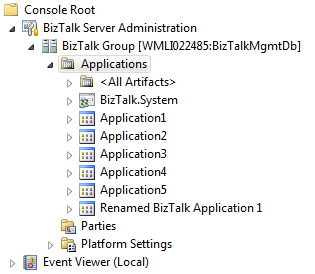
I can however rename BizTalk Application 1 and use that for whatever purposes.

image

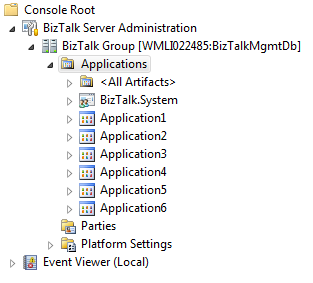
I can also just delete the BizTalk Application 1 and create a new application named whatver-I-want.

image

So. The answer to the question I asked above is – Yes it holds true. BizTalk Server 2010 Standard allows 6 applications on top of the BizTalk.System application, which is read-only. Nothing has changed from 2009 on this account.

64-bit, BizTalk Server 2010

BizTalk Server 2010 Standard DOES support 64-bit

A while back I posted about BizTalk Server 2009 Standard not supporting 64-bit hosts. It was an odd thing in these times of 64-bit computing. The product group came very close to giving an outright promise to remove the limitation in the 2010 version.

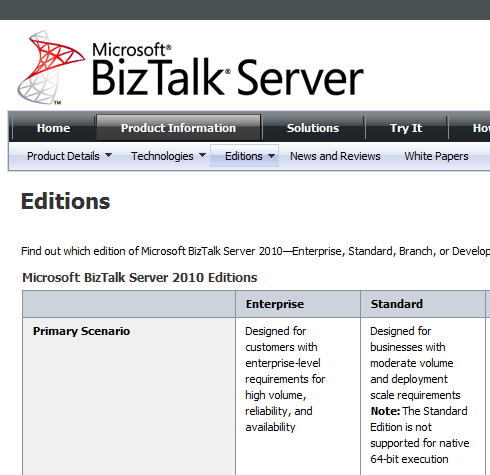
For that reason I was very surprised to still find all references of the documentation suggesting that the limitation was still there. Like the sample below.

image

It might still be due to me misunderstanding exactly what “native 64-bit processing” really means. That’s part of the reason for this article..

When I asked (Paolo Salvatori) though I was told the documentation might be (and was probably) wrong. I took that on faith, but still, what better then a test now once the Standard edition has been release for download.

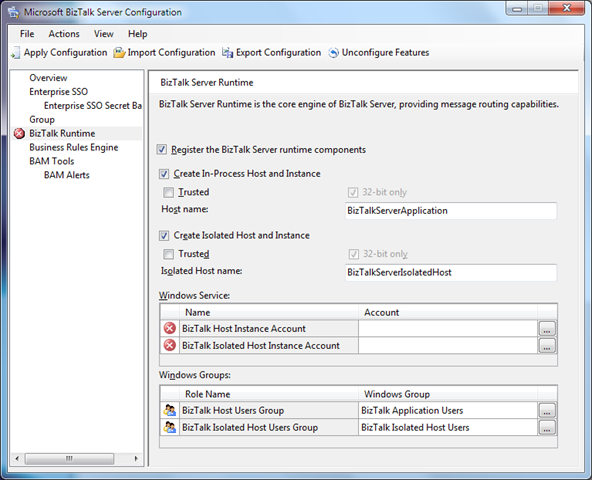
It started of bad with BizTalk Server Configuration. At this point the “32-bit only” checkboxes were grayed out and selected. Nor promising, but maybe it always looks that way.

image

However, when I got into the BizTalk Server Administration console I could create a 64-bit host.

image

And I could create and start a host instance for that host.

image

And yes, I am using a Standard Edition.

image

Update after Comment from Erik:

image

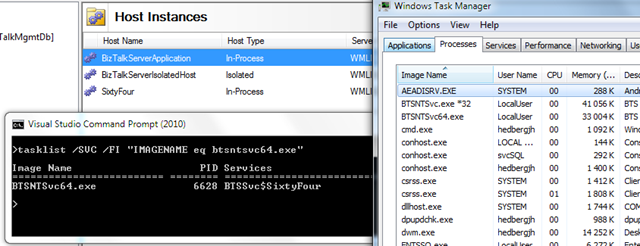
The process can, as per the picture above, be seen as running as the BTSNTSvc64.exe process.

BizTalk Server 2010

BizTalk Server 2010 RTM notes

I generally try not to blog about the same thing as countless others do, but being a BizTalk MVP I feel obliged to make some notes about the release of BizTalk Server 2010 as it really is big news.

BizTalk Server 2010 has actually been RTM for a while and available to Volume License customers for a short period of time already. It will become available for general purchase on October 1st – or so the official announcement on the BizTalk Team Blog says. That post does a good job of covering the news in the release, as does the microsoft.com New Features in BizTalk Server 2010 page. For an even more comprehensive write-up download the Microsoft BizTalk Server 2010 Technical Overview white paper.

There are also numerous other MS web pages that have been updated. I’ll try to highlight a few of the things I haven’t seen mentioned so far and provide links to the more important ones:

  • Editions
    • The Development Edition is now a FREE download and the page clearly states that it’s the one to use for development and testing environments, which is a relief since it’s a discussion I’ve been in more than once regarding the use of MSDN licenses.
    • The BizTalk Adapter Pack is no longer licensed separately. You need at least STD for this.
  • Pricing and Licensing Overview
    • BizTalk Server has gotten slightly more expensive for the production environments ($44k ENT, $10k STD).
    • Current limitations with STD are still there: Single Server, Two procs AND as it seems limited 64-bit support. The technet 64-bit Support pages seems to confirm that STD still has a 64-bit exception when compared to other versions.
      • Update 20100930: Product Group representatives says the documentation is incorrect and Standard DOES SUPPORT 64-bit. Good thing that was included.
      • Update 20101001: It’s proven! 64-bit supports standard. Se blog post here.
    • The AppFabric Connect feature is an installation option. Since I see now real licensing info about it I’m assuming it’s not stand alone. And since the pre-requisite of the Adapter Pack that makes some of that magic happen is packaged with STD (and up) I can only assume at this point that using the mapper in production also requires at least STD. I would still argue that it could be well worth it to enable scenarios like this.
  • Pricing and Licensing FAQ
    • There is a running discussion on how long Microsoft can continue to license per socket instead of heading in a slightly different direction as the number of cores become more and more. Whenever (if ever) that happens. It’s not now. BizTalk continues to be licensed per proc.
    • The ISV Licensing (formerly Runtime Editions) is still there. This is not a really well known possibility but essentially it allows you to package BizTalk as part of you product. The customer can’t use it with any products except your own. It’s hard to get a quote for this as it isn’t publicly listed anywhere, but it’s way cheaper that ordinary licenses. I have a quote, but I don’t want to put it out there. You could probably just call your local MS rep or Licensing partner to get your own.
  • System Requirements
    • You should not be fooled by the fact that it says minimum 2GB of RAM. If you install BizTalk on a 64-bit system you will want at least 4GB or RAM. And I’m saying that even though Windows Server 2008 (R2) says that its minimum system requirements are 512MB. I suppose no one reading would want to try that either.
  • BizTalk Developer Center
    • Has been updated with a lot of new content for BizTalk Server 2010 and October’s theme is the BizTalk Server 2010 Launch.
    • There’s also a BizTalk Server 2010 Training Kit available. It contains 6 labs for the Developer and 3 for the Admin that highlight new features. It’s great to see the Admin getting some much needed love on the training side. There is also 6 videos available weighing in at a 823MB download.
    • Alot of other online content like the tutorial scenarios seems to have been getting an overhaul as well (as you would expect) showing of screenshots of the new mapper and other new features.
  • Microsoft BizTalk Server 2010 Help
    • Except for the updated online version there are numerous downloadable documents. The Installation and Upgrade guides as well as the CHM – which personally, I couldn’t do without.
  • MSDN Subscriptions
    • So far there is no availability through this channel. I would love to see an .iso for the Developer Edition as I’m not to fond of keeping extracted catalogs around, or self-executable zip files. Keep this feed in your feed reader to be notified when it arrives.
      • Update 20101001: Enterprise, Standard, Branch (.iso’s) and Developer (still as .exe) are available at MSDN.
  • Upgrading from Beta
    • Although some people (like Brian Loesgen) seems to have been able to upgrade seamlessly from the beta, I couldn’t. I got an exception saying that the Enterprise version was installed and that I had to uninstall before installing. Fair enough. My Beta version does register as Enterprise in the Add/Remove programs dialog.
  • Errors and issues
  • Misc new features and updated tools

That ended up being quite a lengthy post. But then again… I’m a superstar and that’s how I do it! I hope it helps.

BizTalk Server 2009, BizTalk Server 2010, Deployment, Development

Visual Studio (BizTalk Server) 2010 development / BizTalk Server 2009 deployment mix

Can you use the updated development environment for BizTalk Server 2010 with Visual Studio 2010 while still deploying to BizTalk Server 2009?

Can you do it? On a file level, yes. On a project level, yes. On a solution level, doesn’t seem like it. On an assembly level, no.

I tried two scenarios.

  1. A simple messaging only scenario with a transformation on the receive port.
  2. An orchestration scenario picking up the file from the receive location, doing the mapping and delivering it to the send port.

I developed the solution on a BizTalk Server 2010 / Visual Studio 2010 combo and deployed it to BizTalk Server 2009.

So what worked and what didn’t?

Compile and deploy the .NET 4 assembly to BizTalk Server 2009

FAIL!

Why?

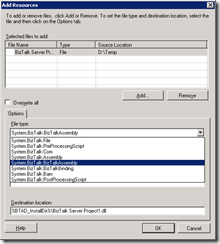
Even though I did Add a resource manually selecting the file to be a BizTalkAssembly BizTalk Server 2009 kept on reverting it back to File. Obviously it doesn’t recognize it, or recognizes that it’s an incorrect version of the framework.
image

Re-target the solution to .NET 3.5 or .NET 2.0

FAIL!

Why?

The following is taken from http://msdn.microsoft.com/en-us/library/ff629735(BTS.70).aspx

BizTalk Server 2010 supports building new applications only on .NET Framework version 4 . You can build both BizTalk applications as well as custom applications (such as custom functoids, custom pipeline components) using .NET Framework 4 . However, BizTalk Server 2010 continues to support the BizTalk Server 2006 R2 and BizTalk Server 2009 applications (BizTalk applications and custom applications) built on .NET Framework 3.5 SP2.

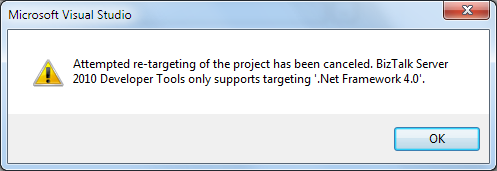
If you launch an existing BizTalk project in BizTalk Server 2010 , it automatically gets migrated, changing the .NET Framework version to 4.0. You cannot modify the .NET version number later in the Properties dialog box of the BizTalk project.

In essence it says that you cannot use the re-targeting functionality within Visual Studio 2010 for BizTalk Server 2010 projects. If you try, because the drop down is still there, you get the following dialog:
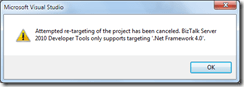
image

Using Files created by Visual Studio 2010, like .xsd, .btm or .odx

SUCCESS!

You can copy paste files from one project into another, without any issues I detected.

Open the project file created with Visual Studio 2010 and re-compile using Visual Studio 2008

SUCCESS! But with some issues…

You can open a BizTalk project created in Visual Studio 2010 in Visual Studio 2008 and just re-compile it. Without any issues I detected. However, it does not seem like Visual Studio 2008 wants to open the solution file, which may be an issue in some situations, like for example if you wan’t to create automated builds. The structure of the solution file begins like this:

Microsoft Visual Studio Solution File, Format Version 11.00
# Visual Studio 2010
Project("{FAE04EC0-301F-11D3-BF4B-00C04F79EFBC}") = "BizTalk Server Project1", 
"BizTalk Server Project1BizTalk Server Project1.btproj", "{DE7C19FB-A5BA-46A0-9382-ACFB3EB91409}"

This may very well be what causes Visual Studio to dismiss it.

Hope this helps someone thinking along these lines 🙂

Disclaimer: This is tested with BizTalk Server 2010 Beta. All artifacts used while performing these tests are trivial. It might very well be that in some more complex scenario this might not work.