Now that I feel I’ve finally reached the bottom of this pit, travelling the last distance in pitch black before finally reaching the bottom, I felt a post was in order. I am however not a licensing expert so I might still take a step to the side here and find myself in a free fall again (a.k.a. I might be wrong). The goal of this post is both to inform and to be informed and I’d be just as happy if someone contradicted me as if they agreed with me by commenting. I’ve made more then one assumption, clearly marked as such, that may or may not be correct although they are what I currently believe to be right.
BizTalk Server is licensed using the Per-Proc licensing model. There are a couple of easy references that most everyone looking at licensing will have read and know.
First of there is the Multicore processor licensing site that clearly state that licensing is done per proc and not core (but everyone knows that by now) – http://www.microsoft.com/licensing/about-licensing/multicore-processor-licensing.aspx.
Then there is the BizTalk pricing and licensing FAQ (at http://www.microsoft.com/biztalk/en/us/pricing-licensing-faq.aspx) and the questions (the quoted anwers are not word by word, they are more my interpretation)
Q: "How is BizTalk Server licensed on computers that have more than one CPU?"
A: …Std Ed needs licenses for all procs available to windows even though it has a technical limitation of two (http://www.microsoft.com/biztalk/en/us/editions.aspx)…
Q: "Does BizTalk Server 2010 allow for virtualization?"
A: …Yes…Ent can be licensed on the physical servers procs running any number of virtual machines with BizTalk on them.
Then there is the volume licensing site for BizTalk Server 2009 / 2010 at http://www.microsoftvolumelicensing.com/userights/ProductPage.aspx?pid=359 which helps mostly just by pointing out the same basics. It explains how the product uses Per-Proc licensing and that you license on either physical or virtual procs and for Enterprise you can also use the “license physical procs and run any number of virtual procs” options. It also points out the current PUR (Product User Rights) document (available at MicrosoftProductUseRights(Worldwide)(English)(December2010), listing in different languages at http://www.microsoftvolumelicensing.com/userights/DocumentSearch.aspx?Mode=3&DocumentTypeId=1) that basically just repeats those same things with better formatting (ie, read that instead since the website really makes some parts hard to read). Per-Proc licensing starts at page 59.
This is an interesting section:
A. General License Terms. You have the rights below for each server you properly license.
I) Licensing a Server. Before you run instances of the server software on a server, you must determine the number of licenses required and assign them to that server.
a) Determining the Number of Licenses Required. The number of licenses required is based on either the total number of physical processors on the server (as described in option (i) below) or the number of virtual and physical processors used (as described in option (ii) below). For Enterprise Editions of the software, you may follow either option. For all other editions of the software, must follow option two.
i) Unlimited Virtualization. Under this option, the number of software licenses required for a server equals the total number of physical processors on that server. Counting and assigning licenses based on this option permits you to run the server software in one physical and any number of virtual operating system environments (or OSEs) without regard to the number of physical and virtual processors used. This option is available to you only for enterprise editions of the software.
ii) Licensing based on Processors Used. Under this option, the total number of software licenses required for a server equals the sum of the software licenses required under (A) and (B) below. This is the only option available to you for editions other than enterprise.
(A) To run instances of the server software in the physical OSE on a server, you need a software license for each physical processor that the physical OSE uses.
(B) To run instances of the server software in virtual OSEs on a server, you need a software license for each virtual processor1 that each of those virtual OSEs uses. If a virtual OSE uses a fraction of a virtual processor, the fraction counts as a full virtual processor.
1 A virtual processor is a processor in a virtual (or otherwise emulated) hardware system. Virtual OSEs use virtual processors. Solely for licensing purposes, a virtual processor is considered to have the same number of threads and cores as each physical processor on the underlying physical hardware system. So, for any given virtual OSE on a server on which each physical processor provides X logical processors, the number of licenses required is the sum of a) and b) below:
a) one license for every X logical processors that virtual OSE uses
b) one license if the number of logical processors it uses is not a whole number multiple of X
“X,” as used above, equals the number of cores, or where relevant, the number of threads in each physical processor.
|
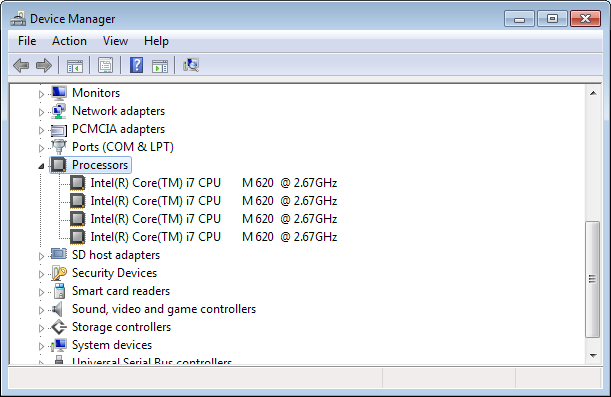
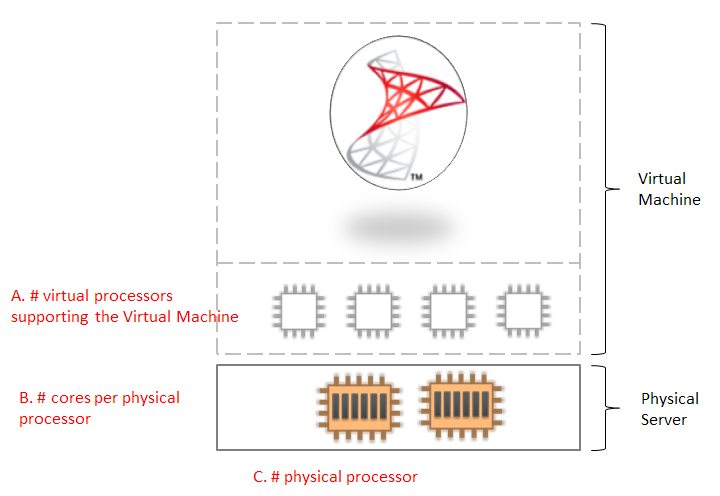
Ok, so you can either license using the unlimited virtualization option mention before, or per physical processor when installing on a physical machine – it will always be a one to one mapping at that point between processor and license, or you can also license per virtual processor. Here is were it gets muddy. Virtual processor… what’s in that term? You might at first think that it means a processor as it is visible to the virtual machine. In case of the below picture… 4.
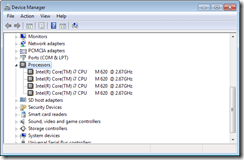
You’d be wrong.
The text that tries to explain the essence of a Virtual Processor is difficult to interpret – for me at least, but then I ‘m a foreigner so you native US or other english spoken nationals might have no problem with it. You will find no further explanation in the above document. Enter the “Licensing Microsoft Server products in Virtual Environments” document (http://www.microsoft.com/downloads/en/details.aspx?FamilyID=9ef7fc47-c531-40f1-a4e9-9859e593a1f1&displaylang=en).
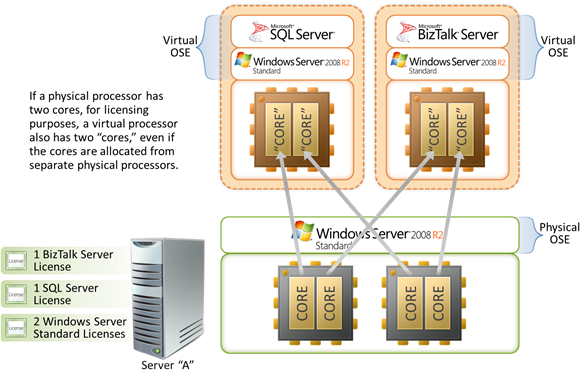
This brief (at page 14) talks about the physical cpu (and core) to virtual cpu relationship. Mostly the point being made is that even though cores from more then one physical cpu gets used – like two cores being used in a dual-core machine still just counts as one virtual proc and one license. What I don’’t like with this document is that I think the images are somewhat confusing as it constantly uses 2 procs and two cores and it seems to put those cores into the same virtual socket (I borrowed the picture for clarity).
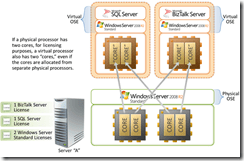
Now it also states that even if you use just one core you will still need to pay for one license, which is an important note. As in “Never do that for BizTalk”.
It also does some attempts to count licenses under some sample deployments (on page 19) but (to me) it falls short here as well.
Now two find a better explanation to the above pictures… Enter the LadyLicensing blog and a post about the per-proc licensing of SQL Server. Now granted SQL Server and BizTalk Server is NOT the same product, but I assume that the licensing rules at this point that the licensing rules around per-proc licensing is shared since I’ve found no indication of otherwise.
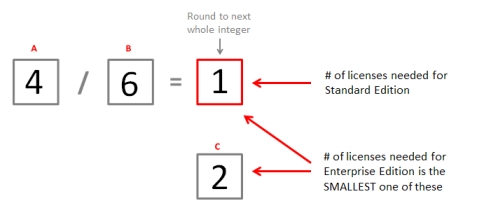
Now I’ll use her visualization (since it really cleared things up for me) but redo it for BizTalk:
1. Gather the following data points of A B C
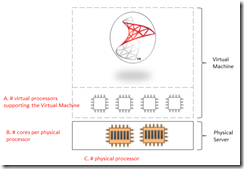
2. Calculate licenses needed
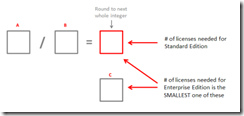
In this sample this would be filled in as:
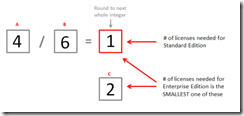
Now that’s basically as clear as it can be, right? Well, yes, but…
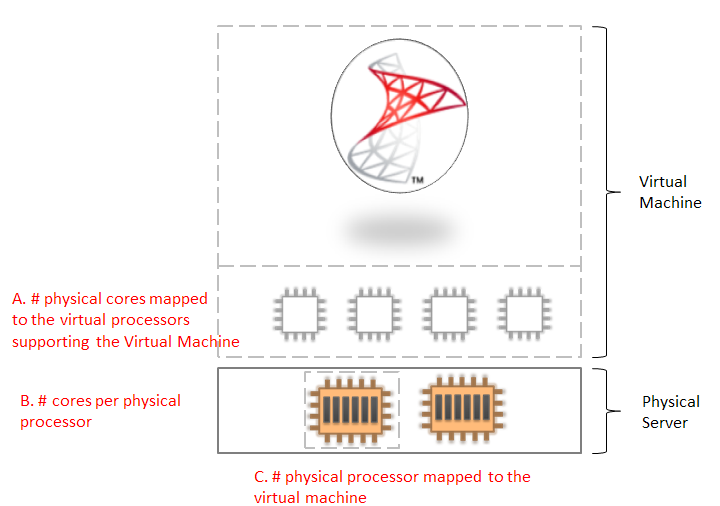
With virtualization a virtual processor is often thought of as a core (at least I, not being an virtualization expert, do), and the sample above I assumes that is the case. In Hypervisors a virtual proc is really just something assigned a timeslot of execution. By default on both ESX and Hyper-V it seems to be the case that when a virtual processor is given time to execute this happens on a core. On both ESX and Hyper-V, through settings cpuid.coresPerSocket and “Virtual machine reserve” respectively, it is possible to equate virtual processors to a whole (or larger part of a) physical processor. I believe that in Hyper-V this does nothing for it’s representation in the virtual machine as other then a single processor, but in ESX makes it appears as a multi-core processor. In this case I am unsure, but I feel that a better fit for A in the calculation above then becomes “# physical cores used by virtual processors” rather then virtual processors, which is not nearly as clear. Now, how is this setting useful?
Well, remember Standard Edition technically merely supporting two processors? I don’t know for sure of course, but I feel pretty confident saying that if you have four virtual processors, which then maps to one license, BizTalk Server Standard will look at that as four separate processors and just use two even though that (kinda) maps to two cores. So these settings might be worth looking into.
I am also not certain that the number of Enterprise licenses that would be needed is really correct, but I’ll get back to that later.
Another interesting point I’ve come across is this (taken from the PUR):
| Under General License Terms for Per-Proc licensed servers…
a) Assigning the Required Number of Licenses to the Server.
i) After you determine the number of software licenses you need for a server, you must assign that number of software licenses to that server. That server is the licensed server for all of those licenses. You may not assign the same license to more than one server. A hardware partition or blade is considered to be a separate server.
ii) You may reassign a software license, but not on a short-term basis (i.e., not within 90 days of the last assignment). You may reassign a software license sooner if you retire the licensed server due to permanent hardware failure. If you reassign a license, the server to which you reassign the license becomes the new licensed server for that license.
|
Basically – you have to guarantee that your virtual machine always is activated on one and only one host. It cannot “float around”. It’s unfortunate that this is not clarified in the same document (that I have found), but I have found another document, the Mobility Brief that states that BizTalk Server Enterprise is exempt from this rule, while it still seems to apply to Standard Edition. Also note that while that document talks about 2006 R2 I am assuming it applies equally to BizTalk Server 2010 as I’ve found nothing that says otherwise.
| In the past, Microsoft server software and EC licenses have had to be assigned to a specific server for at least 90 days before they could be reassigned to another server. Therefore, for example, if you wanted to move running instances of software from one server to another more frequently, you needed to assign licenses to both servers. With Microsoft’s new terms for certain products, Microsoft waives the 90-day reassignment rule, allowing you to reassign licenses from one server to another within a server farm as frequently as you need to. This allows you to freely move both licenses and running instances within a server farm from one server to another. In the example above, so long as you are not running the software on both servers at one time, you can do this without having to assign licenses to both servers at the same time. |
This might also be what the following clause in the PUR details.
|
For BizTalk Server 2010 Standard Edition:
Networked Clusters. The server software may not be used on a server that is part of a networked cluster, or in an OSE that is part of a networked cluster of OSEs on the same server.
|
This could also mean that: “You cannot cluster BizTalk Server Standard”, which given that it’s a single server license also makes total sense. But add the two sources together and I don’t think that’s solely what it means.
Also mentioned by the mobility brief is that:
Today, with licensing for Per Processor products like Microsoft® SQL Server® 2008 Enterprise and Microsoft BizTalk® Server 2006 R2 Enterprise Edition, you can run unlimited software instances in physical operating system environments (OSEs), virtual OSEs, or both on your individual servers by counting all of each server’s physical processors and assigning it that number of licenses. With the new rules, as an alternative to simply counting all of a server’s physical processors and assigning that number of licenses, you may count the number of the server’s physical processors that support OSEs in which server software instances are running at any one time, and assign that number of licenses. This applies both to physical processors being used by physical OSEs in which instances are running and to physical processors supporting virtual OSEs in which instances are running.
…
With the licensing changes, you effectively count the greatest number of physical processors at any time supporting OSEs in which instances are running across your server farm, and assign that number of licenses. |
Remember how I wasn’t sure about the number of Enterprise licenses needed in the calculation above? Well , my interpretation of this text is that if only some (let’s say one) of the processors on the physical machine support the virtual machine then that figure could have been one. This only really matters if you need Enterprise licenses for something, like if you have a web farm – according to the mobility brief. In Hyper-V, as I understand it, there is no way to set processor affinity (as in telling the virtual machine to only use one processor) and the load is spread across all processors – all processors support the virtual machine. However on VMware – it is (or might be, the KB suggests this is an old GSX setting but it’s also linked to from several ESX kb’s so it might still be valid?). This setting, combined with the cores in a virtual proc, would make figures for A B C more like this:
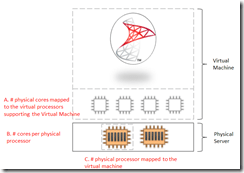
The text, to me, also suggests that if you on a two proc hexa-core machine want to run two virtual machines with one virtual proc used across a web farm you may get away with one license, but it has to be an Enterprise license. It’s an uncertain point for me at the moment.
Giving all these options and settings the variations to take into account are numerous.
And just because this is a licensing post, what about the “Additional Software”:
|
I) Running Instances of the Additional Software. You may run or otherwise use any number of instances of the additional software listed in the table below in physical or virtual OSEs on any number of devices. You may use those instances only with the server software. Use of any instance with the server software may be indirect, through other additional software, or direct.
For all editions of BizTalk Server 2010
- Administration and Monitoring Tools
- BizTalk Server Related Schemas and Templates
- Business Activity Services
- Development Tools
- Master Secret Server/Enterprise Single Sign-On
- Software Development Kit(s)
- MQHelper.dll
- Business Activity Monitoring (“BAM”) Event APIs and Interceptors & Administration Tools
- BAM Alert Provided for SQL Notification Services
- BAM Client
- Windows SharePoint Services Adapter Web Service
- Windows Communication Foundation Adapters
- SOAP Receive Adapter
- HTTP Receive Adapter
- ADOMD.NET
- MSXML
- SQLXML
- UDDI
- Business Rules Component
- MQSeries Agent
Only for BizTalk Server 2010 Branch Edition
- BizTalk Adapter for SQL Server
|
This does not however, according to the pricing & licensing FAQ for BizTalk, include the Adapter Pack, and therefore not the AppFabric Connect features. Those must be used on a server with a valid license assigned. But then, what are the “Windows Communication Foundation Adapters” mentioned above if not the Adapter Pack? Odd… It doesn’t make sense for it to be the WCF-NetTcp et al adapters. Why would you install those on a separate machine? Not crystal.
An additional dimension to this is of course using SPLA licenses, which can be used when you are an outsourcing provider and supply licenses to clients. For now, I’ve decided not to cover those. The Product User Rights documents listing for SPLA can be found at: http://www.microsoftvolumelicensing.com/userights/DocumentSearch.aspx?Mode=3&DocumentTypeId=2
Like I said, I’d be happy to extend this post further with clarifications and corrections based on input so leave your comment to either point out corrections that needs to be made or to point out gaps that could be filled.
Resources used:
Thanks,
/Johan Hedberg




 Be Logical - Notes from Johan Hedberg