BAM, BizTalk, Pipeline Components

XmlDisassemble in a passthrough pipeline?

So, I a couple of weeks ago now I opened a case on Connect, and this is just to wrap it up in a blog-post for discovery and archive purposes.

Background

We use BAM for infrastructure tracking. We apply a simple tracking profile to all our ports for all our customers in all our environments. BAM does this like a charm, and handles the clean up, indexing, and archiving of this data automatically by schedulable jobs – tunable to customer requirements. Many times BizTalk will be used to do file transports without really caring about the content, alongside the more traditional transformation or orchestration work. Other times the requirements might cause me to want to bring in a file in BizTalk to handle things like processing, disassemble, splitting or something else in one (or more) orchestrations. To me, nothing strange with this, and I’m hardly alone in this.

The problem

Even though the passthrough pipeline is used, with BAM tracking, disassemble of the incomming file will be attempted or performed. This might result in disassemble errors and/or debatching of message with envelopes were that was not intended.

If you do BAM tracking and apply that to a port that has the passthrough pipeline on it the code will create a xmldisassembler as part of the BAM tracking process in the passthrough pipeline. If this does not find what it considers XML through it’s Probe method, things seem fine. Otherwise this can create issues. Two that we have identified is:

  1. If the message passed through the passthrough pipeline matches that of an envelope schema deployed to BizTalk it will be debatched into the first document by the pipeline.
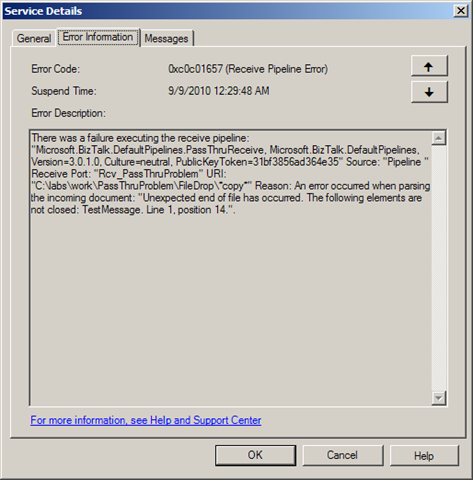
  2. if the document contains faulty xml – pipeline processing will get an exception.
    image

Why does this happen?

Looking through the code with Reflector gives us some insights. The ReceivePipeline class, base class of the PassThruReceive class implements the GetNext member. Towards the end of that code the below code is present:

IBaseMessage ReceivePipeline.GetNext()

if (base.PipelineContext.InvokedFromMessaging)
{
  msg = base.DoBamTracking(msg, Pipeline.BamTrackingMode.BamTrackingOnly);
}

The DoBamTracking method (which resides in the even more generic Pipeline class) decides whether or not BAM tracking is necessary be looking at some context properties (supposedly populated by the fact that I’ve applied a Tracking Profile and mapped it to the port in which context the pipeline is running). If it is it then creates a XmlDasmComp component and Probes the message. If Probe returns false, then we are, as stated above, fine. If not… later in the code it will use the (XmlDasmComp) component to run Disassemble followed by its GetNext implementation and return the result. The result: A disassemble message – if it succeeds that is.

IBaseMessage Pipeline.DoBamTracking(IBaseMessage, BamTrackingMode)

IBaseComponent component = PipelineManager.CreateComponent(
"Microsoft.BizTalk.Component.XmlDasmComp, Microsoft.BizTalk.Pipeline.Components,
Version=3.0.1.0, Culture=neutral, PublicKeyToken=31bf3856ad364e35, processorArchitecture=MSIL"
); IProbeMessage message2 = (IProbeMessage) component; … if (!message2.Probe(this.pipelineContext, msg)) { return next; } … IDisassemblerComponent component2 = (IDisassemblerComponent) component; component2.Disassemble(this.pipelineContext, msg); next = component2.GetNext(this.pipelineContext); ... return next;

Steps to reproduce

  1. Deploy a envelope schema and a document schema.
  2. Set up a BAM activity with at least one field.
  3. Connect the BAM element in the tracking profile to something.
  4. Create a receive port with a passthrough pipeline.
  5. Connect the tracking profile to the receive port.
  6. OPT 1) Send a message through with badly formed xml, like a one line message with only the text "<TestMessage>" (xmldisassembler exception). OR

    OPT 2) Send a valid envelope with two document in it through (debatch will occur and leave only the first document).

Code to reproduce

(PassThruProblem.zip contains artifacts built for 2010)

(PassThruPipeline2006.zip contains 2006 (R2)/VS.NET 2005 artifacts.)

Versions affected

I have tested this in 2010, 2009, 2006 R2 SP1 CU3 – all have the issue.

Are you experiencing this issue?

If you are having this issue and want it fixed, vote it up on Connect and mark is as reproducible.

Further, we have found that to stop this from happening on a port the only way is to to re-create it. Removing the port mapping in the tracking profile for some reason is not sufficient.
BizTalk, Presentation

BizTalk presentations in the summer/fall, part two

I case anyone has missed it, BizTalk User Group Sweden, is as active as ever. We’ve got two great events planned after the summer.

Date: 26/8 2010 – Evening event.
Location: Stockholm
Topic: Managing your BizTalk environment using System Center Operations Manager 2007 R2
Speaker: Kent Weare
Sign-up: Here

This is a great event not only for BizTalk Developers and Operations but also for IT-professionals working with System Center, especially if they have BizTalk in their environment.

Date: 8-9/9 2010 – Yes, that’s right, this is a TWO DAY event.
Location: Stockholm
Topic: Applied Architecture Patterns on the Microsoft Platform aka BizTalk Server 2010 – Release party
Speaker: Richard Seroter, Ewan Fairweather, Stephen W. Thomas
Sign-up: Here

These are both events you do not wan’t to miss, and it seems people agree. Slots are filling up fast so be sure to be quick about signing up.

BizTalk, Presentation

BizTalk presentations during the summer, part one

I’ll be presenting at Microsoft Swedens “Sommarkollo”. I’ll be talking about BizTalk. Introducing it, showing of enhancements in 2010 and going through some (what I hope are) inspirational scenarios. The target audience are developers or architects. Even though I will spend some time in the beginning at an introductory level I believe there are things that will entertain even more seasoned developers. Level is 200-300.

More info about this and other presentations can be found at http://www.microsoft.com/sverige/sommarkollo/default.html

Also, signups for my presentations can be reached through the below links:

Date: 30/6 kl. 13-16
Location: Göteborg
Sign-up: Here

Datum: 1/7 kl. 9-12
Location: Malmö.
Sign-up: Here

Datum: 7/7 kl. 9-12
Location: Stockholm
Sign-up: Here

Datum: 24/8 kl. 9-12
Location: Stockholm
Sign-up: Here

Enjoy the summer! I know I will 🙂

PS. Just to make readers (especially those from other countries with less generous terms) jealous I’ll be on vacation/parental leave (and have been for two weeks) until the very last days of august.

BizTalk, SOAP, SQL

Send Failures, NACKS and SOAP Faults

(or why my previous post doesn’t apply to all adapters)

In a previous post I identified how if you had the WCF-BasicHttp adapter on the backend send and the WCF-NetTcp adapter on the frontend receive you need a transformation for the client to interpret the backend Fault as a Fault since there is a SOAP version mismatch.

As was evident by a comment, this does not apply to all adapters, but only to the base WCF adapters. for example it does not work with the WCF-SQL adapter.

Why?

In contrast to the base WCF adapters, which when you enable the Propagate fault message treats a SOAP Fault coming from the recipient service as an acceptable message and returns it to the receive port as a valid SOAP Fault message that has Fault as the root element, the WCF-SQL adapter returns a NACK message (if there is an error raised in SQL) as the message. The NACK message has not got the Fault element as it’s root, but instead has Envelope, and looks like this:

<?xml version="1.0" encoding="utf-8"?>
<SOAP:Envelope xmlns:SOAP="http://schemas.xmlsoap.org/soap/envelope/" SOAP:encodingStyle="http://schemas.xmlsoap.org/soap/encoding/">
  <SOAP:Body>
    <SOAP:Fault>
      <faultcode>Microsoft BizTalk Server Negative Acknowledgment </faultcode>
      <faultstring>An error occurred while processing the message, refer to the details section for more information </faultstring>
      <faultactor>C:ProjectsSampleLocationsResponseFM_%MessageID%.xml</faultactor>
      <detail>
        <ns0:NACK Type="NACK" xmlns:ns0="http://schema.microsoft.com/BizTalk/2003/NACKMessage.xsd">
          <NAckID>{FFB1A60B-E593-4620-8897-4E9C7030A937}</NAckID>
          <ErrorCode>0xc0c01658</ErrorCode>
          <ErrorCategory>0</ErrorCategory>
          <ErrorDescription>There was a failure executing the send pipeline: "Microsoft.BizTalk.DefaultPipelines.XMLTransmit, Microsoft.BizTalk.DefaultPipelines, Version=3.0.1.0, Culture=neutral, PublicKeyToken=31bf3856ad364e35" Source: "XML assembler" Send Port: "Failed Message" URI: "C:ProjectsSampleLocationsResponseFM_%MessageID%.xml" Reason: This Assembler cannot retrieve a document specification using this type: "http://Sample#Unknown".  </ErrorDescription>
        </ns0:NACK>
      </detail>
    </SOAP:Fault>
  </SOAP:Body>
</SOAP:Envelope>

Therefore it cannot be mapped by the map presented in that post, although the Fault it contains is a SOAP 1.1 Fault.

Read more about ACK and NACK messages here.

BizTalk, SOAP, WCF

BizTalk and SOAP Fault version issues

A developer in the same team made me aware of an issue they were seeing where if the BizTalk Send Port returned an exception the Client that called the ReceivePort would get a response that was interpreted as null instead of as an exception.


Now this is a synchronous service call without any orchestration, where BizTalk is just a broker of the web service calls. What we want out of it is this:


  1. For exceptions throw by the backend service to get relayed back to the original caller.

  2. For no suspended messages to be visible in BizTalk when an exception occurs with the backend service – so that operations won’t be bothered with removing them.

  3. For operations to get notified of all other exceptions, ie suspended messages.

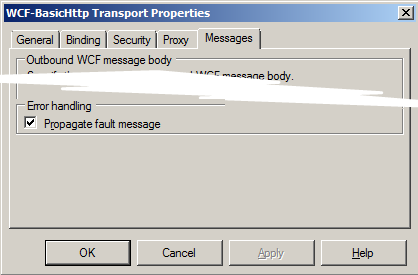
Now this is all quite easy, all you need to do is make sure the propagate fault flag is checked on the send port adapter settings:
image
(somewhat shortened dialog)


What can happen though is that when the SOAP version does not match between what the Send Port receives and relays and what the client that called the Receive Port/Location is expecting is that the Fault ends up not being correctly formatted and thus the client is unable to interpret it.


This happens when you use the BasicHttp adapter or BasicHttpBinding with the Custom Adapter on the Receive Port and NetTcp (or WSHttp or… etc) on the Send Port (or vice versa). It happens because the SOAP version that BasicHttp uses is different than that used by the other WCF Adapters.


A sample SOAP 1.1 Fault look like this:

<s:Fault>
<faultcode>s:Client</faultcode>
<faultstring xml:lang=”sv-SE”>You entered 666</faultstring>
</s:Fault>

(where the namespace s is defined on the envelope and points to xmlns:s=”http://schemas.xmlsoap.org/soap/envelope/&#8221;)


While a sample SOAP 1.2 Fault look like this:

<s:Fault xmlns:s=”http://www.w3.org/2003/05/soap-envelope”>
<s:Code>
<s:Value>s:Sender</s:Value>
</s:Code>
<s:Reason>
<s:Text xml:lang=”sv-SE”>You entered 666</s:Text>
</s:Reason>
</s:Fault>

In our scenario, with the type of metadata that BizTalk exposes for the service, what happens at the client is that what is actually a Fault instead gets interpreted as a valid response, but since the element that represents the response, let’s call it GetDataResponse just for sake of illustration, is missing – the client will interpret it as a null response. Highly unwanted.


The solution is to make sure that the Fault response is valid for the version of SOAP used by the receive side adapter, that is; do a transformation. A transformation can be done in many places: a map, a pipeline component, a WCF Message Inspector. In my case I prefer to place the component resolving the problem as close as possible to the thing causing the problem – which here means I opt for the Message Inspector, but a map might be the easiest for many. I might add the implementation of the message inspector in a later post, but for now, below is some custom xslt you can use in a map (or elsewhere) (if you do not use custom xslt you might get complaints from the client that the namespace prefixes are incorrect for reserved namespaces) – it maps from SOAP 1.1 to SOAP 1.2 (from BasicHttp to others, like NetTcp). You might perhaps also have to map in the other direction.

<xsl:stylesheet xmlns:xsl=”http://www.w3.org/1999/XSL/Transform”
xmlns:msxsl=”urn:schemas-microsoft-com:xslt”
xmlns:var=”http://schemas.microsoft.com/BizTalk/2003/var”
exclude-result-prefixes=”msxsl var s0″ version=”1.0″
xmlns:s0=”http://schemas.xmlsoap.org/soap/envelope/”
xmlns:xml=”http://www.w3.org/XML/1998/namespace”
xmlns:s=”http://www.w3.org/2003/05/soap-envelope”>
<xsl:output omit-xml-declaration=”yes” method=”xml” version=”1.0″ />
<xsl:template match=”/”>
<xsl:apply-templates select=”/s0:Fault” />
</xsl:template>
<xsl:template match=”/s0:Fault”>
<s:Fault>
<s:Code>
<s:Value>
<xsl:value-of select=”faultcode/text()” />
</s:Value>
</s:Code>
<s:Reason>
<s:Text xml:lang=”sv-se”>
<xsl:value-of select=”faultstring/text()” />
</s:Text>
</s:Reason>
<xsl:if test=”faultactor”>
<s:Role>
<xsl:value-of select=”faultactor/text()” />
</s:Role>
</xsl:if>
<xsl:for-each select=”detail”>
<s:Detail>
<xsl:value-of select=”./text()” />
</s:Detail>
</xsl:for-each>
</s:Fault>
</xsl:template>
</xsl:stylesheet>