A few posts ago I wrote about becomming aware of the latest downloads from the Microsoft Download Center and how they didn’t have an RSS feed for that. On the other side of the scale as far as RSS feeds go is the support och knowledgebase articles. There are quite a few different RSS feeds for things that are BizTalk, although most don’t contain anything. Here are the links to the feeds for BizTalk Server 2004 and BizTalk Server 2006.
Category: BizTalk
Consuming pipeline issue fix for BizTalk 2006
I previously blogged about an issue I was experiencing building a custom pipeline component in BizTalk Server 2006, and that I had found it was fixed and was not longer an issue in R2. Now there is a KB (KB941802) out that deals with a fix for that problem in 2006. I think the description of the problem in the the KB is somewhat limited, for a more detailed description read my post. So if you are experiencing an endless loop behviour in BizTalk 2006, get this fix.
Attending a BizTalk Server 2006 R2 Partner Academy course – DVD contents
I’ve signed up for a Mircosoft Partner Academy pre-sale angled course on BizTalk Server 2006 R2. It’s my first time attending a course delivered in this kind of online manner. I still don’t know if it will suit me or not, but today I got the dvd’s accompanying the online content and Jon Flanders is the main presentation deliverer. Knowing I enjoy Jons presentationstyle and after browsing the content of the dvd I feel a little more confident that it might be worth spending the extra hours on this thing. Except for Jon there are also a few other presentations, mostly from (this years I assume) TechReady, PowerPoint Slides and Hands-On Labs. And I’m extracting the VHD as I write this.
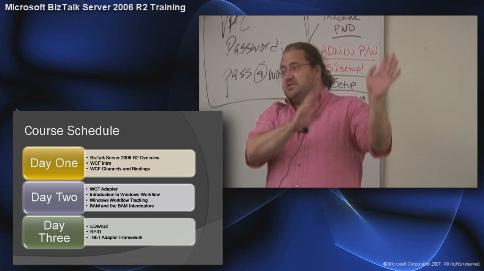
UPDATE: I just recognized this as the same (more or less) Classroom-in-a-Box set as we got at the SOA and BPM Conference in Redmond in October. I haven’t compared file by file on all the discs, but I feel pretty confident saying it’s the same.
Linklist: Installing Microsoft Operations Manager 2007 for BizTalk
The aim of this linklist is to keep track of the links and locations I used to download and install Microsoft Operations Manager 2007 and Management Packs for BizTalk, and thus can be used by others for the same purpose.
System Center Operations Manager 2007 – Main site at Microsoft.
Review Licensing and for more information about licensing read the informational brief. Operations Manager is not an expensive product. It even comes packaged together with SQL for a reasonable cost. Check the link for the latest updated information, on purpose I wont use precise amounts, but roughly it’s $500 for the server install (or $1300 with SQL) and another $30 – $400 for each machine to monitor, depending on the demands of that machine. If it’s a BizTalk machine it’s $400. Compared to the Enterprise License for BizTalk which is $35,000 – it’s hardly worth mentioning.
Get the Eval version – Go here to start the process of downloading the evaluation copy of Microsoft Operations Manager 2007. If you are a TechNet Plus or MSDN subscriber, perhaps you’d rather download the full, non-evaluation, copy from there.- Get OpsMgr 2007 MOM 2005 Backward Compatibility Management Pack Update – you need it for the management packs we’ll install later.
- Management Packs – Get your management packs of choice from here. There are quite a few to choose from and I’ve selected only the few I considered important in my case. Those are…
- Microsoft Windows Server 2000/2003 Operating System Management Pack – for monitoring the operating system.
- Microsoft SQL Server 2000/2005 Management Pack – for monitoring the database.
- Microsoft Biztalk Server 2006 Management Pack for SC Operations Manager 2007 – for monitoring BizTalk Server.
- You cannot install Operations Manager on your XP or Vista development machine, it must be installed on a machine (or VPC) with Windows Server 2003 and SP1. Consider downloading a Virtual Hard Drive as a starting point, for example one with Microsoft BizTalk Server 2006 R2.
- SQL Server 2005 is required, SQL Server 2000 is not enough. Get a trial of SQL Server 2005 here or make sure the vhd you get comes with 2005, which as far as I know (at this point in time) all except the ones featuring 2008 CTPs do.
- Some key points about the server environment you are installing to. It should not have Windows Sharepoint (if you have it uninstall it using Add/Remove Windows Components), but it should have Powershell. It should also have IIS (install using Add/Remove Windows Components), .Net 2.0, .Net 3.0 and a sufficient version of MDAC, equal to or later then 2.80.1022.0. As opposed to some other installs I’ve seen, MOM actually has a very good pre-requisites check complete with links to the installs your specific environment is missing. Above I just mention what I consider are the main ones.
Linklist: BizTalk 64-bit
I’ve read a few links lately that has to do with issues or gotchas around BizTalk and 64-bit computing. I decided to publish the list to make it more easily available for myself, and others.
BizTalk Server 64-bit Support – Frequently asked questions about 64-bit support in BizTalk. Like which plattforms are supported, that the cost is the same for 64-bit as 32-bit and how parts of BizTalk, like adapters but also the client tools, handles themselves under 64-bit.
Summary of operating systems and SQL Server versions supported by different versions of BizTalk Server – a title that says it all.
Using the Explorer Object Model from Managed Code – Contains a note that the object explorer model (Microsoft.BizTalk.ExplorerOM.dll) should not be used in a 64-bit process.
Customizing the BAM Portal Configuration – Although not the main purpost of the article this talks about how you need to configure IIS to be able to run the BAM Portal, by setting IIS to 32-bit mode.
BizTalk Server 2006 Redistributable CAB files – links to the different types of pre-requisite CAB files, different 64-bit versions and Vista included. English version of Windows 2003 Server 64-bit is here.
BizTalk 64-bit high cpu utilization issue – a blogpost that discusses a potential problem with BizTalk and 64-bit computing, it also links to the KB for fixing the issue. Apparently this bug can cause other types of issues as well.
BizTalk 32-bit with SQL 64-bit – a MSDN forums post discussing a hybrid installation, on separate boxes.
Running 32-bit processes on a 64-bit BizTalk machine – blog post that elaborates a bit about how you go about running BizTalk host instances as 32-bit even if you are running a 64-bit install.
How to configure the MIME/SMIME Decoder Pipeline Component – tells us that the MIME/SMIME and with it the POP3 Adapter cannot run in native 64-bit.
BizTalk Adapter for Enterprise Applications, the Oracle Adapter – Blogpost on how to get the Oracle adapter working in a 64-bit environment. The post adds a bit of sugar over the KB which is here.
How to Deploy a custom adapter – The article mentions the fact that there are different registry hives for 32-bit as opposed to 64-bit processes in a 64-bit plattform. This is something you have to take into account when deploying your own adapters, and other registry settings for that matter.
How to add 64-bit artifacts to an Application – this short article mentions some problems you might encounter with added 64-bit artifacts.
Installing the client-based WebSphere MQ adapter on 64-bit – discusses the support for WebSphere MQ on 64-bit BizTalk plattforms.
I’ll settle for these links for now, but I’ll probably keep adding as I find more 64-bit links relating to BizTalk that interests me.
 Be Logical - Notes from Johan Hedberg