.NET 3.5, BizTalk, LINQ

LINQ in BizTalk?

Intriguing title, and I think it can be done. It might not be practical, not yet. We’ll get there eventually. But for now…


There are ways to utilize many of the C# 3.0 features in 2.0, even extension methods, and there is even a LINQ library that allows you to do LINQ to objects in .NET 2.0. However these approaches still requires Visual Studio 2008 (or rather the C# 3.5 compiler), since they make use of Visual Studios multi-targeting features. And if you have to use Visual Studio 2008 there is really no point in not using .NET 3.5. But BizTalk doesn’t work with VS.NET 2008 yet. At least not the Visual part. There should however not be anything stopping you from building for example pipeline components or functoids with Visual Studio 2008. The way I’ve understood it, it’s “only” the designers and project templates that are missing. And since Visual Studio 2008 functions side-by-side with Visual Studio 2005, it’s totally plausible to do one type of development in one tool and the other in another. Not very practical though. I’m guessing we have to wait quite awhile to get VS.NET 2008 support. Information about when this will be is scarce, about the only thing I’ve found is below.


From Paul Somers blog (Pauls blog seems to frequently use more resources than allowed and can at times not be viewed, so I am choosing to reproduce part of it here. The blogpost itself seems to be quoting someone else, but I couldn’t say whom or what)
With the launch of Windows Server 2008, SQL Server 2008 and Visual Studio 2008 right around the corner, a number of you have asked when you will be able to take advantage of the new platforms with BizTalk Server.  We are currently investigating various options to deliver updates prior to Oslo. As we have done historically, this would follow the RTM of Windows Server and SQL Server.  This will give us time to do the final work and testing to ensure compatibility.  Our intent is to provide an integrated release that supports the updated Tools (Visual Studio 2008), OS (Windows Server 2008) and DB (SQL Server 2008) as part of an infrastructure update.


To me this suggest availability at the earliest somewhere in Q4 2008, if we’re lucky, since at the moment SQL 2008 is planned for Q3. This will probably happen through a SP1 for BizTalk Server 2006 and R2. And based on the above that release will be much larger then just tools, or even .NET 3.5, compliance.


With all that said, although I think LINQ and the new language features are cool, I can’t really say it’s something that I am really missing in BizTalk development. Being able to run BizTalk on Windows Server 2008 utilizing SQL Server 2008 excites me more then getting access to LINQ. Oh, and don’t take this post as stating truths, it’s just my 5 cents as it stands right now.


[Edit: For an example of using LINQ to XML in a helper class from an Orchestration, view my post here.]

Adapters, BizTalk, Configuration, Messaging, Pipeline Components

Delivery Notifications outside Orchestrations – a pure Messaging approach

Scenario
You have a pure messaging solution (no orchestrations) and you wan’t to be able to keep track of messages delivered to their destination by send ports and adapters for internal logging purposes. That is, you want delivery notifications, or acknowledgements, that a message has been successfully delivered to it’s configured location by your send port adapter.


Background
Kevin B Smith (old Microsoft blog here) explains the concepts and functionality of Acknowledgements (ACK) and Negative Acknowledgements (NACK) in this post and Stephen W Thomas has a sample based on that explanation for download here. But both of those deals mainly with doing this from an orchestration. But how do you enable delivery notifications with messaging only and how do you handle the acknowledgement (or for that matter negative acknowledgements) returned?


Solution
It’s really quite simple. Kevin talks about how the system context property AckRequired is set to true. That’s what need to happen, for example in a custom pipeline component.

// Abbreviated version of a Custom Pipeline Components Excute method 
public IBaseMessage Execute(IPipelineContext pContext, IBaseMessage pInMsg)
{
pInMsg.Context.Promote(“AckRequired”,
“http://schemas.microsoft.com/BizTalk/2003/system-properties”
true);
}

This will cause BizTalk to generate ACK and NACK messages when the adapter reports a message as succesfully delivered (or in the case of a NACK, when the adapter has failed and a message will be suspended). These messages are special and will only be published to the MsgBox if there is someone subscribing to them.


So you need a port, in the screenshot below a direct bound receive port in an orchestration, that filter on acknowledgement messages (in this case on BTS.AckType == “ACK”)

and something that you can use to correlate back to the message that was sent message. Me, in my internal logging solution, use a combination of BTS.InterchangeID and BTS.AckSendPortID. It might not work in all scenarios, but it does where I am using it. There are other properties you can use like BTS.AckID (that maps back to the original messages MessageID) or BTS.ReceivePortName (that maps back to the original receive port). To see a complete list of Message Context Properties available for ACK and NACK messages follow this link.


Limitations and possibilties
In this scenario receive ports are One-Way, and the goal is to keep track of the delivery of messages received by BizTalk to their subscribers internally within the BizTalk solution. There is however nothing that stops you from having a send port that filters on, for example, BTS.AckReceivePortName to route acknowledgements back to the original sender, in a pure messaging way, instead of an orchestration. And since BizTalk is publish-subscribe based, you can do this at the same time that you take the orchestration approach, if you so wish.


If there is a demand, I’ll package a sample, but the meat of the solution is above – the rest is just plumbing.

Adapters, BizTalk, Orchestrations, SFTP

Using the SFTP Adapter in a Dynamic Send Port

In the comments to a previous blog post announcing the Blogical SFTP Adapter I got a question regarding the use of the SFTP Adapter in a Dynamic Send Port. The answer I was forced to give was that the SFTP Adapter did not in its current state support being used in a Dynamic Send Port. Not being one to shy away from a challenge, and eager to show we listen to feedback, I have added the artifacts and code necessary to support Dynamic Send Ports. Mikael has included my change and it will be available in the next release of the adapter to codeplex. The problem was that the adapter had no propertyschema, and so there was no way to access the properties needed from within an orchestration, and no support in the adapter for loading properties from anywhere but its configuration. It now has those things. The installer and source download now includes a propertyschema and the adapter looks at the message context if the config is null, which it will be in a Dynamic Send Port.


So, to use the SFTP adapter from your orchestration and a Dynamic Send Port, use something similiar to the below code:

DynamicSendPort(Microsoft.XLANGs.BaseTypes.Address) = “SFTP://server:22/”;
MsgOut(BTS.OutboundTransportType) = “SFTP”;
MsgOut(Blogical.Shared.Adapters.Sftp.Schemas.host) = “server”;
MsgOut(Blogical.Shared.Adapters.Sftp.Schemas.portno) = 22;
MsgOut(Blogical.Shared.Adapters.Sftp.Schemas.user) = “user”;
MsgOut(Blogical.Shared.Adapters.Sftp.Schemas.identityfile) = @”c:mysftpkeyfile.ppk”;
MsgOut(Blogical.Shared.Adapters.Sftp.Schemas.remotefile) = “OUT_%SourceFileName%”;

I’d post a full downloadable sample, but there really isn’t anything more to it then that. You should however take a look at the propertyschema, available in both the binary download and the source, to see which properties you can use.

BizTalk, Configuration

BizTalk Server 2006 Configuration – Error loading data

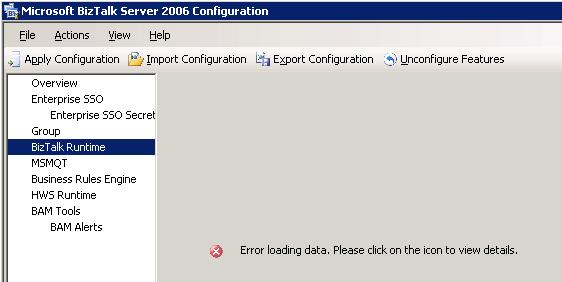
The other day I revisited the configuration screen for one of our production environments. When I selected BizTalk Runtime I was greated by the message “Error loading data. Please click on the icon to view details.”.


Clicking the icon didn’t do anything. Now I could imagine a couple of different things that could cause this to happen. Lost database connectivity or database corruption and security issues were my two first guesses. However in this case I knew the server was working and I knew that the user with which I was running the configuration had the required authorization, but just in case I confirmed it. I pondered this a moment and did a quick search. I only came up with two links, none of which really seemed to fit (see bottom of post for references). So I thought I’d blog about the way I “solved it”.


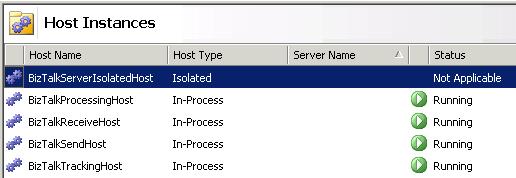
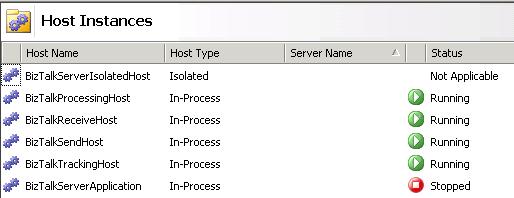
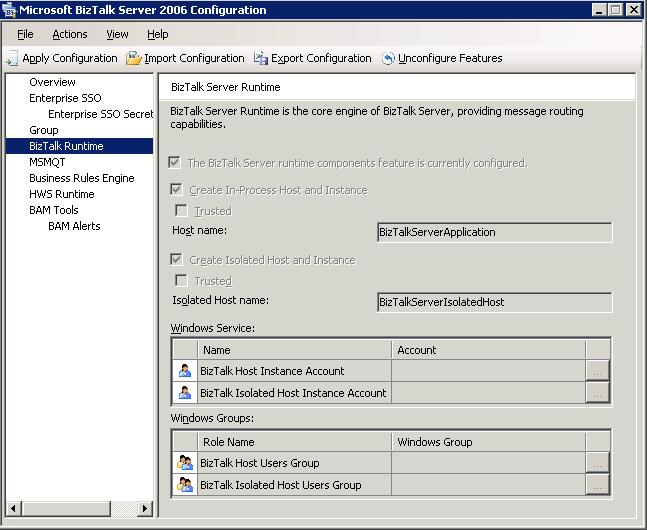
Lets take a step back. What should the screen show? It should show how you configured the default host instances (BizTalkServerApplication and BizTalkServerIsolatedHost). Now in our production environment we no longer have BizTalkServerApplication, instead for this server and customer it looked like this:


We had deleted the BizTalkServerApplication host instance and replaced it by host instances better suited for this environment. This causes problems for the configuration tools as it looks for that host instance (NT Service) when displaying that screen. So I added it back.


Now when we try to open the BizTalk Runtime section of the BizTalk Server 2006 Configuration, everything works.


A short note though: The screen is in this case more or less pointless, since it shows a configuration that we aren’t using, thus it can no longer be used to represent a BizTalk server configuration, nor can the export configuration option be used to fully backup a servers configuration.


While writing this post I removed the name of some servers, accounts and groups from the screenshots above. Just to be clear.


References I found that seems to deal with something of the same problem:


Adapters, BizTalk

BizTalk SFTP Adapter

A while ago I wrote about different kinds of file transfer protocols that contained the acronym FTP in one way or another, and what they really meant. I mentioned that I had worked with these different protocols. Now the BizTalk Adapter that we used for SFTP has been made available online by Mikael, who was the one responsible for developing it. Considering what the going rate is for BizTalk adapters I’d say that this is highly generous. I know of at least one company that charges several tens of thousands of dollars for their BizTalk SFTP Adapter. Why not save a buck or two for the projects release party? The only thing I have against this adapter is the SharpSsh library it uses, which is a port from Java that has resulted in some C# code that I just don’t like. However I must say that we have been using it in production for some time and it hasn’t failed us yet. As usual though, don’t take my word for it. If you plan to use this adapter test to see that it fits your requirements (as you should with everything in your solution). Read more here.