BizTalk, Development, Orchestrations

You do not (always) need a correlation set to promote properties in a message sent from an orchestration

It is common knowledge that you use a Correlation Set to correlate message by creating an instance subscription that subscribes to hopefully unique properties. The subscription is created by pointing out a number of properties that you want to use for the correlation. Then when a message is published to the MessageBox that matches that subscription it is delivered to the orchestration. What most experienced developers knows is that Correlation Sets also promote properties as they are initialized; as the first message is sent by the orchestration. There is no other way to manually select properties to be promoted in a message sent from an orchestration. However, do not think that manual promotion through the use of Correlation Sets is the only way that properties will get promoted when published by an orchestration. It is not.

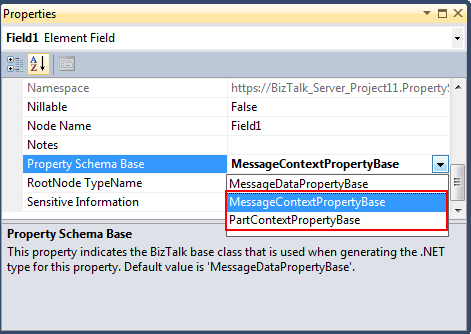
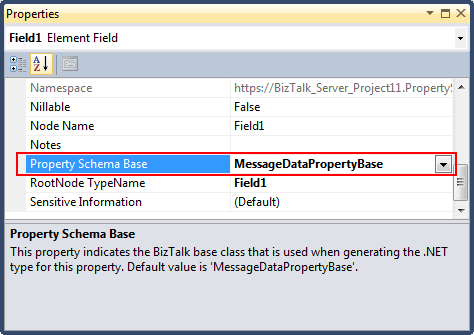
If the property has a Property Schema Base of MessageDataPropertyBase as below, then you do not need a correlation set. You only need to send the message and promotion will be taken care of automatically.

image

Only if you want to promote a property that has a Property Schema base of context type (MessageContextPropertyBase or PartContextPropertyBase) do you need to manually provide a Correlation Set to make sure promotion happens.

image

By *ContextPropertyBase we mean that its origin cannot be found within the data of the message, but is expected to be promoted to the context by another component, such as the adapter, a pipeline component or something else – in this case an orchestration, do you need to manually take action to make sure it is promoted as you publish a message to the MessageBox from an orchestration. And in this case you need a Correlation Set.

Of course if you were to be actually doing correlation with the Correlation Set and not only using it to promote a property then you would still want to Initialize a Correlation Set containing all properties you want to use regardless if these have their origin in the message data or not.

Azure, BizTalk, Presentation, Sommarkollo

Sommarkollo 2012–The Microsoft Integration Story

Ever updated, The Microsoft Integration Story, in an extended 3h format, joins the lists as one of the available topics in Microsoft Swedens Summercamp (Sommarkollo) 2012. Two stops in Stockholm (27/6, 21/8) and one in Helsingborg (26/6). I hope to see you there.

Enjoy
/Johan

clip_image001

Additional info (in Swedish):

Snart är sommaren här och med den Microsofts uppskattade evenemang Sommarkollo. För tionde året i rad har vi massor av spännande seminarier och produkter att presentera. Delta i så många seminarier du vill – helt utan kostnad! Passa på att träffa oss när vi besöker Stockholm, Göteborg och Helsingborg på vår turné genom Sverige i sommar.

Sommarkollo är ett evenemang för dig som vill bli inspirerad och påläst inför hösten. Du blir väl insatt i nyheter, teknik och annan intressant och användbar information som rör våra senaste och hetaste produkter. Seminarierna riktar sig både till dig som är kund och partner till Microsoft.

Vi kommer bland mycket annat presentera nyheterna System Center 2012, Windows Server 2012 och SQL Server 2012. Vi ger dig även unik inblick på hur Windows 8 kommer se ut och hur du och ditt företag kan arbeta enklare och effektivare med hjälp av Microsofts produktivitetsplattform. Vi bjuder också på flera målgruppsanpassade seminarier för exempelvis utvecklare, it-proffs och säljare.
Välj och kombinera de seminarier som intresserar och passar just dig. Om du bokar både för- och eftermiddagspass bjuder vi på en lättare lunch.

Det här är ett strålande tillfälle att under avslappnade former diskutera, få inspiration och utveckla din kompetens.

Anmäl dig här!

BizTalk, Presentation, TechDaysSE

TechDays 2012–The Microsoft Integration Story

At TechDays 2012 in Sweden we did a presentation called “The Microsoft Integration Strategy” (or Story), something that we have done in variations for BizTalk User Group Sweden and other events.

I am delighted to have gotten back the review which puts the session in the top 10 sessions (7th). Glad you liked it. The presentation slides are here (as a pdf). I’ll be happy to share the pptx if you want it, just ask (It keeps me up to date with other interesting presenters and events). The video should be available shortly (in Swedish though). The video is available here.

Microsoft Integration Story

BAM, BizTalk, Installation

BizTalk Server and named SQL Server Analysis Services instances

The documentation for BizTalk Server 200X is very clear, and has been since BizTalk Server 2006. See the 2010 versions of technet wiki and download. It states:

Named instances of SQL Server 200X Analysis Services are not supported

But why is that? I set out to investigate if I could find a reason for it still being true.

Examining the history

In the beginning, there was a limitation with SQL Server 2000 Analysis Services (SSAS). It was not instance or cluster aware (much like SSIS today). Some time later with the help of service packs (if I can recall and use my search engine correctly) SSAS became cluster aware, but only supported running on the default instance. Thus the requirements and the reason that was true with BizTalk Server 2006 is crystal – due to the support of the underlying technology, namely SQL Server 2000, named instance of Analysis Service was not supported.

Present

I later versions of SQL Server, and the latest of SQL Server 2008 R2 specifically, there is no such limitation. Analysis Services is both cluster and instance aware and can be installed in a named instance. So the underlying limitation just isn’t there. But what about BizTalk? Does it have some built in limitation to how it uses Analysis Services that doesn’t allow working against a named instance?

The scenario

Two BizTalk Server Group installations – connected to their respective database instance – side-by-side. Both SQL Server instances has the database, agent and analysis services services installed. In the default instance I have a BizTalk Server Group configured with BAM tracking and Analysis, and a deployed activity and view when we start our journey. For the named instance I wanted to configure the same thing to see that there were no issue with

  • running Analysis Service in a named instance, and
  • running it side by side with the default instance and its Analysis Services on the same SQL Server machine.

Configuring BizTalk Server against a named instance of SQL Server 2008 R2 Analysis Services

First configuring the feature using BizTalk Server Configuration.
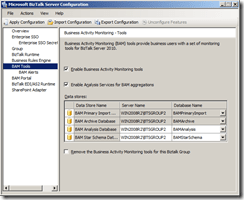
BTS2_BAM_config_seperateAS_2

Then applying the configuration and view the result.
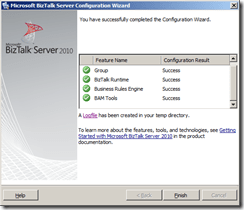
BTS2_BAM_config_seperateAS_2_configDone

No issues.

Deploy BAM activities and views

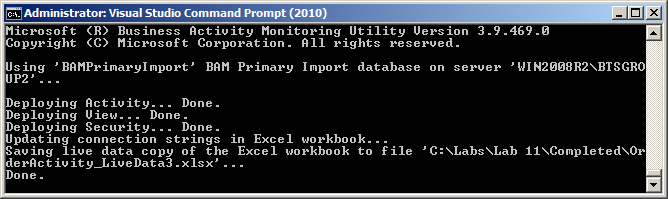
Using bm.exe to deploy my BAM activity and view to my named instance.
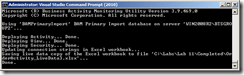
BTS2_BAM_config_seperateAS_2_deployOK

No issues.

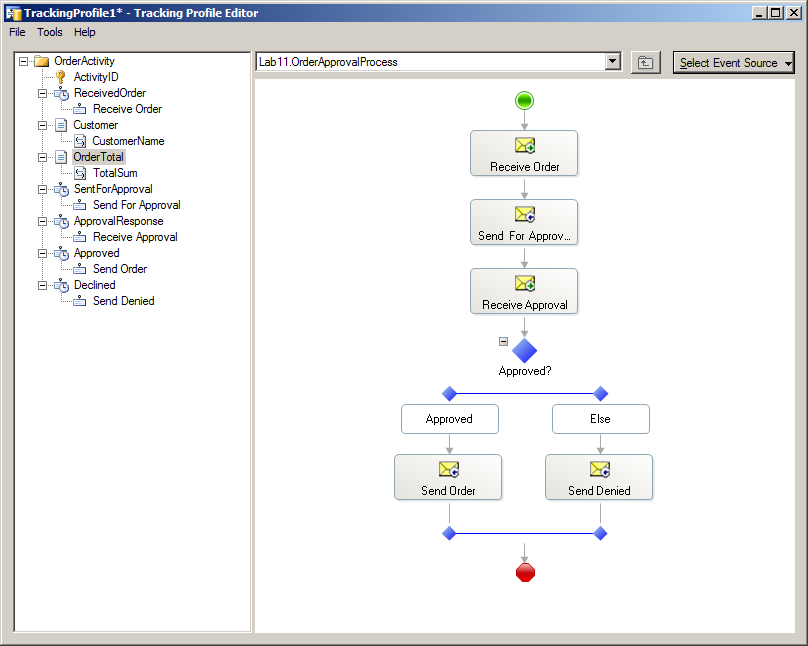
Using Tracking Profile Editor to connect my activity to an orchestration.
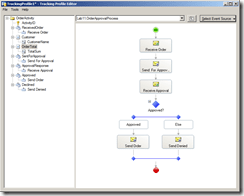
BTS2_BAM_config_seperateAS_btt

No issues.

Running some data through the integration

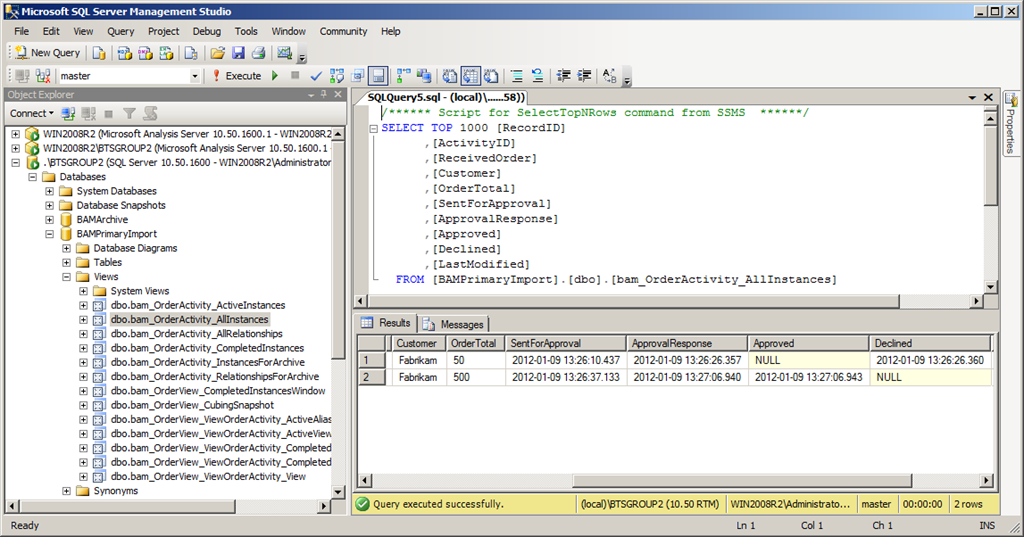
BizTalk Server behaves as expected. After running some sample data through the integration I could open my BAMPrimaryImportDb and run a Select against it to view my data.
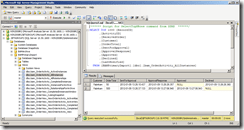
BTS2_BAM_config_seperateAS_Select

Running my BAM_AN_<View> SSIS package

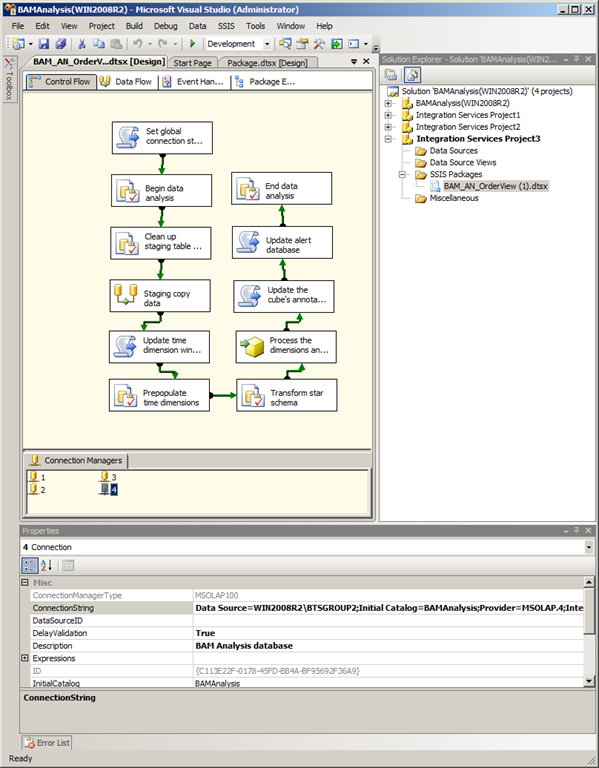
This was one of my prime candidates beforehand of where it could possibly go wrong. However as I used Business Intelligence Development Studio to inspect the package I could see that it was configured with datasources for the databases that it worked with, including the Analysis Services database, and it clearly points to the correct configured instance.
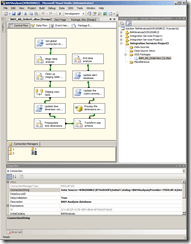
BTS2_BAM_config_seperateAS_BIstudio_BAM_AN_OrderView

Running it caused no incidents that I could detect. After having run the package and processed the cube I was ready to look at the data in the cube to see if it got there as expected.

Viewing the Live Workbook

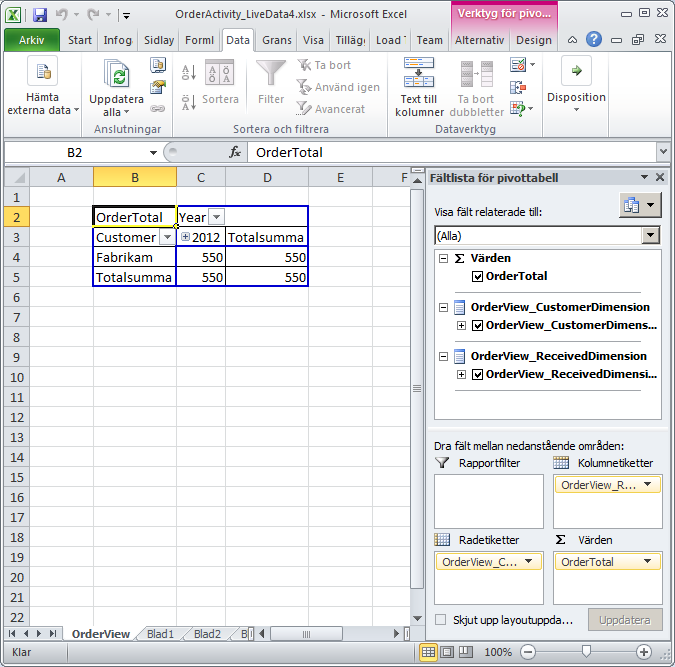
The first thing to check was the live workbook (useless as I find this feature I wanted to see if it could read the data as expected).
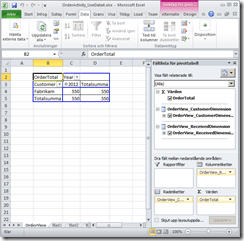
BTS2_BAM_config_seperateAS_ExcelLiveWoorkbook

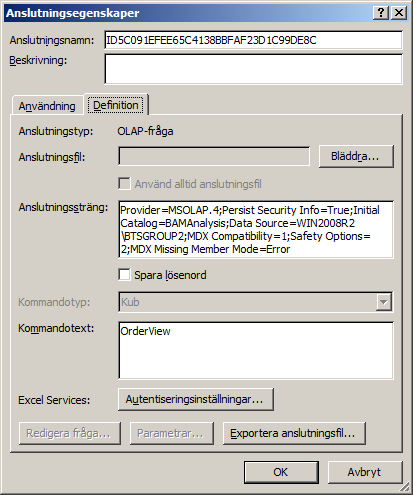
It could. And again, if we view the data connection properties here it point to my named instance.
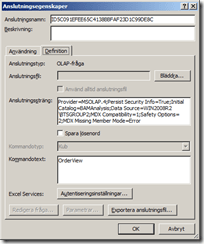
BTS2_BAM_config_seperateAS_ExcelLiveWoorkbook_ConnectionProperties

(sorry about the swedish locale here, but you get the point)

Viewing data in the BAM portal

Next up, what about the BAM portal – would it be able to understand the named instance of SSAS and retrieve my data?
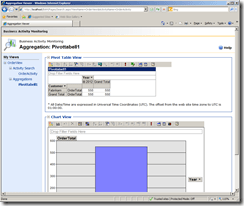
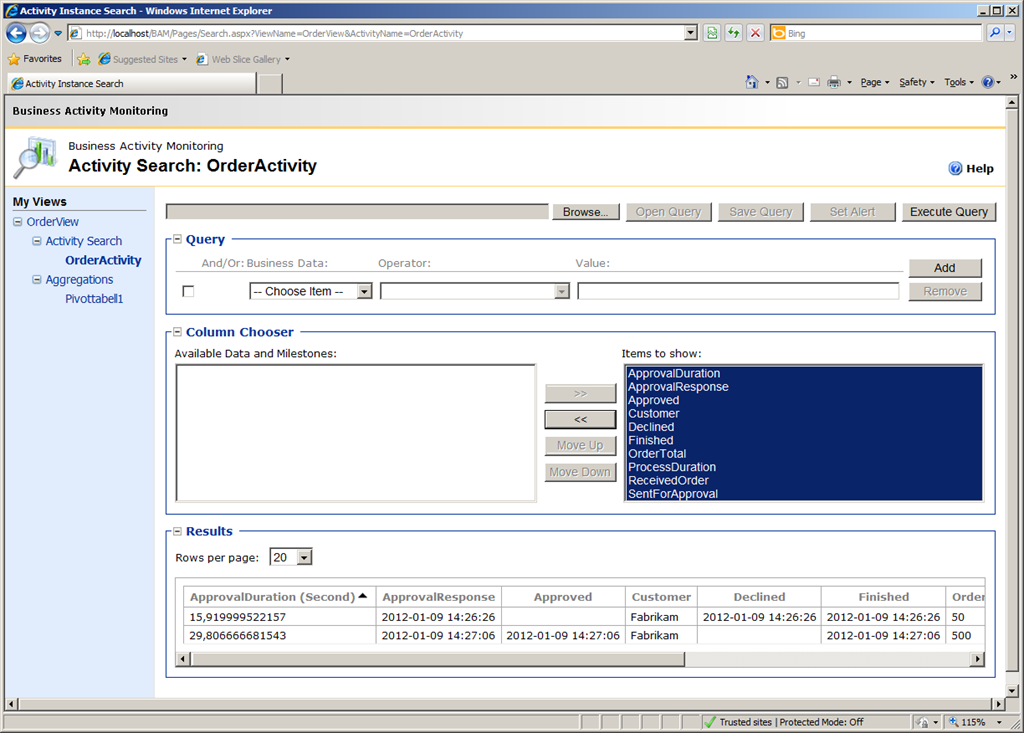
BTS2_BAM_config_seperateAS_BAMPortalView BTS2_BAM_config_seperateAS_BAMPortalActivitySearch

Yes. Both the Activity Search and the Aggregations show the data expected.

Conclusion

I can find no reason why SQL Server 2008 R2 Analysis Service cannot be used on a named instance with BizTalk Server 2010. Granted, this was just a small test and I certainly haven’t investigated this through every aspect (as per the usual disclaimer), but it “Works on my Machine”.

Do you know a reason that this will not work? Are you running this configuration yourself and can confirm further that it does work? Let me know…

HTH
/Johan
BizTalk, Licensing, Maintenance

Why BizTalk Server 2010 R2 should be BizTalk Server 2013

That BizTalk Server 2010 will have a successor and that the working title of that release is BizTalk Server 2010 R2 was announced at the BizTalk Server team blog in december 2011 and re-announced by folks like Kent Weare, Charles Young, Saravana Kumar, Steef-Jan Wiggers among others.

What some of them hints at but doesn’t discuss further is that the version naming “2010 R2” might not stick. There are good grounds for such guesses. Historically BizTalk Server 2009 was initially called BizTalk Server 2006 R3 before the renaming was announced and BizTalk Server 2010 was called BizTalk Server 2009 R2 when first announced before it too was renamed.

One might argue that the R2 is a good suffix in this release since it is a minor release, without an abundance of new functionality. That’s true.

One might argue that there is only so much to a name, the important thing is that Microsoft is showing that it will continue to maintain and carefully evolve the product. Not so I say.

There is one very important thing that goes into that name that should not be overlooked or underestimated – the support lifecycle. Microsoft’s support lifecycle policy says that products will have 5+5 (mainstream+extended) support. However, that applies to major versions. An excerpt:

“Minor releases follow the same Support Lifecycle as the major product release.

An example of this is Windows Server 2003 R2 which has the same Mainstream Support phase and Extended Support phase dates as the parent product, Windows Server 2003. Likewise, Windows Server 2008 R2 follows the same Support Lifecycle dates as the initial release of Windows Server 2008″

If the product will be BizTalk Server 2010 R2 (and assuming it will follow the general rule), it will not get an extended support lifecycle end date. Except for what is stated in the general policy you can see examples of this scheme throughout the product chain. BizTalk Server 2006 and 2006 R2 are the closest examples, but also Windows Server 2008 and 2008 R2, and SQL Server 2008 and 2008 R2 both follow suit. In all these cases the R2 version does not start a new 5+5 year period. Where as with BizTalk Server 2006 R2 to BizTalk Server 2009 and again to BizTalk Server 2010, we got new lifecycle support dates.

One of the major asks around BizTalk Server before the announcement was for Microsoft to clearly show its continued support for BizTalk Server as a product – they did that, but here is hoping that they will strengthen that statement further by giving us a BizTalk Server 2013 (or 2012).

HTH
/Johan