BizTalk, Presentation, TechDaysSE

TechDays Sweden 2010

techdays-blogg-speaker


That should read… I was a speaker at the Swedish TechDays, since I am writing this post after the fact, although I’m backdating the post a bit to more closely match in time when I was supposed to have published it.


I did a session titled “The Future Roadmap of BizTalk Server” and I’m happy to say I drew a full room (not that the room was all that big, but all the same). Future in this case meant I covered both current and coming technology. The reasoning behind it was that a lot of people probably wouldn’t have BizTalk Server 2009. This turned out to be true since it was a clear minority of the people in the room that raised their hands when asked if they had had previous contact with BizTalk Server 2009. I covered ESB Toolkit 2.0 and Itinerary processing as well as connecting to Windows Azure Platform Service Bus. I was a little surprised here that as I asked for a raise of hands on how many were familiar with the Service Bus only a couple of hands went up. Either it’s a Swedish mentality thing – to not want to stand out – or there simply aren’t all that many people interested in it, yet. I went on to cover some of the news in 2009 R2 (which I learned had gotten renamed to 2010 the evening after my presentation). I couldn’t demo anything, but am quite satisfied with how the Powerpoint “Demo” I was able to do (yes, I know, you can kill a presentation, and other things, with Powerpoint, but I think I did ok). I also related some of the vision given by the team at PDC in November and subsequent WebCasts about vNext. The recorded session should be up soon at the TechDays site, however it will be in Swedish, so for an international audience it will be useless. The presentation will be availble soon as well, as a pdf.


Because I believe in sharing I’ve decided to make the presentation available through the blogical Downloads section, here. I have myself borrowed small parts and ideas from the presentation from elsewhere as you often do, but almost all slides and images are built from scratch. I’m sharing those under a “if you decide to use parts of it please at least tell me that you liked it and that it was useful to you through commenting this blog post” license. I’ve marked it as final, but it’s not copy protected or in pdf format or anything, it’s the pptx file itself. Enjoy.


UPDATE: Recorded session (in swedish) is here.


Also BizTalk User Group Sweden was represented at TechDays as well.
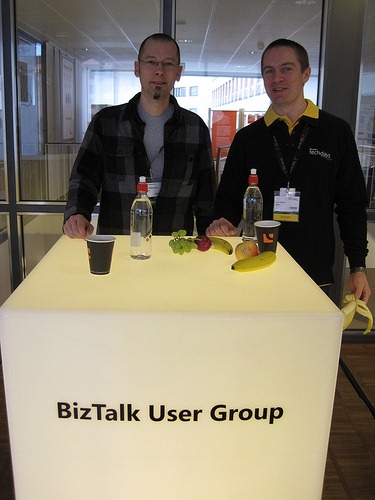


(Not the best of pictures, with the backlight and all, but there we are… From MPN Swedens photostream)

BizTalk, SOA, Webcast

Recent and upcoming BizTalk User Group Sweden events

Some time ago, back on the 20th of November, Richard Seroter visited BizTalk User Group Sweden and talked about BizTalk, SOA and leveraging the cloud. His talks are now live on channel9, part 1 and part 2. A short blogpost explaining the talk is here.

It was great fun to have Richard visit, although some (most) of the laughter and clapping that your hear on the videos is really due to me making a pantomime Richard imitation outside of the frame of the video and should not be credited to him 😉

Getting the videos published wasn’t lightning fast due to some unfortunate circumstances and personnel changes. Hopefully that will be all ironed out by November 26th when Charles Young swings by us again, this time to talk about the Business Rules Framework. I’m sure it’ll be a classic. Take the chance to say “I was there”. There are still slots left. Sign up here.

Should you happen to pass by Sweden and have an interesting Connected Systems topic that you would like to talk about feel free to drop us a line.

Or as Richard commented his visit on his blog through this sentence taken totally out of it’s context 😉 “If you get the chance to visit this user group as an attendee or speaker, don’t hesitate to do so.

color-drop[1]

Administration, BizTalk, Maintenance

Cleaning up BizTalk database backups

Everyone knows (read that as: should know 😉 that enabling the BizTalk jobs “Backup BizTalk Server” and “DTA Purge and Archive” is a good thing. Even on simple test machines, and perhaps (preferably) even on your developer laptop. What happens some times though is that, when you end up using the dump-to-disk approach, you fill up your disks. This happens because by default the BizTalk Backup and DTA Purge and Archive jobs doesn’t clean house. In your production and staging environments the “IT guys” will usually have your back in this case and make sure that doesn’t happen. For those environment where that isn’t the case here’s an easy to use script provided by our IT guys to help keep things tidy. It uses the forfiles statement as the bulk of its logic.

@echo off
set BACKUP_PATH=%1
set RET_INTERVAL=%2

if "%BACKUP_PATH%"=="" exit 1
if "%RET_INTERVAL%"=="" exit 1

Forfiles /P %BACKUP_PATH% /S /M *.BAK /D -%RET_INTERVAL% /C "cmd /C Del @path"
exit %ERRORLEVEL%

Now all you need to do is to call this script from somewhere. A suggestion might be from a SQL job. This way you configure the backup and the cleanup of the backup files from a single location. Like this:

exec xp_cmdshell 'script.cmd C:Backup 4'

script.cmd should be the full path to your script, while C:Backup should be the full path to your backup directory. Remember to surround paths by ” should they contain spaces. The 4 in this case says that any files 4 days and older will be removed. Schedule as you see fit.

Administration, BizTalk, WMI

Strange BizTalk WMI behavior (curious BizTalk SQL)

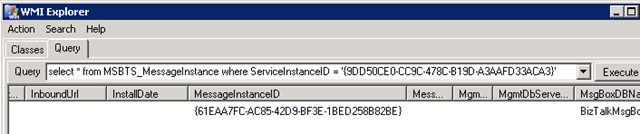
This week a co-worker raised an issue with a WMI query where he did a simple query for an orchestrations messages, and for some reason not all of them were returned. This behavior exists on both 2006 R2 and 2009, and thus most likely on 2006 as well. The query was simple:

select    *
from MSBTS_MessageInstance
where ServiceInstanceID = ‘{9DD50CE0-CC9C-478C-B19D-A3AAFD33ACA3}’

This was supposed to return two messages, but only one was returned, illustrated below in WMIExplorer:


image


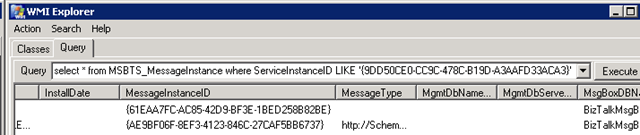
He came up with a solution where he could instead do a LIKE query and get both message instances returned:

select    *
from MSBTS_MessageInstance
where ServiceInstanceID LIKE ‘{9DD50CE0-CC9C-478C-B19D-A3AAFD33ACA3}’

image


Now I was ok with this as a solution, but I wanted to find out a bit about why this happened.


Using SQL Profiler to see what this WMI query meant I found a call that looked like this when I used ‘=’:

exec BOM_LookupMessageReferences
@nvcHost=NULL,@nServiceClass=127,@uidServiceType=NULL
@uidInstanceId=‘9DD50CE0-CC9C-478C-B19D–3AAFD33ACA3’,
@uidMessageId=NULL,@snStatus=63,@nReferenceType=15,
@dtFrom=‘Oct 25 3009 12:06:31:360PM’,@dtUntil=‘Oct 25 1809 12:06:31:360PM’,
@nMaxMatches=200

and like this when using ‘LIKE’:

exec MBOM_LookupMessageReferences
@nvcHost=NULL,@nServiceClass=127,@uidServiceType=NULL,
@uidInstanceId=NULL,
@uidMessageId=NULL,@snStatus=63,@nReferenceType=15,
@dtFrom=‘Oct 25 3009 12:06:42:867PM’,@dtUntil=‘Oct 25 1809 12:06:42:867PM’,
@nMaxMatches=200

Spot the difference?


Sure enough in one case we send in the (service)instanceId and in the latter, we don’t. This in effect, causes the latter query to return all messages matching the other criteria, and filtering on the serviceInstanceId is made elsewhere, presumably in the code executed by the WMI call, although I haven’t investigated that further.


So what makes the first query return only one message? It’s got the service instance Id with it, and nothing else, so what’s causing it to filter out the single message.


Looking further into the call chain in SQL, the method MBOM_LookupMessageReferences uses methods named MBOM_LookupMessageReferences_<host>, for example MBOM_LookupMessageReferences_BizTalkServerApplication.


In this (these) procedures you can find the following code:

if (@uidInstanceId IS NOT NULL)
set ROWCOUNT 1
else if (@nMaxMatches > 0)
set ROWCOUNT @nMaxMatches

So if we send in a serviceInstanceId we will just get a single message instance returned. I’m not sure what the point of this is really, but it seems to be interfering with what we want.


It’s an universal truth that you do best to stay out of the BizTalk databases and their queries. I’m not going to suggest something that I will call a solution in this post, especially not since I haven’t done sufficient testing to see that this doesn’t interfere with something else.


However, from the test I have done, it seems as if the following code change might be what was intended:

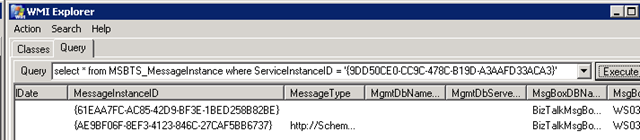
if (@uidMessageId IS NOT NULL)
set ROWCOUNT 1
else if (@nMaxMatches > 0)
set ROWCOUNT @nMaxMatches

Which gives the result I want for a serviceInstanceId query:


image


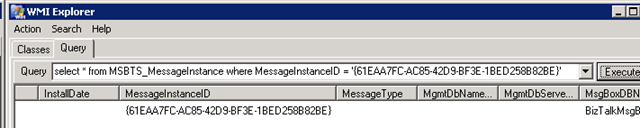
as well as for a messageInstanceID query;


image


We are not likely to use this alteration, since I’m ok with the way that the LIKE query works, even though it takes a wider scope then necessary. But perhaps this might help or enlighten someone that finds themselves with a similar puzzle.

.csharpcode, .csharpcode pre
{
font-size: small;
color: black;
font-family: consolas, “Courier New”, courier, monospace;
background-color: #ffffff;
/*white-space: pre;*/
}
.csharpcode pre { margin: 0em; }
.csharpcode .rem { color: #008000; }
.csharpcode .kwrd { color: #0000ff; }
.csharpcode .str { color: #006080; }
.csharpcode .op { color: #0000c0; }
.csharpcode .preproc { color: #cc6633; }
.csharpcode .asp { background-color: #ffff00; }
.csharpcode .html { color: #800000; }
.csharpcode .attr { color: #ff0000; }
.csharpcode .alt
{
background-color: #f4f4f4;
width: 100%;
margin: 0em;
}
.csharpcode .lnum { color: #606060; }

BAM, BizTalk, Configuration, Installation

BAM and SSIS notes worth repeating

SQL Server Integration Services (SSIS) is not a clustered resource. Connecting to SSIS generally means connecting to any of the SQL Server servers in your cluster environment directly, not to a virtual cluster address. Configuring SSIS for a named BAM instance still involves configuring it against your clustered BAM database instance. The BizTalk install documentation (Multicomputer) also claims that SSIS needs to be installed on the BizTalk Servers. That’s incorrect. You could install SSIS and that’d be good, but I much rather install the management tools, as explained and outlined here.

While talking about BAM I can’t help but to mention an excellent article recently written by Saravana Kumar here.