Blogging, General

2008 popular posts

So, a year passed. Year-end statistics are always fun. However I really need to make sure we have additional statistics available, as it stands now, stats are somewhat too sparse to give really meaningful feedback.


I’d like to highlight a few posts that people seem to have found interesting (based on the stats I do have):


Although the comparison might be a little unfair, since the items in the beginning of the year has obviously been online for far longer then the posts done during the latter part.


Also the Blogical SFTP Adapter at Codeplex, maintained by Mikael HΓ₯kansson and myself, has raised people’s interest as well.


Lastly two of my more recent articles about mapping patterns: Appending new records to existing (looping) records and Using a message as a lookup and merging data, for the short time they have been online has surfaced as popular.


Good bye 2008 πŸ™‚

General

In the same bookshelf?

netdejting

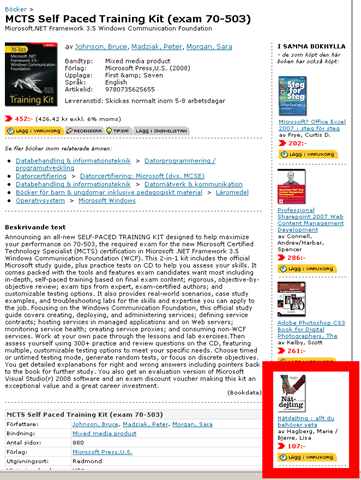
I’ve gotten myself a new book. We are looking at options of doing in-house training, and I’m currently looking at material to use for that purpose, and I got this book as part of that quest. I got the MCTS Self Paced Training Kit (exam 70-503), Microsoft.NET Framework 3.5 Windows Communication Foundation.

Now online bookstores likes to find different ways to try to entice you to buy more, and one way they do this is buy giving you a list of other books that people in your situation has found interesting. What I found funny, and slightly scary was the suggestions that I got. In the same bookshelf of people who bought this book, apparently, are: Microsoft Office Excel: Step by Step and Online dating – all you need to know. The latter is circled in the included picture.

Somehow I just don’t see it as being the same people that get these books – I mean, a .NET 3.5/WCF book and Excel step by step? Really!? But hey, maybe I’m wrong πŸ˜‰

Configuration, General, Maintenance, Monitoring

Event log service is unavailable issue

I thought I’d blog about this issue I had, since it was in the end so easy to solve, but I had a hard time finding a good description of both my specific problem and any resolution. I am a bit ashamed to say that I got quite creative before trying this.


The problem I was having was that when opening the Event Viewer on my Windows Server 2008 I’d got a message saying that “The Event Log service is unavailable. Verify the service is running.“. And if I went to look it was in fact not running. The thing is though that I could easily start it, and it would keep running, until I went to the Event Viewer to look at the logs, which would then bring it down.


I solved this by simply deleting all the files in the C:WindowsSystem32winevtLogs folder.


Update 2010-02-22: Feedback in comments suggest that you might need to restart after performing this step.  


I’m not going to patent the solution, or make the claim that it will work in every case, but it did for me, and if you are experiencing this problem it’s easy enough to try.

General, VirtualPC

Recipes for working with Microsoft Virtual PC

Robert Folkesson, a Swedish Microsoft developer evangelist, wrote recently about a recipe for getting good performance out of a VPC (in Swedish). In summary and translated to English, he suggest that you run the base VPC from an USB memory stick and run with the configuration file and therefore undo disks located in the system drive. This will help performance since USB memory does reads really well, while doing writes less so.


I thought I’d share a link to a document from Microsoft with loads of information about Microsoft Virtual PC Best Practices, see Working with Microsoft Virtual PC (I’ve got it tucked away should the link go dead). If you work a lot with VPC’s, have a look through the document. There are some worthwhile stuff in there. It describes several procedures for how to speed things up (far more than I use).


The steps that I perform before tucking away the VPC includes:


  • Clean up all logs and temporary folders, including running disk cleanup.

  • (Temporarily) disable and remove the page file (and restarting)

  • Defrag the (virtual) disk

  • Re-enabling the page file

  • Run the pre-compactor

  • Do a last cleanup and shut down.

  • Run the the virtual disk compactor.

And then tuck the disk away as base image. This is regardless if you plan to use it as a base for a differentiating disk strategy or for using state files or undo disks. I’ve never tried running it from a USB memory stick though, I don’t even have a memory stick big enough. Yet… πŸ˜‰

General, Installation, VirtualPC

I’m in .iso installation hell

I’ve been installing a new VPC with Windows 2008, SQL Server 2008, Visual Studio 2008 and BizTalk Server 2009. I’ve never had so much trouble installing from .iso files. It seems to work 1 out of 5 times, or less. Even when you try the same file over and over it just pops up different errors, and then the fifth time it just works. It’s incredibly time consuming. I don’t even care to think about how many times I’ve re-downloaded and re-tried the installation. It’s all done now, but please someone make this easier!


If I never see a “A file that is required cannot be installed because the cabinet file d:somepathcabXx.cab has an invalid digital signature.” again it will be too soon.


I’m posting a few links for my future reference. Not that they didn’t really help me much, but maybe they will next time. They at least seem to be describing the issues I’ve been having, and the solution that seems to make the chance of success higher is to copy the content from the .iso onto the harddrive (in my case the vhd drive).


http://social.msdn.microsoft.com/forums/en-US/vssetup/thread/00cf6d2d-2bf1-49ae-8453-07ff11b0a380/
http://social.msdn.microsoft.com/Forums/en-US/vssetup/thread/ecb1403a-a343-43d9-92c6-a50f5bee3cf6/


But hey, what doesn’t kill you makes you stronger, or so they say…