BizTalk, Presentation, Usergroup

BizTalk, OpsMgr and Triathlon – What have they got in common?

Canadian BizTalk MVP Kent Weare.

At the 26th of august the BizTalk User Group Sweden had Kent over to deliver two sessions around System Center Operations Manager and its Management Pack for BizTalk Server. The sessions were separated by a networking and food pause and delivered to a group of around 75 people. Together with Johan Hedberg (me!) and 35 others he also completed the Stockholm Triathlon participating in the Microsoft SQL Server Fast Track Team (newspaper slideshow (in swedish) here: http://it24.idg.se/2.2275/1.337297/blott-och-svettigt-for-microsoft) (Named persons not featured). Url of user group event is here. Blog post by Kent is here. Presentation slides can also be found at the BizTalk User Group Sweden site (look in the lower right corner area).

IMG_2264

Administration, BizTalk, Tracking

How-to: Easily examine the incoming message using tracking

I got a question the other day, and thought I’d post a very short how-to. The problem the questioner had was this: They encountered a situation where they wanted to view the incoming document before BizTalk has begun processing it – the sending party “hadn’t changed anything” yet all of a sudden the message was failing in BizTalk. How can this easily be available?

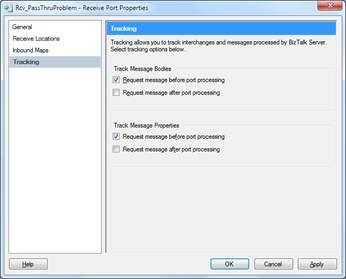
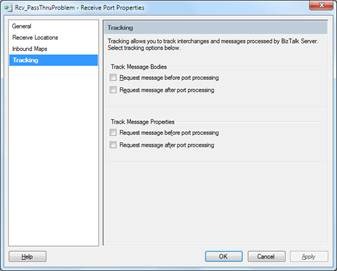
By default, when you look at a ports Tracking tab, no box is checked.

clip_image001

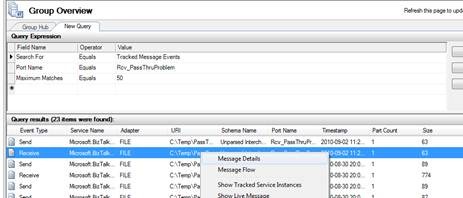
If you try and look at the message details of such a message

clip_image002

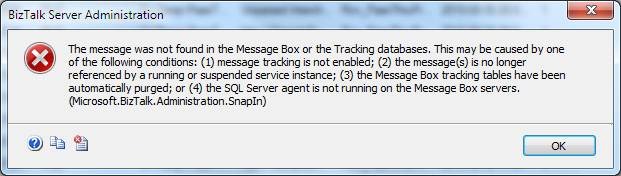
you will get an error dialogue.

clip_image004

However if I return to my port and check some of those check boxes for tracking, in this case “Request message before port processing”

clip_image005

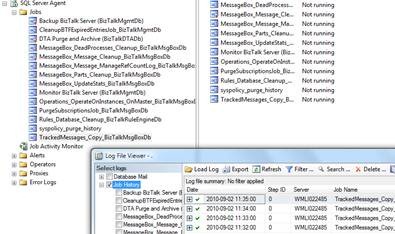
make sure that the SQL job TrackedMessages_Copy_BizTalkMessageBoxDb is running as it should (which by default is enabled and running)

clip_image006

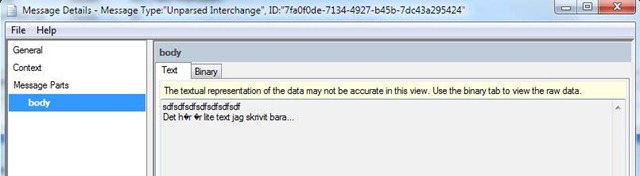
Now if I send in another message and try to look at its Message Details I get a dialogue containing the details I am after, including the content of the message

clip_image008

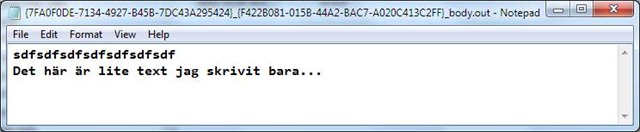
As expected this dialogue may not show some characters correctly, but you can easily go to File… Save Message.

This will create two files, one which is the context properties, and the other the message.

clip_image010

The message will stay in the database as long as configured in the database job DTA Purge and Archive (BizTalkDTADb). Live means the the ServiceInstance exists (ie suspended) and Hard that it is no longer in BizTalk.

BAM, BizTalk, Pipeline Components

XmlDisassemble in a passthrough pipeline?

So, I a couple of weeks ago now I opened a case on Connect, and this is just to wrap it up in a blog-post for discovery and archive purposes.

Background

We use BAM for infrastructure tracking. We apply a simple tracking profile to all our ports for all our customers in all our environments. BAM does this like a charm, and handles the clean up, indexing, and archiving of this data automatically by schedulable jobs – tunable to customer requirements. Many times BizTalk will be used to do file transports without really caring about the content, alongside the more traditional transformation or orchestration work. Other times the requirements might cause me to want to bring in a file in BizTalk to handle things like processing, disassemble, splitting or something else in one (or more) orchestrations. To me, nothing strange with this, and I’m hardly alone in this.

The problem

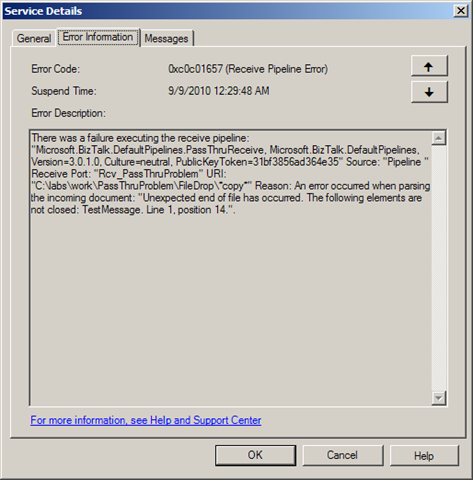
Even though the passthrough pipeline is used, with BAM tracking, disassemble of the incomming file will be attempted or performed. This might result in disassemble errors and/or debatching of message with envelopes were that was not intended.

If you do BAM tracking and apply that to a port that has the passthrough pipeline on it the code will create a xmldisassembler as part of the BAM tracking process in the passthrough pipeline. If this does not find what it considers XML through it’s Probe method, things seem fine. Otherwise this can create issues. Two that we have identified is:

  1. If the message passed through the passthrough pipeline matches that of an envelope schema deployed to BizTalk it will be debatched into the first document by the pipeline.
  2. if the document contains faulty xml – pipeline processing will get an exception.
    image

Why does this happen?

Looking through the code with Reflector gives us some insights. The ReceivePipeline class, base class of the PassThruReceive class implements the GetNext member. Towards the end of that code the below code is present:

IBaseMessage ReceivePipeline.GetNext()

if (base.PipelineContext.InvokedFromMessaging)
{
  msg = base.DoBamTracking(msg, Pipeline.BamTrackingMode.BamTrackingOnly);
}

The DoBamTracking method (which resides in the even more generic Pipeline class) decides whether or not BAM tracking is necessary be looking at some context properties (supposedly populated by the fact that I’ve applied a Tracking Profile and mapped it to the port in which context the pipeline is running). If it is it then creates a XmlDasmComp component and Probes the message. If Probe returns false, then we are, as stated above, fine. If not… later in the code it will use the (XmlDasmComp) component to run Disassemble followed by its GetNext implementation and return the result. The result: A disassemble message – if it succeeds that is.

IBaseMessage Pipeline.DoBamTracking(IBaseMessage, BamTrackingMode)

IBaseComponent component = PipelineManager.CreateComponent(
"Microsoft.BizTalk.Component.XmlDasmComp, Microsoft.BizTalk.Pipeline.Components,
Version=3.0.1.0, Culture=neutral, PublicKeyToken=31bf3856ad364e35, processorArchitecture=MSIL"
); IProbeMessage message2 = (IProbeMessage) component; … if (!message2.Probe(this.pipelineContext, msg)) { return next; } … IDisassemblerComponent component2 = (IDisassemblerComponent) component; component2.Disassemble(this.pipelineContext, msg); next = component2.GetNext(this.pipelineContext); ... return next;

Steps to reproduce

  1. Deploy a envelope schema and a document schema.
  2. Set up a BAM activity with at least one field.
  3. Connect the BAM element in the tracking profile to something.
  4. Create a receive port with a passthrough pipeline.
  5. Connect the tracking profile to the receive port.
  6. OPT 1) Send a message through with badly formed xml, like a one line message with only the text "<TestMessage>" (xmldisassembler exception). OR

    OPT 2) Send a valid envelope with two document in it through (debatch will occur and leave only the first document).

Code to reproduce

(PassThruProblem.zip contains artifacts built for 2010)

(PassThruPipeline2006.zip contains 2006 (R2)/VS.NET 2005 artifacts.)

Versions affected

I have tested this in 2010, 2009, 2006 R2 SP1 CU3 – all have the issue.

Are you experiencing this issue?

If you are having this issue and want it fixed, vote it up on Connect and mark is as reproducible.

Further, we have found that to stop this from happening on a port the only way is to to re-create it. Removing the port mapping in the tracking profile for some reason is not sufficient.

BizTalk, Presentation

BizTalk presentations in the summer/fall, part two

I case anyone has missed it, BizTalk User Group Sweden, is as active as ever. We’ve got two great events planned after the summer.

Date: 26/8 2010 – Evening event.
Location: Stockholm
Topic: Managing your BizTalk environment using System Center Operations Manager 2007 R2
Speaker: Kent Weare
Sign-up: Here

This is a great event not only for BizTalk Developers and Operations but also for IT-professionals working with System Center, especially if they have BizTalk in their environment.

Date: 8-9/9 2010 – Yes, that’s right, this is a TWO DAY event.
Location: Stockholm
Topic: Applied Architecture Patterns on the Microsoft Platform aka BizTalk Server 2010 – Release party
Speaker: Richard Seroter, Ewan Fairweather, Stephen W. Thomas
Sign-up: Here

These are both events you do not wan’t to miss, and it seems people agree. Slots are filling up fast so be sure to be quick about signing up.

BizTalk, Presentation

BizTalk presentations during the summer, part one

I’ll be presenting at Microsoft Swedens “Sommarkollo”. I’ll be talking about BizTalk. Introducing it, showing of enhancements in 2010 and going through some (what I hope are) inspirational scenarios. The target audience are developers or architects. Even though I will spend some time in the beginning at an introductory level I believe there are things that will entertain even more seasoned developers. Level is 200-300.

More info about this and other presentations can be found at http://www.microsoft.com/sverige/sommarkollo/default.html

Also, signups for my presentations can be reached through the below links:

Date: 30/6 kl. 13-16
Location: Göteborg
Sign-up: Here

Datum: 1/7 kl. 9-12
Location: Malmö.
Sign-up: Here

Datum: 7/7 kl. 9-12
Location: Stockholm
Sign-up: Here

Datum: 24/8 kl. 9-12
Location: Stockholm
Sign-up: Here

Enjoy the summer! I know I will 🙂

PS. Just to make readers (especially those from other countries with less generous terms) jealous I’ll be on vacation/parental leave (and have been for two weeks) until the very last days of august.