Blog

General, Learning

Doesn’t everyone want to be the one that chooses?

Lazy? Perhaps. But bad? Unfair!

IT departments and consulting companies alike are not populated by bad developers, or lazy developers, or impassionate for that matter. The word passionate is appropriate for developers or architects that do keep in sync with all the new choices available to us. Pragmatic may very well be a good definition for the rest. But calling them bad developers wont motivate anyone, and, in my opinion, is unfair. Keeping that up to date is not a task necessary for all developers. But all developers could benefit and grow from doing so.

The developer isn’t the problem

However, as I see it, the problem isn’t with the developers, the problem is with management. Developers want to learn. I think that applies to most if not all developers. The problem however is two fold. One, Developers are not given the time need to learn by management to be able to make educated choices. You really have to be passionate to take that learning outside of your working hours, and push that passion onto your family and friends, to the point where it’s not just your job – it’s become a much bigger part of your life. That’s why I think the word passionate fits.

What choice is there?

So if you aren’t given time to learn as part of your job, you really have very little choice. The choice left is instead to do it in your free time or not. Two, even though Microsoft may sometimes claim that new choices are driven by business demand, and I’m sure it often is, it’s often not driven by the business that you as a developer are supporting. What I mean is – the people manning your business will not always (and do not often) see how the new technologies benefits the business. The use for the business is often visualized to them by the developers, and this is where the real issue and catch 22 lies… 

It will never be the same again

This increased flow of choices is in itself the root of the problem. Developers used to know it all. Management has gotten used to that. Today, the technologies to learn are so many more and diverse. We will never know it all again. But we can become fairly good and know enough to be good at our job. But we need to be given the time and possibility. Given that, I think everyone would choose to learn.

Focus on management

So, my call to action is to instead shift the focus from the developers, whom I’m believe in general want to learn, to management and the business, and make them understand how enabling people to learn new technology will help them realize their business goals. Because I do firmly believe they will benefit.

This post was my thoughts on the topic initiated by the duoblog done by Johan Lindfors and Patrik Löwendahl. Oh, and incidentally, we’ve been here before. I wrote about this topic, or one very close too it, as a result of things said or written by close to the same people a year ago, see here and here, if interested.
64-bit, Administration, BizTalk Server 2009, Installation

BizTalk Server 2009 Installation Errors

I just thought I’d mention these install errors since I’ve gotten them now on several occasion when installing BizTalk Server 2009 Enterprise 64-bit Single Sign On Master Secret Server on Windows Server 2008 and SQL Server 2008 (although I doubt the last one has any role in these errors).

This page describes the procedure of Installing and Clustering the Enterprise SSO Master Secret Server, although it mentions nothing about these specific peculiarities.

Error1

Log

[10:03:05 Error] Setup runtime files for AMD64 platform: Fatal error during installation.
[10:03:05 Info] Marking Stage: Install/Installing components as Completed in TaskInfo XML
[10:03:05 Info] ReadTaskInfoXML: Attempting to load TaskInfo xml from string
[10:03:15 Info] Showing MessageBox with text: The following platform components failed to install and will need to be manually installed before setup can proceed: Setup runtime files for AMD64 platform: Fatal error during installation. Check the log for details. Return Code: 1

MSI (s) (8C:FC) [10:03:04:688]: Product: Microsoft BizTalk Server Setup Bootstrap Files (x64) — Error 1310. Error writing to file: atl90.dll. System error 0. Verify that you have access to that directory.
Error 1310. Error writing to file: atl90.dll. System error 0. Verify that you have access to that directory.
Action ended 10:03:04: InstallFinalize. Return value 3.
Action ended 10:03:05: INSTALL. Return value 3.
MSI (s) (8C:FC) [10:03:05:867]: Product: Microsoft BizTalk Server Setup Bootstrap Files (x64) — Installation failed.
MSI (s) (8C:FC) [10:03:05:868]: Windows Installer installed the product. Product Name: Microsoft BizTalk Server Setup Bootstrap Files (x64). Product Version: 3.8.368.0. Product Language: 1033. Installation success or error status: 1603.

Resolution

I have received this error if I connected to the server using Remote Desktop/Microsoft Terminal Service Client without using the /admin flag (former /console flag). Read more here.

Error2

Log

[10:34:48 Info] Showing MessageBox with text: The following platform components failed to install and will need to be manually installed before setup can proceed: Enterprise Single Sign-On Server: Unspecified error Check the log for details. Return Code: 1

[10:34:35 Info] Error 1928.Error registering COM+ application. Please ensure that DTC is enabled. Contact your support personnel for more information.
[10:34:35 Info] Showing MessageBox with text: Error 1928.Error registering COM+ application. Please ensure that DTC is enabled. Contact your support personnel for more information. Return Code: 0
[10:34:35 Info] Action 10:34:35: Rollback. Rolling back action:
[10:34:39 Info] Detailed Log information for product D:InstallBiztalk 2009PlatformSSO64SSO64.msi is available at <a href="C:UsersxxxAppDataLocalSetup(072909 103411).log">DetailedLog</a>
[10:34:39 Info] MSI installation returned 1603 – Fatal error during installation.
[10:34:39 Error] Error 1928 occurred during MSI installation.
[10:34:39 Error] Action 10:34:30: InstallComplus.8E665C9D_5561_45FC_AAA0_3878B87F3B86. Installing COM+ components
[10:34:39 Error] Error 1928.Error registering COM+ application. Please ensure that DTC is enabled. Contact your support personnel for more information.
[10:34:39 Error] c:depotsetupv2privatecommonsetupwizardexesetup.cpp(1670): FAILED hr = 80004005

Resolution

This error has occurred in clustered environments when the clustered instance of MSDTC was not active on the node on which the installation was taking place. Failover the MSDTC to the current node that installation is to be run on and try again.

Administration, Blogging

Captcha updated – Email re-enabled

Just a short note and apology to those that have used the contact form in the last few weeks. While we have been working to find a suitable method to stop spam we have disabled the email functionality altogether – which has affected the contact form as well. Messages sent through the contact form over the last couple of weeks may therefore not have reached us. Since enabling a new captcha, reCAPTCHA, spam has stopped and the email functionality is once again enabled. I can highly recommend it. If you feel you have not received a response to your message, please accept our apology and feel free to try again.

Administration, BizTalk, Maintenance

Redeploying a schema assembly…

If I ask you upfront: Can I redeploy an assembly to BizTalk (that contains a schema) that is referenced by (and used in) another assembly? – What would you say?


Some of you might say yes, some might say no. And you’d both be right! It all depends on what it is being used by and how it’s deployed.


Redeploying a schema referenced by a map in another assembly


Yes. This will work – provided you specify overwrite when redeploying or updating the resource, and regardless if the resources are placed in the same or different applications. The behavior is the same in all relevant tools, whether it is Visual Studio, BizTalk Administration Console or the BtsTask tool. For the remainder of the discussion I’ll use BtsTask only, since it has the easiest (or at least most verbose) output to follow.


Sidenote: If you don’t specify overwrite, you’ll get something like:
Error: Failed to add resource(s).
Resource (-Type=”System.BizTalk:BizTalkAssembly” -Luid=”SchemaProject, Version=1.0.0.0, Culture=neutral, PublicKeyToken=0a220f093608cb3f”) already in store.
1) Use BTSTask’s overwrite flag or
2) Set redeploy flag to true in BizTalk Project or
3) Click overwrite all checkbox in Admin MMC to update if the resource exists in the specified target application “SchemaApplication”.
Overwrite flag will be ignored if the resource is associated with another application.

Redeploying a schema referenced by an orchestration in another assembly in the same application


Yes. This will work. It assumes that the orchestration is unenlisted (which may be a huge problem in some cases), or you will get an error. If it is however, and as long as you specify the overwrite flag, BtsTask will happily inform you of it’s progress telling you exactly what it’s doing – which is to find the referencing resources, save their binding information, removing them, then doing the same with the thing you want to redeploy, then deploying the thing you are deploying and applying it’s bindings, and finally deploying the referencing resources and applying their tucked away bindings.


The tools does all this for you, in a controlled manner under one transaction that can be rolled back if something fails. BtsTask output is here.


Redeploying a schema referenced by an orchestration in another assembly in another application


No. This is where the fun stops. You cannot do this with the out of the box tools. The Application boundary will stop you. To be frank: WTF!? For someone approaching BizTalk Server 2006/R2/2009 from a 2004 (single/no application) perspective this could invalidate their whole deployment strategy. BtsTask output is here.


In Summary


Why is this happening? If we use Reflector to disassemble BtsTask and the Deployment API’s it uses it’s apparent that the whole things is built around an Application and it’s around an Application that everything revolves. So… If you are faced with this kind of requirement for your deployment scenarios – the tools won’t do it for you – you have to do it yourself. Mimicking the steps taken by BtsTask, but without the dependency on Application, is my recommended approach. But the implementation of that is for another post…


Has anyone already done this and have or know of a tool developed for this purpose?


Update: The odd cases


I want to add that I make no claim to cover all scenarios in the above write up. I only wanted to highlight the Application boundary as one of the things that will have a big impact on redeploying schemas. We have for example come across scenarios such as when an orchestration within the same application is “specify later”-bound to a port, on which there are maps, for which there are no referential relationship with the orchestration assembly, though there are with the schema assembly being redeployed. This scenario may fail, depending on your luck, where BizTalk is unaware of the correct order to re-deploy these things. This may result in the orchestration (and the port) being re-added before the assembly containing the maps is in place. Which in itself will fail since an attempt to add a binding containing a port that has maps configured that are not deployed will of course not work. There are more scenarios, and it would be unfair to expect any tool to cover them all.

Adapters, Azure, BizTalk, Mesh

Test run of the BizTalk Adapter for Live Mesh

The Live Mesh adapter is part of the recently released BizTalk Azure Adapters SDK 1.0 July CTP. It was first shown at TechEd 2009 North America by Danny Garber. But as someone who didn’t attend the conference, it passed me by. It didn’t surface for me until it made it’s way to codeplex and Richard Seroter made a note of the fact a week ago or so. If you have TechEd Online access you can find the original video demoing it here.


How to use it


  1. Register for an account on Azure services development portal, if you don’t have one already. Specifically you want access to Live Services.

  2. Install the pre-requisites.


    • The WCF LOB Adapter SDK.

    • The Live Framework SDK. You don’t need the tools, but you need the SDK.

    • There might be other pre-requisites though that I already had in place. So your experience might vary.

  3. Install the adapter. If you want to install it on a 64-bit system you can download the installer from codeplex. At the time of this writing a 32-bit (for VPCs etc) installer isn’t available, so you need to get the sources and build the installer. However see my install note 3 below, as you have to make a small change to the installer for it to work.

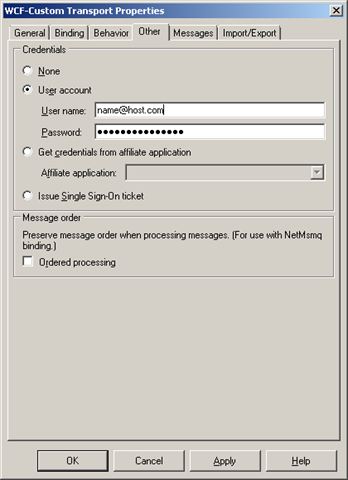
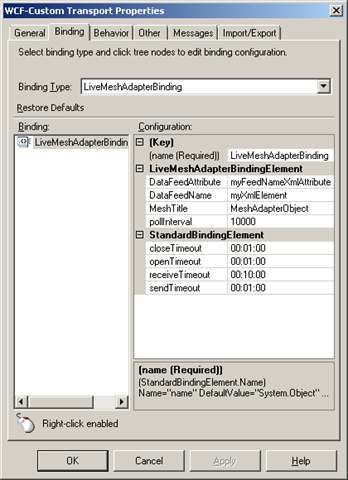
  4. Configure the adapter in BizTalk using the WCF-Custom adapter, or use my mesh.bindinginfo.xml as a template (don’t forget to change to your username and password). Some notes here:


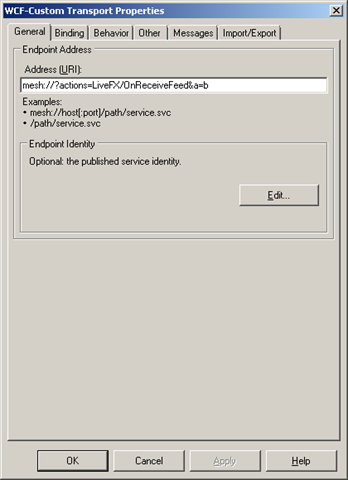
    • You have to give it an URI of “mesh://?actions=LiveFX/OnReceiveFeed“, it’s hard coded in the adapter. If it isn’t given that then it does nothing. To make it unique and be able to have more then one mesh receive location you can add to it, like you would a querystring. It will be accepted, but not handled, only the value of actions is retrieved and used by the adapter. A smart thing here would be to move something into the URI that would make it naturally unique. When you configure other adapters it’s the name of a service, or a procedure or something like that. In a scenario where you are listening to a mesh folder for example, then the name of that would be appopriate, or when listening to notifications from an application, then the name of that; the name of the MeshObject is perhaps a common denominator?


    • image image image

    • At the moment it receives notifications about changes to all resources and then when it gets a notification retrieves all feeds for that MeshObject and tries to read the userdata of the DataEntries associated with each DataEntry as a string, and if it succeeds initializes an XmlReader over that string and creates a message. Thus the userdata must conform with the rules of xml and also a couple of other things built into the adapter today. Like the name of the first node, and an attribute in that node must match those in configuration of the adapter, as must the title of the MeshObject. The attributes value must be equal to the name of the DataFeed that contains the entry which we received a notification for. 
      The logic is a little unclear to me, and has lots of room for improvement, but admittedly – I’m no expert on the mesh resource model, nor do I know what the application it was built for sent across or how it stored it – and, it’s an early CTP. Sample (matching the config seen above, and produced by my sample app):
    • <myXmlElement myFeedNameXmlAttribute=“MeshAdapterFeed”>This is my data</myXmlElement>

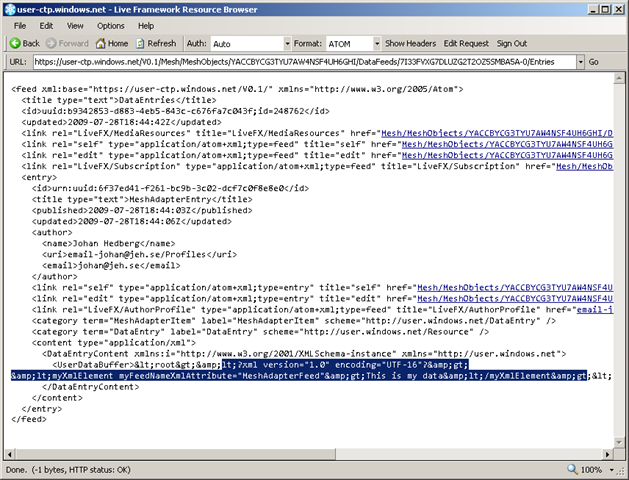
  5. Build a cloud app to generate notifications with proper userdata content, or download my meshadaptertestconsole.zip (don’t forget to change to your username and password), which corresponds with my bindings above. It creates a MeshObject, a corresponding DataFeed and a DataEntry in that with userdata. In the Live Framework Resource Browser (an invaluable tool that comes with the SDK) it looks something like this:
     image

Conslusion


First thing to note about the adapter is that at the moment it seems very tightly coupled to the demo. Judging from the “vision slide” at codeplex, the idea is for it to eventually expand into other areas as well. It isn’t to hard to change it or update it to for example read files out of a mesh folder. The Live Framework is pretty straight forward once you get used to it. But right now it’s just a glimpse into a future where BizTalk is the server product to bridge on-premises with the cloud – and doing so effortlessly and seamlessly with the use of the artifacts that we as BizTalk Developers are used to.


Install notes


Install note 1:
If the adapter install complains about not being able to find Microsoft.ServiceModel.Channels you haven’t got the WCF LOB Adapter SDK. The exception message (for completeness and search-engines, was: “Could not load file or assembly ‘Microsoft.ServiceModel.Channels, Version=3.0.0.0, Culture=neutral, PublicKeyToken=31bf3856ad364e35’ or one of its dependencies. The system cannot find the file specified.“. 
image


Install note 2:
If you get a message when running the installer that “Please wait while the installer finishes determining your disk space requirements” – try to run the installer from the commandline using the command msiexec /i <name_of_installer.msi>, or msiexec /package <name_of_installer.msi> /qr.


Install note 3:
I got the message that “Machine.config doesn’t contain system.servicemodel node”. First of all – yes it did, secondly – I could see that the adapter had added it’s bindings to the section – so it must be due to something else. When “binging” (do we call it that now 😉 the exception message I got this post. It didn’t help much, but it did point me in the right direction, becauseit made me remember seeing a custom action in the solution. Sure enough, looking at the code for the custom action revealed the issue. At line 106, the installer is trying to apply the config for the 64-bit machine.config as well as 32-bit, not finding it since I’m on a 32-bit environment. Commenting out that line and rebuilding the install does the trick. Note: I’m not trying to do a fancy works-for-all-scenarios solution. I just wanted to fix my specific problem.


Install note 4:
I can swear on the fact that just before beginning the process of installing the adapter I could create BizTalk projects. After the adapter (and WCF LOB Adapter SDK) was installed – I can’t. Project creation fails and I get the message “One or more templates do not match any installed project packages.”. I can’t really point a finger or lay the blame on any particular point, install, configuration or other entity. It did however stop working. Reinstalling BizTalk Server 2009 Developer Tools and SDK resolved the issue.