Blog

Mapping

BizTalk mapper – Using a message as a lookup and merging data

Following on my previous post on how to append records to existing (looping) records I am following up on that with a solution, or pattern as that’s a word in high fashion, for how to use a second message as a lookup table to merge or enrich data in the first message. In this sample we are not adding any new rows, we are enriching existing rows and merging the data of the second message into the records of the first document. Again, it’s a form of enrichment pattern.

Say for example that you have a list of products and now you need to do a lookup into some other system that owns a specific type of data, like for example when the first document only contains information about who the manufacturer of a product is, but you need to go to the logistics system to lookup who the distributor is as well, and enrich the document with that information before sending it to the ERP system. How would you do that? And just for the sake of argument, let’s asume that you would use a chunky interface to talk to the logistic system instead of a chatty – meaning you would of course send several products to the system and get several products, and their distributors, in response.

With the BizTalk mapper, using only the basic functoids provided, I don’t have a solution for that. I’ve tried different options, but the mapper just didn’t like what it saw. The solution then, is the advanced functoids, more specifically the scripting functoid and a custom xslt call template (it might as well be done using inline xslt for that matter, a call template is not crucial for the solution, it’s just my choice).

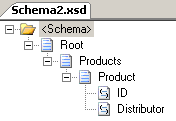
So to setup the scenario. Here are the two incoming schemas:
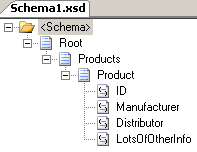
image image

In both schemas Product is repeating.

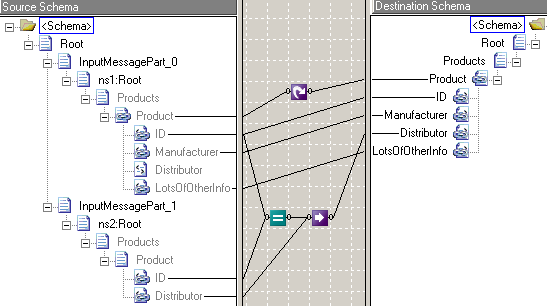
As always when you have two messages as input to a map, the typical place you would place that map is inside an orchestration. So we create an orchestration, get our messages created, and create a map and make it take two inputs and one output and we are all set. Review my previous post for more info on this. In this post I’ll jump right to the mapping logic. First of, let me demonstrate using regular BizTalk mapper shapes what I would like to do, but that will not work!
image

What I want this to do is: “Loop all products, and the use the ID of the product to lookup the Distributor that we recieved from the logistics system and output that to the output”. But again, it doesn’t work. However if this would be a single product that I would need to enrich, the solution in the above image does work! (the loop in that case is of course ignored). But in this case I have multiple products.

For the sake of clarity I’ve added a loop. It isn’t really needed – the BizTalk mapper would have implied the loop had I not and produce the same xslt as the above would. I could connect the Schema2 product to the same loop functoid and that would introduce the same look as in my previous post, where it tries to loop the second messages Products as well, but that’s no good. I could even try to use an additional loop functoid, but that would just get blatantly ignored by the mapper.

Anyway, so what can we do. Enter the scripting functoid, enter xslt.

I can do this:

image

As you can see, I am now connecting a scripting functoid between the Product.ID of the input and the Product.Distributor of the output. The second message has no links at all! Instead the lookup logic is contained in the scripting functoid.

So how does this magic that the scripting functoids does look like?
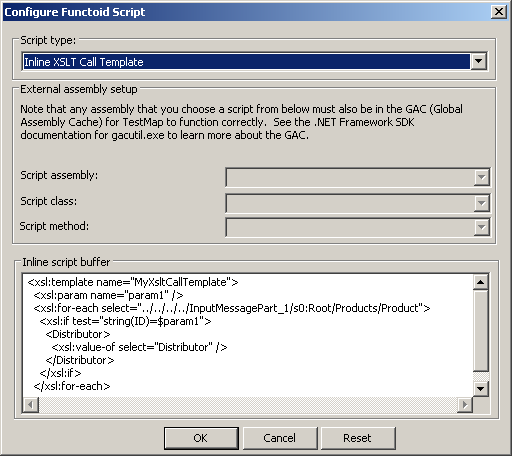
image

And here is the actual xslt script:

<xsl:template name="MyXsltCallTemplate">
  <xsl:param name="param1" />
  <xsl:for-each select="../../../../InputMessagePart_1/s0:Root/Products/Product">
    <xsl:if test="string(ID)=$param1">
      <Distributor>
        <xsl:value-of select="Distributor" />
      </Distributor>
    </xsl:if>
  </xsl:for-each>                   
</xsl:template>

To explain the script in words, what it does is that it loops through the records until it finds the correct Product with the matching ID, and when it does, it outputs the Distributor information. I’m realize there is a way to do this without looping, but I’ll leave that particular gem for those who comment to point out.

A simple example:

Input:

<ns0:Root xmlns:ns0="http://schemas.microsoft.com/BizTalk/2003/aggschema">
  <InputMessagePart_0>
    <ns1:Root xmlns:ns1="http://MappingLookupPattern.Schema1">
      <Products>
        <Product>
          <ID>123</ID>
          <Manufacturer>Manufacturer_0</Manufacturer>
          <Distributor />
          <LotsOfOtherInfo>LotsOfOtherInfo</LotsOfOtherInfo>
        </Product>
      </Products>
    </ns1:Root>
  </InputMessagePart_0>
  <InputMessagePart_1>
    <ns2:Root xmlns:ns2="http://MappingLookupPattern.Schema2">
      <Products>
        <Product>
          <ID>123</ID>
          <Distributor>Distributor_0</Distributor>
        </Product>
      </Products>
    </ns2:Root>
  </InputMessagePart_1>
</ns0:Root>

Output:

<ns0:Root xmlns:ns0="http://MappingLookupPattern.Schema1">
  <Products>
    <Product>
      <ID>123</ID>
      <Manufacturer>Manufacturer_0</Manufacturer>
      <Distributor>Distributor_0</Distributor>
      <LotsOfOtherInfo>LotsOfOtherInfo</LotsOfOtherInfo>
    </Product>
  </Products>
</ns0:Root>

For those reading my previous post saying that what we did there was nothing special, I believe some of you will have found this example slightly more interesting. It’s a useful thing to be able to do in so many scenarios. And yes, I recognize that there are those of you who seldom use the mapper at all any more. I am still among those that think it has it’s benefits, especially since more often then not there are at least some junior members of the team that aren’t comfortable with pure xslt, and there is really no reason in that scenario to take an otherwise quite simple map to pure xslt when all you need is a small scripting functoid to do the trick.

Mapping

BizTalk mapper – Appending new records to existing (looping) records

Does BizTalk Server maps have patterns? What are patterns? Wikipedia states that it’s a pattern if

“…it happens 5 or more times…”

and that a design pattern in computer science

“…is a general reusable solution to a commonly occurring problem…”

To summarize, the solution that I’m going to present is certainly something that I’ve been up against a number of times, and its something that’s really quite useful, yet simple, and something that the BizTalk mapper does really well. It’s the task of data concatenation, or appending data if you’d rather call it that. It’s an implementation of the content enricher pattern.

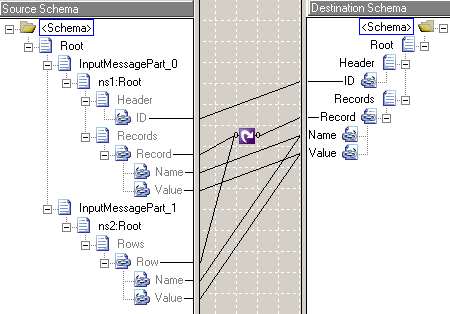
Say that you have two schemas, for simplicity, lets call them Schema1 and Schema2. Now both of them are based on a kind of name/value looping structure. What you would like to do is to append the name/value pairs in Schema2 to the recurring record in Schema1 and produce a new, enriched schema.

image image

In Schema1, Record is repeating, and in Schema2, Row is repeating.

Now how do you combine that. That answer is… easily.

Now to do this combining you have to use an orchestration, since you can’t do a map with multiple inputs outside an orchestration. So we create an orchestration, get our messages created, and create a map and make it take two inputs, that is, we drop a transform shape, double click it and assign two input messages, and one output, like so:

image

After you open the map created, you will have two message parts under the root, like so:

image

Now we can do the mapping:

image

As always, the best way to check that the map really does what you are after is to look at the xslt generated. I’m not going to paste the entire xslt generate here, but if we take it down to just the important part, it’s this:

<ns0:Root>
  <Header />...
  <Records>
    <xsl:for-each select="InputMessagePart_0/ns0:Root/Records/Record" />...
    <xsl:for-each select="InputMessagePart_1/s0:Root/Rows/Row" />...
  </Records>
</ns0:Root>

The map we created will loop first the Record records, and then the Row records, and for each such found it will output (not shown) the Record record with a Name and Value.

Mission accomplished.

Just so there is no misunderstanding, here are sample documents. First the xml sent in (the combination of two xml messages conforming to the two schemas)

<ns0:Root xmlns:ns0="http://schemas.microsoft.com/BizTalk/2003/aggschema">
  <InputMessagePart_0>
    <ns1:Root xmlns:ns1="http://MappingConcatenation.Schema1">
      <Header>
        <ID>ID_0</ID>
      </Header>
      <Records>
        <Record>
          <Name>Name_1</Name>
          <Value>Value_1</Value>
        </Record>
      </Records>
    </ns1:Root>
  </InputMessagePart_0>
  <InputMessagePart_1>
    <ns2:Root xmlns:ns2="http://MappingConcatenation.Schema2">
      <Rows>
        <Row>
          <Name>Name_2</Name>
          <Value>Value_2</Value>
        </Row>
      </Rows>
    </ns2:Root>
  </InputMessagePart_1>
</ns0:Root>


and then the result:

<ns0:Root xmlns:ns0="http://MappingConcatenation.Schema1">
  <Header>
    <ID>ID_0</ID>
  </Header>
  <Records>
    <Record>
      <Name>Name_1</Name>
      <Value>Value_1</Value>
    </Record>
    <Record>
      <Name>Name_2</Name>
      <Value>Value_2</Value>
    </Record>
  </Records>
</ns0:Root>

For those saying that what I’ve done is nothing special. You are quite right, it’s not, but it’s a very useful pattern.

BizTalk Server 2009, News

BizTalk Server 2009 CTP goes public

Finally. Ever since being told of a rough estimate of the date it was to be released I’ve been waiting for it to come. And now it has. Read the official word at Steve Martins blog. Get it here. ESB Guidance 2.0 is here.


It took a while longer than I originally expected. Still, it’s been available as a TAP for awhile, and with it the details of the features contained within, so there are no real news or suprises there, but it will be good to get your hands on it. And lots of folks are and will of course blog about the event as well, so there is really no point of iterating the features again.


 When installing Windows Server 2008 to run BizTalk Server 2009 on your image, remember that you can configure it as a workstation, it’s been blogged about here (don’t miss the pdf download) and there is a KB available as well.

.NET 3.5, Download, WCF

How-to: Get status from a windows service?

I was asked: “How can I call into a Windows Service to get it’s status?”


A little more background said that status was to be retrieved by clients (a website) on the same machine.


My response was to use WCF with the NetNamedPipeBinding. Since the recipient of my response, by his own accord, was unaccustomed to WCF, I decided to write up a small app that showed the concept.


The key thing here is that service expose an endpoint at an address that looks like this: net.pipe://localhost/ServiceMonitoringEndpoints/<name_of_service>. Name of service will be the same name as the ServiceName property of the ServiceInstaller component. This enables us to et the status of an arbitrary service just by knowing its name. First we look at the status through ServiceController and then, if the service is running, we call the WCF service to get the actual status, in this case in the form of a string. Pretty simple, wrapped up in a Library component ready to be used by both Windows Service servers and their clients. The Windows Service server is configured through its config file in my sample, but that’s something you can alter should that be one of your requirements.


Basically the server configuration is (mex of course not really necessary):

<services>
  <service behaviorConfiguration=“includeExBehavior”
      name=“SharedMonitoringUtilityLibrary.MonitoringService”>
    <endpoint address=“” binding=“netNamedPipeBinding”
              contract=“SharedMonitoringUtilityLibrary.IMonitoringService” />
    <endpoint address=“mex” binding=“mexNamedPipeBinding”
              contract=“IMetadataExchange” />
  </service>
</services>

and the it uses one of ServiceHosts constructors to supply that takes type and address:

protected override void OnStart(string[] args)
{
    host = new ServiceHost(typeof(SharedMonitoringUtilityLibrary.MonitoringService),
        new Uri(“net.pipe://localhost/ServiceMonitoringEndpoints/MonitorMeWithWCFService_Service1/“));
    host.Open();
    MonitoringService.Status = “Started at ” + DateTime.Now.ToString();
}
protected override void OnStop()
{
    if (host != null)
        host.Close();
}

as you can see from the code above, I’m simply using a static method to supply the status to the running WCF Service. This particular point of interaction wasn’t my primary point of this post or code. A better option could be getting an instance of the host from the other direction using an overloaded ServiceHost and Get the host using OperationContext.InstanceContext.Host.. Another option might even be where the server is a client to it’s own service, using a set method to set the status. What you don’t want to do is make the service hostdependent. Just be aware that my choice above is clearly limiting, and that you have plenty of other options.


The client is dynamically configured to look for and call the service using the following method:

Binding binding = new NetNamedPipeBinding();
EndpointAddress endpoint = new EndpointAddress(
    string.Format(@”net.pipe://localhost/ServiceMonitoringEndpoints/{0}/“, serviceName));
MonitoringServiceClient client = new MonitoringServiceClient(binding, endpoint);
statusInfo = client.GetStatus();

Although it’s surrounded by other things as well in the actual sample code, like the call to ServiceController.


Here is the sample code.


It contains three projects. The Windows Service Server, the library and a simple console client. Compile the sample code, install the service using installutil and run the client. Now that you’ve validated it and it’s running you can begin expanding it.


Additional Resources:
Hosting WCF Service in Windows Service screencast
Hosting and consuming WCF services
NamedPipe activation

General

Resource availability for standard platforms (like BizTalk Server) is insufficient

The papers in Sweden reported last week that resources with expert level knowledge on standard platforms and systems are hard to come by. In summary it says that its an emerging trend in Sweden to use standard platforms, but the fact that resources are hard to come by is pushing resource prices up. The majority still considers it to be worth it, because of the wins they foresee.

It’s not a moment too soon. And I’m not saying that because I happen to be one of those scarce resources that will (supposedly) be high priced (in fact I see prices being pushed down due to the economy if anything). The reason that I think that it’s about time is that too many companies has for too long been all about the “not built here” attitude in combination with “that doesn’t meet up to our exact standards, therefore it can’t be any good” point of view. Standard platforms are better. They do incur less overhead and less time spent on plumbing. We see that more and more with different technologies emerging; Microsoft and others are moving in to alleviate the burden of doing plumbing from developers. WCF is an excellent example of this. Standard platforms is another. BizTalk Server certainly contains a lof of functionality that would otherwise be quite complex and time consuming to build. Unfortunately not everyone is following the trend, just the other day I heard of a large A-listed company that is going against the trend instead…

But of course, for standard platforms to be successful it demands people that know how to utilize them, or the end solution will turn up nearly as complex as without, and far from standardized. But please, look at standardized platforms before looking to develop it yourself. Don’t reinvent the wheel!

The article, (in Swedish) is here: http://www.idg.se/2.1085/1.194781/stor-brist-pa-experter-pa-standardsystem