Blog

Configuration, General, Performance

I’ve got 4GB, or do I?

When installing Windows Vista SP1 for your 32-bit operating system you may be fooled into believing that you do in fact have more than 3GB of memory and that the operating system is taking advantage of that. In pre SP1 installs only 3GB will be detected and reported. After installing SP1, since I have a compatible BIOS, Vista recognizes the fact that I have 4GB of memory installed on my motherboard. However, as far as I understand, it won’t actually use it. Here’s a quote from the Notable Changes in Vista SP1 document:


With SP1, Windows Vista will report the amount of system memory installed rather than report the amount of system memory available to the OS. Therefore 32-bit systems equipped with 4GB of RAM will report all 4GB in many places throughout the OS, such as the System Control Panel. However, this behavior is dependent on having a compatible BIOS, so not all users may notice this change.


And here is a more detailed explanation as to why there is a 3GB limit in 32-bit operating systems, regardless of it being Vista SP1 or anything else.


Although my computer is what passes for a high performance model it came pre-installed with a 32-bit operating system. Since the processor it features is an Intel Core 2 Duo processor, that’s 64-bit capable, I’m considering re-installing. I just have to read up on the impact of having a 64-bit operating system, how it impacts my applications, battery lifetime etc. Anyone want to share their experiences running 64-bit compared to 32-bit or have a link to some good up to date resource that talks about it?

General, LINQ, Readings, SOA

Snow and LINQ

For those of you wondering where I’ve been – I’ve been on vacation for the last 10 days, skiing and snowboarding. Although slightly of topic for this blog I just have to share one of the pictures we took with you, to give you an idea of the wonderful snow and weather we had. And yes, that’s me in the midst of that snow. And no, I’m not about to fall, we just had alot of snow.


For those who know me, you know I like to bring some litterature along on my vacations to catch up on some topic of interest. This time that topic was LINQ and the reading was the free ebook from Microsoft press: Introducing Microsoft LINQ. Go here for details about the book and the free ebook offer. I’ve listened in on presentation about LINQ before, but not lately, and they have never gone deeper than to show the grace of the syntax, and talk about why LINQ was developed and what you can do with it. The ebook also talks about the language syntax and background, but goes into more detail about the .NET language features that enables LINQ, and their history and evolution. Good stuff.


Of the different aspects I’ve learned about LINQ I most like the idea of LINQ as a SOA enabler, rather than a simple data access language. Being able to do join, where, etc. on data returned from different Services being called in parallell, all wrapped up in a simple functional statement. That’s where LINQ really becomes useful. 

Adapters, BizTalk, Orchestrations, SFTP

Using the SFTP Adapter in a Dynamic Send Port

In the comments to a previous blog post announcing the Blogical SFTP Adapter I got a question regarding the use of the SFTP Adapter in a Dynamic Send Port. The answer I was forced to give was that the SFTP Adapter did not in its current state support being used in a Dynamic Send Port. Not being one to shy away from a challenge, and eager to show we listen to feedback, I have added the artifacts and code necessary to support Dynamic Send Ports. Mikael has included my change and it will be available in the next release of the adapter to codeplex. The problem was that the adapter had no propertyschema, and so there was no way to access the properties needed from within an orchestration, and no support in the adapter for loading properties from anywhere but its configuration. It now has those things. The installer and source download now includes a propertyschema and the adapter looks at the message context if the config is null, which it will be in a Dynamic Send Port.


So, to use the SFTP adapter from your orchestration and a Dynamic Send Port, use something similiar to the below code:

DynamicSendPort(Microsoft.XLANGs.BaseTypes.Address) = “SFTP://server:22/”;
MsgOut(BTS.OutboundTransportType) = “SFTP”;
MsgOut(Blogical.Shared.Adapters.Sftp.Schemas.host) = “server”;
MsgOut(Blogical.Shared.Adapters.Sftp.Schemas.portno) = 22;
MsgOut(Blogical.Shared.Adapters.Sftp.Schemas.user) = “user”;
MsgOut(Blogical.Shared.Adapters.Sftp.Schemas.identityfile) = @”c:mysftpkeyfile.ppk”;
MsgOut(Blogical.Shared.Adapters.Sftp.Schemas.remotefile) = “OUT_%SourceFileName%”;

I’d post a full downloadable sample, but there really isn’t anything more to it then that. You should however take a look at the propertyschema, available in both the binary download and the source, to see which properties you can use.

BizTalk, Configuration

BizTalk Server 2006 Configuration – Error loading data

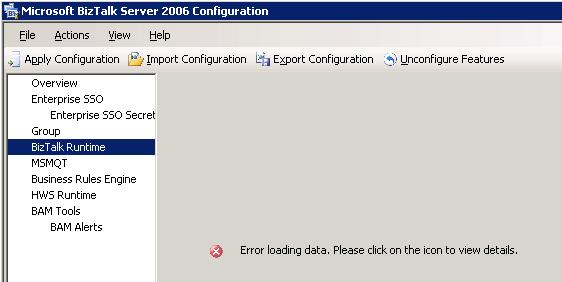
The other day I revisited the configuration screen for one of our production environments. When I selected BizTalk Runtime I was greated by the message “Error loading data. Please click on the icon to view details.”.


Clicking the icon didn’t do anything. Now I could imagine a couple of different things that could cause this to happen. Lost database connectivity or database corruption and security issues were my two first guesses. However in this case I knew the server was working and I knew that the user with which I was running the configuration had the required authorization, but just in case I confirmed it. I pondered this a moment and did a quick search. I only came up with two links, none of which really seemed to fit (see bottom of post for references). So I thought I’d blog about the way I “solved it”.


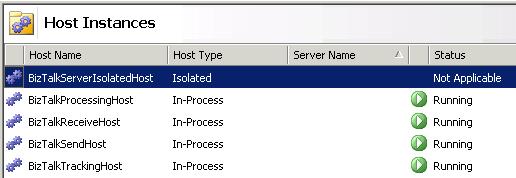
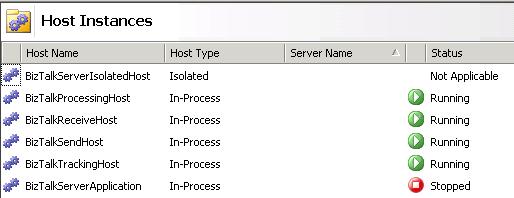
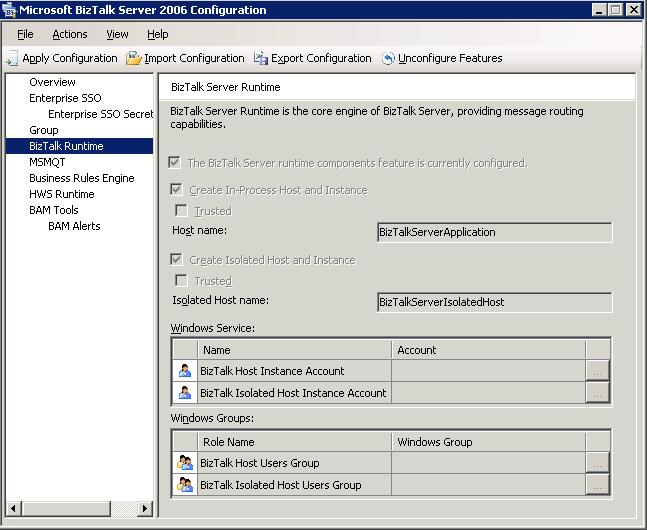
Lets take a step back. What should the screen show? It should show how you configured the default host instances (BizTalkServerApplication and BizTalkServerIsolatedHost). Now in our production environment we no longer have BizTalkServerApplication, instead for this server and customer it looked like this:


We had deleted the BizTalkServerApplication host instance and replaced it by host instances better suited for this environment. This causes problems for the configuration tools as it looks for that host instance (NT Service) when displaying that screen. So I added it back.


Now when we try to open the BizTalk Runtime section of the BizTalk Server 2006 Configuration, everything works.


A short note though: The screen is in this case more or less pointless, since it shows a configuration that we aren’t using, thus it can no longer be used to represent a BizTalk server configuration, nor can the export configuration option be used to fully backup a servers configuration.


While writing this post I removed the name of some servers, accounts and groups from the screenshots above. Just to be clear.


References I found that seems to deal with something of the same problem:


Adapters, BizTalk

BizTalk SFTP Adapter

A while ago I wrote about different kinds of file transfer protocols that contained the acronym FTP in one way or another, and what they really meant. I mentioned that I had worked with these different protocols. Now the BizTalk Adapter that we used for SFTP has been made available online by Mikael, who was the one responsible for developing it. Considering what the going rate is for BizTalk adapters I’d say that this is highly generous. I know of at least one company that charges several tens of thousands of dollars for their BizTalk SFTP Adapter. Why not save a buck or two for the projects release party? The only thing I have against this adapter is the SharpSsh library it uses, which is a port from Java that has resulted in some C# code that I just don’t like. However I must say that we have been using it in production for some time and it hasn’t failed us yet. As usual though, don’t take my word for it. If you plan to use this adapter test to see that it fits your requirements (as you should with everything in your solution). Read more here.