I got inivited to do the beta exam 71-504: TS: Microsoft .NET Framework 3.5 – Windows Workflow Foundation. Once in a while I get these kinds of invites, those of you who are certified and have reached a certain level and/or participated in beta exams before know what they are. Given my experience from beta exams from the past they are usually much longer then your regular exam, often containing up towards 90 or so questions making you busy for a bit longer then the run on the mill exam. With betas running now the exam itself will probably go live sometime this spring or early summer, although the exam site says March. As my primary interest at this point in time is BizTalk, I have a fair understanding of workflow, but it’s been two years since I was involved in actually doing real-world projects in WF and back then it was in beta. I’ll probably not do this exam, especially since the beta period runs through January 4th, and I’m on vacation. I’d much rather do the beta exam for Windows Communication Foundation, but so far I haven’t seen any invite for that. Full list of current and comming certifications is here. So far there seems to be no practice tests available for these new exams for those of you who like that learning path, but I’m sure they’ll popup soon after the tests become available.
Blog
Visualizing the benefit of forwardonly streaming in custom pipeline components
When doing custom pipeline component development you need to be aware of the forward-only streaming best practice. In short this means developing your pipeline components so that they do their logic either as a custom stream implementation or by reacting to the events availble to you through the Microsoft.BizTalk.Streaming.dll stream classes. Without ever keeping anything except the small stream buffer in Memory and without ever seeking the original stream. This is best practice from the perspective of resource utilization, both memory and processor cycles.
Microsoft.BizTalk.Streaming isn’t available to reference out of the box in BizTalk Server 2006, you have to get it out of the GAC to be able to use it.
Now there are a couple of good writings about streaming pipeline components and some of the peculiarities you have to think about when developing them. I won’t repeat more of it here. Instead the focus of this post is to make you aware of the difference between acting upon the stream as it is being read as opposed to reading through the stream in the execute method of the pipeline component (which is generally a bad idea, but necessary in some cases) by presenting a visual image of it for you.
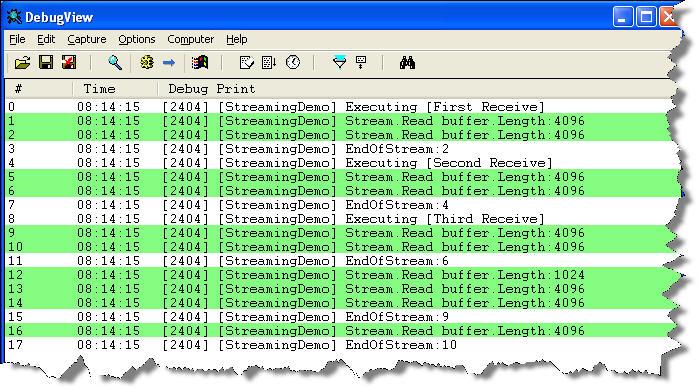
The scenario is the following: We have three custom pipeline components in a pipeline. The images below will show the difference between reading the stream the best practice way of reacting to what you need as the stream is being read once as opposed to reading the entire stream through in each pipeline component. I’m sure everyone is familiar with DebugView, and I will use it to display the trace statements outputed by the pipeline component.

Now basically what is being done here is that in the first pipeline component a stream wrapper is created, just so that we will get events from when the original stream is being read, in all three components we then use the events of the forward only eventing stream to react to events as the stream is being read. In the image above we can see that the original stream read event is called 3 times.
This instead is what would happen if we read through the stream in every pipeline component, instead of once. As we can see the stream is read 10 times. Now 3 times or 10 might not sound that much – the stream is however intentionally small. The point is that it is read 3 times, instead of the one. You should also keep in mind that many streams are not naturally seekable, requiring temporary storage or the likes to make them so which only adds to the resource waste.
Clean up the MsgBox
Do you sometimes end up with instances in the admin console that just wont go away? That are pending to be suspended, but doesn’t seem to ever get there. I did just the other day. To solve this I used the SQL way of terminating these messages, which always seems to do the trick. But it’s not without risk. Thats one of the many reason why there is emphasis on not running this against production. As the technet how-to describes this procedure is empty by default, so remember to add the logic by running the msgbox_cleanup_logic.sql script. There is also an issue with this procedure and tracking but there is a kb hotfix available that solves that. Presumably it’s correct from the start in R2 but I haven’t compared the two.
In short the SQL way of doing it involves running the procedure bts_CleanupMsgbox (once it contains logic). This procedure has an optional parameter named @fLeaveActSubs which by default is 1. Running it with the optional parameter set to something other then 1 will cause all subscriptions to be removed. Not something you’d typically want. A special note here is that since SQL checks for <> 0, passing in null will cause it to behave as if you sent in 0, since null compared to anything in SQL is always false. This is an issue because if you do Script As Execute in SQL the code that gets generated will default to you passing in null:
DECLARE @RC int

DECLARE @fLeaveActSubs int

— TODO: Set parameter values here.

EXECUTE @RC = [BizTalkMsgBoxDb].[dbo].[bts_CleanupMsgbox] @fLeaveActSubs
Your ports and orchestrations will still look like their running, and in a way they are, but there are no subscriptions, so you’re likely to get a routing failure. For you to get your subscriptions back you need to unenlist the send ports and then restart them. For orchestrations this isn’t enough, here you have to go the additional length of un-binding them and then re-configure and start them.
The BizTalk Core Engine’s WebLog mentions in this post that it might also be a good idea to run bts_PurgeSubscriptions directly after, but if your SQL Agent and the PurgeSubscriptionsJob is enabled (and it should be) then this will be done as part of that job.
What you can expect from this blog
I think starting a blog merrits an introduction. This isn’t the first time I’ve jumped on the blogging train. The first time was actually back in 2004, though that time I decided to do it in a more closed circle. My blog back then was (still is) hosted on msn spaces and available to my msn contacts only. I’ve since moved on and don’t use that msn account any more and the content of that blog is outdated.
I title myself a solutions architect, or perhaps an integration architect, working within the sphere of products and technologies coming out of Microsoft and the Connected Systems Division. I appreciate certifications as a learning path and have aquired a few over the years. In Microsoft certification terms I’m an MCP, MCAD, MCSD, MCTS and MCPD.
Expect to see me deliver posts with technical content in the CSD area, mostly around BizTalk. At the moment my main focus apart from that of my customer is ESB Guidance and BizTalk services. I will however also post interesting tidbits from my daily work and articles about things I have found or have been asked about.
 Be Logical - Notes from Johan Hedberg