Azure, cloud

Defining “cloud computing” – in my opinion

As I will begin doing more posts on and around cloud computing in general, and Windows Azure in particular, I’d first like to give my view on when something is cloud and not.

Why? Well, it’s not the first time a word gets status. It gets hot. It gets overused, overloaded and obfuscated. Vendors, consumers, service providers and others might not always agree what cloud is. It will get slapped on, belted down or fuzzily added to an existing product or service to make it more “today”. I might not agree. Others in turn may think I’m wrong. It will add to the overall confusion. So, to hopefully help provide clarity (but potentially adding to the confusion), when do I consider something to be “cloud”?

There are a couple of characteristics that I would look for when it comes to cloud.

Elastic

Or On-Demand. I would assume that I could scale up and down. At any time. I would assume that the procurement process for another server, piece of service (accounts, users, databases etc) is immediate (or next to). Same when scaling down. I would expect to be able to manage this elasticity myself.

Elasticity is not “I have a cold stand by server I can bring online”. Elasticity is “I need 10, 20, or 100 new instances and I need them for two days”. The dynamic capacity does not have a defined limit.

Pay-per-use

I would expect that the service uses some kind of pay-per-use charge model. How I use the service would be measured. How many hours have I been using it? How many GB of storage? How many MB transferred? How many connections opened? How many customers on boarded? How many users? – That sort of thing.

I would hope not (and this one is on the fence) to have to pay for underlying software in the form of procurement or running licensing. It would be included in the service. However this very much plays to the Software-as-a-Service or Platform-as-a-Service (PaaS) rather that say Infrastructure-as-a-Service (IaaS). In the latter I would of course have to handle licenses myself.

Hardware agnostic

I would expect that I do not need to care about underlying hardware. I wouldn’t need to know the cost of purchasing it nor how it is set-up or configured. I wouldn’t need to specify how my machine is built. Even if I do choose the size of the machine, that’s not really my machine, and I can change that at any time.

I would expect the environment, as far as the service or servers go, to be fault tolerant. If hardware fails, or some service needs to be performed, I would assume it to be transparent to me and not effect me or my service.

Summary

If someone calls their offering a cloud service, and it does not fulfill these things I would think twice before considering it a cloud offering. The service offered might be just what I want and need, but I wouldn’t consider it “cloud”. Windows Azure fulfill all these.

This is not an exhaustive list of what I would expect, nor of the capabilities or limitations of Windows Azure or any other platform, though it is what I would say raises cloud above hosting.

Addendum

The term private cloud is often mentioned by hosting providers that would like to compete (at least marketing wise) with the bigger cloud offerings like Windows Azure. In my experience, localized as it might be, they fulfill some of the tenants I hold to, but they often fail on things like rapid (and self-serviced) procurement of a new resource (like a server) or on the metered pay per use model – where often you are expected to pay for something based on your time of pre-determined need of availability to that resource – like a month, if not a year.

Also, for the something in the cloud to be usable for a business that will likely have parts of their business, but not all of it, in the cloud I would look for it to be

Secure connectivity

Since the cloud is not on-premise I would expect there to be a solution available for how do I, in a secure manner, connect what I almost certainly still have on-premise with what I have off-premise – in the cloud. I would hope this to be based on some kind of federated security model, and not by leasing a land line, using VPN, connecting to the existing Active Directory domain or setting up a trust. Though I’ll settle for tried and proven solution.

Further posts

Continuing on with additional Azure posts I’ll try and link back to these pillars, if possible. With pure how-to technology posts that might not always be applicable, but keep these base concepts in mind anyway so that you architect and build your solutions to support them.
Adapters, Azure, BizTalk, Mesh

Test run of the BizTalk Adapter for Live Mesh

The Live Mesh adapter is part of the recently released BizTalk Azure Adapters SDK 1.0 July CTP. It was first shown at TechEd 2009 North America by Danny Garber. But as someone who didn’t attend the conference, it passed me by. It didn’t surface for me until it made it’s way to codeplex and Richard Seroter made a note of the fact a week ago or so. If you have TechEd Online access you can find the original video demoing it here.


How to use it


  1. Register for an account on Azure services development portal, if you don’t have one already. Specifically you want access to Live Services.

  2. Install the pre-requisites.


    • The WCF LOB Adapter SDK.

    • The Live Framework SDK. You don’t need the tools, but you need the SDK.

    • There might be other pre-requisites though that I already had in place. So your experience might vary.

  3. Install the adapter. If you want to install it on a 64-bit system you can download the installer from codeplex. At the time of this writing a 32-bit (for VPCs etc) installer isn’t available, so you need to get the sources and build the installer. However see my install note 3 below, as you have to make a small change to the installer for it to work.

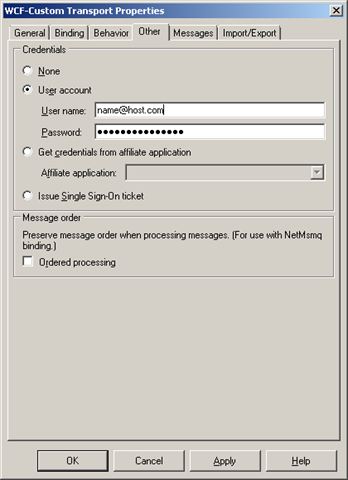
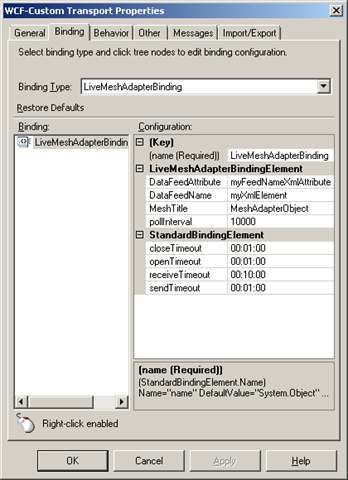
  4. Configure the adapter in BizTalk using the WCF-Custom adapter, or use my mesh.bindinginfo.xml as a template (don’t forget to change to your username and password). Some notes here:


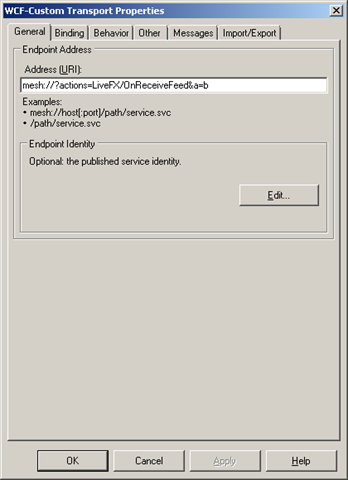
    • You have to give it an URI of “mesh://?actions=LiveFX/OnReceiveFeed“, it’s hard coded in the adapter. If it isn’t given that then it does nothing. To make it unique and be able to have more then one mesh receive location you can add to it, like you would a querystring. It will be accepted, but not handled, only the value of actions is retrieved and used by the adapter. A smart thing here would be to move something into the URI that would make it naturally unique. When you configure other adapters it’s the name of a service, or a procedure or something like that. In a scenario where you are listening to a mesh folder for example, then the name of that would be appopriate, or when listening to notifications from an application, then the name of that; the name of the MeshObject is perhaps a common denominator?


    • image image image

    • At the moment it receives notifications about changes to all resources and then when it gets a notification retrieves all feeds for that MeshObject and tries to read the userdata of the DataEntries associated with each DataEntry as a string, and if it succeeds initializes an XmlReader over that string and creates a message. Thus the userdata must conform with the rules of xml and also a couple of other things built into the adapter today. Like the name of the first node, and an attribute in that node must match those in configuration of the adapter, as must the title of the MeshObject. The attributes value must be equal to the name of the DataFeed that contains the entry which we received a notification for. 
      The logic is a little unclear to me, and has lots of room for improvement, but admittedly – I’m no expert on the mesh resource model, nor do I know what the application it was built for sent across or how it stored it – and, it’s an early CTP. Sample (matching the config seen above, and produced by my sample app):
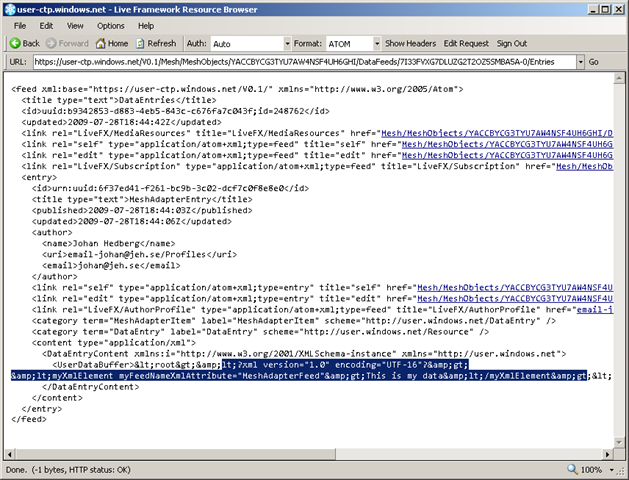
    • <myXmlElement myFeedNameXmlAttribute=“MeshAdapterFeed”>This is my data</myXmlElement>

  5. Build a cloud app to generate notifications with proper userdata content, or download my meshadaptertestconsole.zip (don’t forget to change to your username and password), which corresponds with my bindings above. It creates a MeshObject, a corresponding DataFeed and a DataEntry in that with userdata. In the Live Framework Resource Browser (an invaluable tool that comes with the SDK) it looks something like this:
     image

Conslusion


First thing to note about the adapter is that at the moment it seems very tightly coupled to the demo. Judging from the “vision slide” at codeplex, the idea is for it to eventually expand into other areas as well. It isn’t to hard to change it or update it to for example read files out of a mesh folder. The Live Framework is pretty straight forward once you get used to it. But right now it’s just a glimpse into a future where BizTalk is the server product to bridge on-premises with the cloud – and doing so effortlessly and seamlessly with the use of the artifacts that we as BizTalk Developers are used to.


Install notes


Install note 1:
If the adapter install complains about not being able to find Microsoft.ServiceModel.Channels you haven’t got the WCF LOB Adapter SDK. The exception message (for completeness and search-engines, was: “Could not load file or assembly ‘Microsoft.ServiceModel.Channels, Version=3.0.0.0, Culture=neutral, PublicKeyToken=31bf3856ad364e35’ or one of its dependencies. The system cannot find the file specified.“. 
image


Install note 2:
If you get a message when running the installer that “Please wait while the installer finishes determining your disk space requirements” – try to run the installer from the commandline using the command msiexec /i <name_of_installer.msi>, or msiexec /package <name_of_installer.msi> /qr.


Install note 3:
I got the message that “Machine.config doesn’t contain system.servicemodel node”. First of all – yes it did, secondly – I could see that the adapter had added it’s bindings to the section – so it must be due to something else. When “binging” (do we call it that now 😉 the exception message I got this post. It didn’t help much, but it did point me in the right direction, becauseit made me remember seeing a custom action in the solution. Sure enough, looking at the code for the custom action revealed the issue. At line 106, the installer is trying to apply the config for the 64-bit machine.config as well as 32-bit, not finding it since I’m on a 32-bit environment. Commenting out that line and rebuilding the install does the trick. Note: I’m not trying to do a fancy works-for-all-scenarios solution. I just wanted to fix my specific problem.


Install note 4:
I can swear on the fact that just before beginning the process of installing the adapter I could create BizTalk projects. After the adapter (and WCF LOB Adapter SDK) was installed – I can’t. Project creation fails and I get the message “One or more templates do not match any installed project packages.”. I can’t really point a finger or lay the blame on any particular point, install, configuration or other entity. It did however stop working. Reinstalling BizTalk Server 2009 Developer Tools and SDK resolved the issue.

Azure, BizTalk, General, Learning, Presentation, TechDays09, Usergroup

Upcoming speaking engagements

I’ve been blessed with quite an active speaking schedule over the next couple of months. I’m happy to have been trusted with the talks, and look forward to giving them.


  • The 10th of February is the BizTalk User Group Sweden, and a talk about the new features of BizTalk Server 2009, geared towards BizTalk developers wanting to get the low-down of the new stuff. I’m (hopefully) co-presenting this talk with Mikael Håkansson. The slots for the talk is full, but we have a waiting list that is also an overflow list. If the overflow is of a sufficient size the talk will be repeated the week after.

  • The 11th of February I’m giving an Introduction to REST talk, as part of an WCF seminary at an corporate internal gathering.

  • The 6th of March I’m giving a talk about Windows Azure for Informator in Stockholm, see details (in swedish) and sign up here.

  • The 17-18 of March is TechDays 2009 Sweden. I was excited about this event way back in April of 2008, and am glad to able to present a session about BizTalk Server 2009, aimed at .NET Developers curious about BizTalk as well as BizTalk developers interested in the new features. I’m co-presenting this session with Mikael Håkansson. Our talk is at 14:30 on Tuesday, don’t miss it! Also a thanks to Alan Smith for making this one happen.

2.svenska_bloggknapp150x130


TechDays 2009 will among also be visited by the BizTalk User Group Sweden for which we will have a booth at TechDays. Stop by to say hi, learn what BizTalk Server is and can do for you, or get the chance to get our view on BizTalk Server and related questions you are having. The goal is to keep the booth manned at all times, so there will always be someone there. Hopefully someone who will be quite busy 😉


 Finally, I’m currently set to be holding a Windows Communication Foundation (WCF) custom onsite course delivery, sketched to be running one day per week through March. Should be interesting.