Blog

Administration, BizTalk, Maintenance

Cleaning up BizTalk database backups

Everyone knows (read that as: should know 😉 that enabling the BizTalk jobs “Backup BizTalk Server” and “DTA Purge and Archive” is a good thing. Even on simple test machines, and perhaps (preferably) even on your developer laptop. What happens some times though is that, when you end up using the dump-to-disk approach, you fill up your disks. This happens because by default the BizTalk Backup and DTA Purge and Archive jobs doesn’t clean house. In your production and staging environments the “IT guys” will usually have your back in this case and make sure that doesn’t happen. For those environment where that isn’t the case here’s an easy to use script provided by our IT guys to help keep things tidy. It uses the forfiles statement as the bulk of its logic.

@echo off
set BACKUP_PATH=%1
set RET_INTERVAL=%2

if "%BACKUP_PATH%"=="" exit 1
if "%RET_INTERVAL%"=="" exit 1

Forfiles /P %BACKUP_PATH% /S /M *.BAK /D -%RET_INTERVAL% /C "cmd /C Del @path"
exit %ERRORLEVEL%

Now all you need to do is to call this script from somewhere. A suggestion might be from a SQL job. This way you configure the backup and the cleanup of the backup files from a single location. Like this:

exec xp_cmdshell 'script.cmd C:Backup 4'

script.cmd should be the full path to your script, while C:Backup should be the full path to your backup directory. Remember to surround paths by ” should they contain spaces. The 4 in this case says that any files 4 days and older will be removed. Schedule as you see fit.

Conference, General, PDC

Preparing for PDC 09


I’ll be there. I’m happy about it. The sessions looks promising, although I have to say that the functionality of the website as far as scheduling goes really blows. There it no way to visualize your schedule, and no way to export it to your outlook calendar or even to something like Excel. That I’ve found to this date.


There are three sessions awarded with the BizTalk keyword (listed in my order or interest):


Microsoft BizTalk Server Futures and Roadmap


Learn how BizTalk Server 2009 lets you focus on writing the code to do the hardcore business logic and let BizTalk take care of moving the data. Hear how your development skills with Windows Communication Foundation (WCF), and Windows Workflow Foundation (WF) work seamlessly with the powerful integration platform of BizTalk. Find out how BizTalk aligns with the Microsoft application server in the longer term.


Queuing and Publish/Subscribe in a Heterogeneous Environment


Queuing and publish/subscribe are common patterns for building loosely-coupled, distributed applications. Learn how to use Microsoft Windows Communication Foundation (WCF) the new Microsoft ASP.NET 4.0 routing service, the Microsoft .NET Service Bus, and Microsoft BizTalk Server to easily connect heterogeneous systems. We then introduce AMQP (the Advanced Message Queuing Protocol), an important new open standard for interoperable message-oriented middleware, which will reduce the friction in connecting heterogeneous clients. A real-world scenario shows AMQP in action, connecting WCF, Microsoft Excel, and Java-based clients.


Connecting Applications with the Microsoft BizTalk Enterprise Service Bus


See how the BizTalk Enterprise Service Bus (ESB) enables you to build services that can be quickly located and connected, whether they live behind the firewall or in the cloud, without creating a brittle point-to-point link. Learn how to dramatically improve the service lifecycle of development, testing, and deployment by using the powerful messaging, routing, and transformation capabilities of the BizTalk ESB in your solution today, and get a glimpse of future plans for BizTalk service bus/pub-sub pattern


The team talks about the upcomming BizTalk content at PDC09 here.

.NET 3.5, BizTalk Server 2009, Development, SOA, WCF

Oh BizTalk, why dost thou mock me?

In any given integration project many different parties are involved. In some cases these parties have standard endpoints against which BizTalk operates and sometimes these endpoints are built as you go in the participating systems to meet a new demand. This is true for other types of projects as well – things get finished at different times – and you need to be able to work independent of each other during that time. What you often do determine very early in the project are the design of messages, schemas or APIs through which you exchange information. In many cases a BizTalk project can effectively use FILE send or receive ports that serve the same purpose as a One-Way send or receive port to say SAP would do at a later stage. But how about solicit-response send ports? What do you exchange these for?


In this post I’d like to introduce a way to handle solicit-response through the use of a catch all WCF Service. There any many ways in which to mock a service. The prime benefit with this approach is that you will be able to model your BizTalk solution the way you want it to be, without having to have access to the real service, and exchange the solicit-response port for it’s production or acceptance test counter parts at your convenience.


To achieve this we need something that let’s us send in any message, and based on some part of the message determine what message to send back, and the send it as a response.


WCF is a perfect candidate. It has functionality both to allow us to create methods that handles all incoming requests by specifying a wildcard (*) as the Action property, and accept any message and can send any message as a return. Using the Message base class it also allows us to easily create the response message, and populate the body of the message from the contents of a stream, such as a file (See the ‘Creating Messages from XmlReaders’ topic in the link).


So what I did was I created a WCF Service, and added a method to catch all messages:

[OperationContract(Action = “*“, ReplyAction=”*“)]
Message CatchAll(Message message);

In the implementation for this method I have include the following code:

FileStream stream = new FileStream(ResponseHelper.GetResponseFile(requestAction), FileMode.Open);
XmlDictionaryReader xdr = XmlDictionaryReader.CreateTextReader(stream, new XmlDictionaryReaderQuotas());
MessageVersion ver = OperationContext.Current.IncomingMessageVersion;
return Message.CreateMessage(ver, ResponseHelper.GetResponseAction(requestAction), xdr);

I have a small helper class that just helps me get data from the config, the config in turn looks like this:

<configSections>
  <section name=”requestResponseHandling
type=”ServiceHost.RequestResponseHandlingConfigSection, ServiceHost“/>
</configSections>
<requestResponseHandling>
  <actionList>
    <add requestAction=”http://tempuri.org/IService1/GetData2
responseAction=”http://tempuri.org/IService1/GetData2Response
responseLocation=”GetData2Response.xml” />
  </actionList>
</requestResponseHandling>

This enables me to add new responses to incoming requests without needing to rebuild the service to incorporate a new response. You could go crazy here with code and undertakings to reply based on some context or what not. In the case presented here I’m just making it simple and returning the same static message for all request that matches a certain requestAction.


Finally, put this in the host of your choice. In my case I’ve got IIS so I’m hosting it there. That will also cause changes to the web.config to automatically get loaded, so that’s happy times.


Using this from a client is super easy. Just point the address of the client endpoint towards this service instead. The only thing that might not be super simple (though still fairly simple) is that you need to know what the meat of the response will look like when serialized as a response (the body of the response message). That is you need to Generate a sample response message from your wsdl.


Now let’s look at how we can utilize this to mock services in BizTalk Server. Oh, but wait, that sounds like it would be a bit of work to do, but… no, that isn’t the case. In fact, once you have configured the WCF service the only thing you need to do is to point your Send port at this service instead of the system that would otherwise be there in it’s place. Loop closed.

Visual Studio, wsdl, xsd

Generate sample request/response message from WSDL

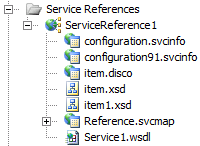
For those of you well versed in the ways of wsdl, you might be able to do this by hand. But if you want a little help you can generate sample xml from the wsdl/xsd you get from a service’s metadata. Using Add Service Reference in Visual Studio creates this metadata for you. When you add your service reference, if you expand the files that you got you will see a couple of schemas.


image


Now if you have a xsd in BizTalk Generating an instance of a schema is a very basic functionality for all developers. I’m not sure how it is for the pure .NET developers though, but there are ways (of which this is one) that does not include BizTalk tools that allows you to generate xml for pieces of a schema.


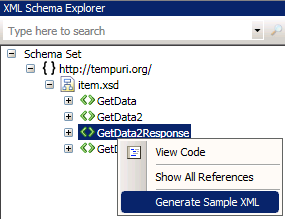
In your service reference locate the schema you want (hint: in the above image that would be item.xsd) and open it with the XML Editor (you could just as well open any other schema, it need not come from a service reference in a project). Then go for View – XML Schema Explorer.


Right clicking on the node you want (your response) you can then choose to Generate Sample XML.


image


Now I make no claim as to having used this extensively – I’m a BizTalk developer, and as such I’ve got other tools at hand. I’m sure it’s got it’s flaws, but hey – you can always do it by hand if you aren’t happy with the help you get.

General, Presentation, Toys, Webcast

LiveMeeting presentation tools

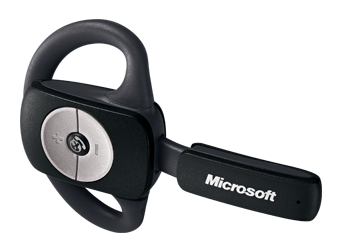
I just finished delivering the last of the modules of 6461A: Visual Studio 2008: Windows Communication Foundation, through a mix of on-premises and distance delivery, for a group of roughly 30 people. All that’s left is a little wrap up. Previously on Windows Vista I’ve had my A2DP bluetooth headset working, but I just simply couldn’t get that to work on Windows 7. So I got a new toy, the LifeChat ZX-600.

image

I can recommend it for delivering LiveMeetings or Webcasts. The sound quality is good, the device is unobtrusive allowing movement (which is a problem with a non-portable microphone) and it works nicely for Windows 7 although the product info page doesn’t explicitly say so.

I use it together with my Presenter Mouse 8000 (which also works perfectly both on Windows 7 without its co-delivered USB transmitter) as the hardware part of the tools I use when delivering courses as an MCT or otherwise.