Administration, BizTalk, Maintenance

Redeploying a schema assembly…

If I ask you upfront: Can I redeploy an assembly to BizTalk (that contains a schema) that is referenced by (and used in) another assembly? – What would you say?


Some of you might say yes, some might say no. And you’d both be right! It all depends on what it is being used by and how it’s deployed.


Redeploying a schema referenced by a map in another assembly


Yes. This will work – provided you specify overwrite when redeploying or updating the resource, and regardless if the resources are placed in the same or different applications. The behavior is the same in all relevant tools, whether it is Visual Studio, BizTalk Administration Console or the BtsTask tool. For the remainder of the discussion I’ll use BtsTask only, since it has the easiest (or at least most verbose) output to follow.


Sidenote: If you don’t specify overwrite, you’ll get something like:
Error: Failed to add resource(s).
Resource (-Type=”System.BizTalk:BizTalkAssembly” -Luid=”SchemaProject, Version=1.0.0.0, Culture=neutral, PublicKeyToken=0a220f093608cb3f”) already in store.
1) Use BTSTask’s overwrite flag or
2) Set redeploy flag to true in BizTalk Project or
3) Click overwrite all checkbox in Admin MMC to update if the resource exists in the specified target application “SchemaApplication”.
Overwrite flag will be ignored if the resource is associated with another application.

Redeploying a schema referenced by an orchestration in another assembly in the same application


Yes. This will work. It assumes that the orchestration is unenlisted (which may be a huge problem in some cases), or you will get an error. If it is however, and as long as you specify the overwrite flag, BtsTask will happily inform you of it’s progress telling you exactly what it’s doing – which is to find the referencing resources, save their binding information, removing them, then doing the same with the thing you want to redeploy, then deploying the thing you are deploying and applying it’s bindings, and finally deploying the referencing resources and applying their tucked away bindings.


The tools does all this for you, in a controlled manner under one transaction that can be rolled back if something fails. BtsTask output is here.


Redeploying a schema referenced by an orchestration in another assembly in another application


No. This is where the fun stops. You cannot do this with the out of the box tools. The Application boundary will stop you. To be frank: WTF!? For someone approaching BizTalk Server 2006/R2/2009 from a 2004 (single/no application) perspective this could invalidate their whole deployment strategy. BtsTask output is here.


In Summary


Why is this happening? If we use Reflector to disassemble BtsTask and the Deployment API’s it uses it’s apparent that the whole things is built around an Application and it’s around an Application that everything revolves. So… If you are faced with this kind of requirement for your deployment scenarios – the tools won’t do it for you – you have to do it yourself. Mimicking the steps taken by BtsTask, but without the dependency on Application, is my recommended approach. But the implementation of that is for another post…


Has anyone already done this and have or know of a tool developed for this purpose?


Update: The odd cases


I want to add that I make no claim to cover all scenarios in the above write up. I only wanted to highlight the Application boundary as one of the things that will have a big impact on redeploying schemas. We have for example come across scenarios such as when an orchestration within the same application is “specify later”-bound to a port, on which there are maps, for which there are no referential relationship with the orchestration assembly, though there are with the schema assembly being redeployed. This scenario may fail, depending on your luck, where BizTalk is unaware of the correct order to re-deploy these things. This may result in the orchestration (and the port) being re-added before the assembly containing the maps is in place. Which in itself will fail since an attempt to add a binding containing a port that has maps configured that are not deployed will of course not work. There are more scenarios, and it would be unfair to expect any tool to cover them all.
Adapters, Azure, BizTalk, Mesh

Test run of the BizTalk Adapter for Live Mesh

The Live Mesh adapter is part of the recently released BizTalk Azure Adapters SDK 1.0 July CTP. It was first shown at TechEd 2009 North America by Danny Garber. But as someone who didn’t attend the conference, it passed me by. It didn’t surface for me until it made it’s way to codeplex and Richard Seroter made a note of the fact a week ago or so. If you have TechEd Online access you can find the original video demoing it here.


How to use it


  1. Register for an account on Azure services development portal, if you don’t have one already. Specifically you want access to Live Services.

  2. Install the pre-requisites.


    • The WCF LOB Adapter SDK.

    • The Live Framework SDK. You don’t need the tools, but you need the SDK.

    • There might be other pre-requisites though that I already had in place. So your experience might vary.

  3. Install the adapter. If you want to install it on a 64-bit system you can download the installer from codeplex. At the time of this writing a 32-bit (for VPCs etc) installer isn’t available, so you need to get the sources and build the installer. However see my install note 3 below, as you have to make a small change to the installer for it to work.

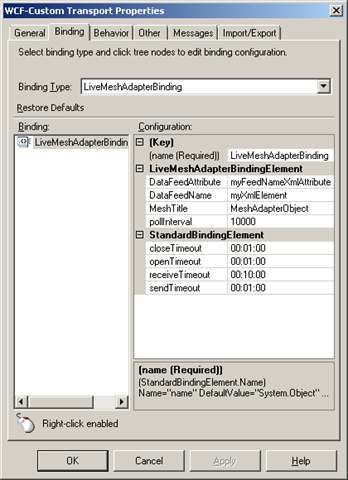
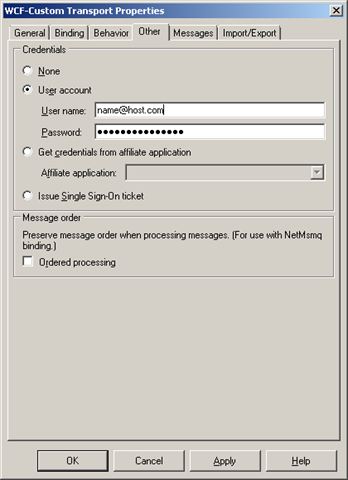
  4. Configure the adapter in BizTalk using the WCF-Custom adapter, or use my mesh.bindinginfo.xml as a template (don’t forget to change to your username and password). Some notes here:


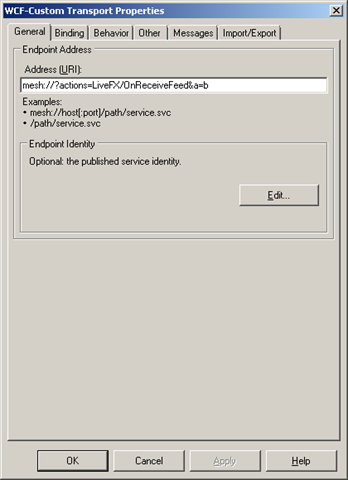
    • You have to give it an URI of “mesh://?actions=LiveFX/OnReceiveFeed“, it’s hard coded in the adapter. If it isn’t given that then it does nothing. To make it unique and be able to have more then one mesh receive location you can add to it, like you would a querystring. It will be accepted, but not handled, only the value of actions is retrieved and used by the adapter. A smart thing here would be to move something into the URI that would make it naturally unique. When you configure other adapters it’s the name of a service, or a procedure or something like that. In a scenario where you are listening to a mesh folder for example, then the name of that would be appopriate, or when listening to notifications from an application, then the name of that; the name of the MeshObject is perhaps a common denominator?


    • image image image

    • At the moment it receives notifications about changes to all resources and then when it gets a notification retrieves all feeds for that MeshObject and tries to read the userdata of the DataEntries associated with each DataEntry as a string, and if it succeeds initializes an XmlReader over that string and creates a message. Thus the userdata must conform with the rules of xml and also a couple of other things built into the adapter today. Like the name of the first node, and an attribute in that node must match those in configuration of the adapter, as must the title of the MeshObject. The attributes value must be equal to the name of the DataFeed that contains the entry which we received a notification for. 
      The logic is a little unclear to me, and has lots of room for improvement, but admittedly – I’m no expert on the mesh resource model, nor do I know what the application it was built for sent across or how it stored it – and, it’s an early CTP. Sample (matching the config seen above, and produced by my sample app):
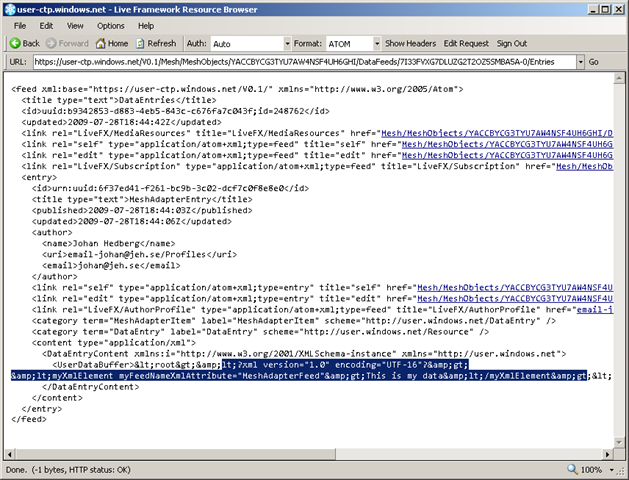
    • <myXmlElement myFeedNameXmlAttribute=“MeshAdapterFeed”>This is my data</myXmlElement>

  5. Build a cloud app to generate notifications with proper userdata content, or download my meshadaptertestconsole.zip (don’t forget to change to your username and password), which corresponds with my bindings above. It creates a MeshObject, a corresponding DataFeed and a DataEntry in that with userdata. In the Live Framework Resource Browser (an invaluable tool that comes with the SDK) it looks something like this:
     image

Conslusion


First thing to note about the adapter is that at the moment it seems very tightly coupled to the demo. Judging from the “vision slide” at codeplex, the idea is for it to eventually expand into other areas as well. It isn’t to hard to change it or update it to for example read files out of a mesh folder. The Live Framework is pretty straight forward once you get used to it. But right now it’s just a glimpse into a future where BizTalk is the server product to bridge on-premises with the cloud – and doing so effortlessly and seamlessly with the use of the artifacts that we as BizTalk Developers are used to.


Install notes


Install note 1:
If the adapter install complains about not being able to find Microsoft.ServiceModel.Channels you haven’t got the WCF LOB Adapter SDK. The exception message (for completeness and search-engines, was: “Could not load file or assembly ‘Microsoft.ServiceModel.Channels, Version=3.0.0.0, Culture=neutral, PublicKeyToken=31bf3856ad364e35’ or one of its dependencies. The system cannot find the file specified.“. 
image


Install note 2:
If you get a message when running the installer that “Please wait while the installer finishes determining your disk space requirements” – try to run the installer from the commandline using the command msiexec /i <name_of_installer.msi>, or msiexec /package <name_of_installer.msi> /qr.


Install note 3:
I got the message that “Machine.config doesn’t contain system.servicemodel node”. First of all – yes it did, secondly – I could see that the adapter had added it’s bindings to the section – so it must be due to something else. When “binging” (do we call it that now 😉 the exception message I got this post. It didn’t help much, but it did point me in the right direction, becauseit made me remember seeing a custom action in the solution. Sure enough, looking at the code for the custom action revealed the issue. At line 106, the installer is trying to apply the config for the 64-bit machine.config as well as 32-bit, not finding it since I’m on a 32-bit environment. Commenting out that line and rebuilding the install does the trick. Note: I’m not trying to do a fancy works-for-all-scenarios solution. I just wanted to fix my specific problem.


Install note 4:
I can swear on the fact that just before beginning the process of installing the adapter I could create BizTalk projects. After the adapter (and WCF LOB Adapter SDK) was installed – I can’t. Project creation fails and I get the message “One or more templates do not match any installed project packages.”. I can’t really point a finger or lay the blame on any particular point, install, configuration or other entity. It did however stop working. Reinstalling BizTalk Server 2009 Developer Tools and SDK resolved the issue.

BizTalk, Usergroup

April post-swebug-event resources, part 2

Slides and video for Paolo Salvatoris End-to-end performance testing session is not available just yet, we’ll let you know when. I’ll update this post and also post a tweet on Twitter.

UPDATE 1: First (of two) videos available here.
UPDATE 2: Second video available here. Slides for Paolos session are here.

One of the things he talked about was that a new version of the Hyper-V guide for BizTalk Server 2009 was forthcomming. It’s available now.

Other news was that the official release date for BizTalk Server 2009 (at least in Sweden) is April 27th – although it’s available through MSDN subscriptions already, and has been for awhile.

To see some pictures, go here. Also see the Twitter chatter, search for #swebug.

In related news I have noticed that usage of Eventbrite has spread in the BizTalk Community. It’s really a great tool and one I can highly recommend.

BizTalk, Maintenance

Cleanup BizTalk Servers MgmtDb

I’ve previously blogged about cleaning (emptying) the MsgBox database, something that can be useful in some scenarios, like development and test. While looking for something else the other day I found information about an equally useful procedure, again mainly in an development environment. Speaking for myself I can say that there has been a number of time where I have just wanted to start from a clean slate with my development BizTalk Server installation. Just remove all ports and other deployed artifacts and start from a clean slate. Do NOT run this in production, and be careful that this is REALLY what you want even when running it in another environment.


According to the documentation:
In the BizTalk Management (BizTalkMgmtDb) database, there’s a stored procedure named dbo.adm_cleanupmgmtdb. If you do run this stored procedure, all the entries in the database will be deleted.


It was documented in this article, which wasn’t really on topic with the other content of the page: http://msdn.microsoft.com/en-us/library/aa561960.aspx


Nostalgic off-topic link: For some reason I always come to think about the starting sequence for “Anslagstavlan” when talking about clean slates. This link is completely irrelevant to BizTalk, it’s swedish television from the 80’s.

Azure, BizTalk, General, Learning, Presentation, TechDays09, Usergroup

Upcoming speaking engagements

I’ve been blessed with quite an active speaking schedule over the next couple of months. I’m happy to have been trusted with the talks, and look forward to giving them.


  • The 10th of February is the BizTalk User Group Sweden, and a talk about the new features of BizTalk Server 2009, geared towards BizTalk developers wanting to get the low-down of the new stuff. I’m (hopefully) co-presenting this talk with Mikael Håkansson. The slots for the talk is full, but we have a waiting list that is also an overflow list. If the overflow is of a sufficient size the talk will be repeated the week after.

  • The 11th of February I’m giving an Introduction to REST talk, as part of an WCF seminary at an corporate internal gathering.

  • The 6th of March I’m giving a talk about Windows Azure for Informator in Stockholm, see details (in swedish) and sign up here.

  • The 17-18 of March is TechDays 2009 Sweden. I was excited about this event way back in April of 2008, and am glad to able to present a session about BizTalk Server 2009, aimed at .NET Developers curious about BizTalk as well as BizTalk developers interested in the new features. I’m co-presenting this session with Mikael Håkansson. Our talk is at 14:30 on Tuesday, don’t miss it! Also a thanks to Alan Smith for making this one happen.

2.svenska_bloggknapp150x130


TechDays 2009 will among also be visited by the BizTalk User Group Sweden for which we will have a booth at TechDays. Stop by to say hi, learn what BizTalk Server is and can do for you, or get the chance to get our view on BizTalk Server and related questions you are having. The goal is to keep the booth manned at all times, so there will always be someone there. Hopefully someone who will be quite busy 😉


 Finally, I’m currently set to be holding a Windows Communication Foundation (WCF) custom onsite course delivery, sketched to be running one day per week through March. Should be interesting.