Blog

BizTalk Server 2009, TFS

BizTalk Server 2009 – automated build & deployment using TFS 2008 – parameterization

This post is all about how you can parameterize your builds to work in different scenarios. Before you read this, please take a moment to read Mikaels introductory blog post and take a look at my webcast on Channel9 [~18m], if you haven’t already – it will eaze your understanding of this article.


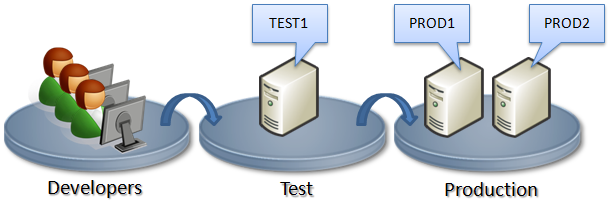
To put this post in to context, let’s assume we have a multi target environment, with multiple servers in the production environment.

image


So for this sample we have two environments; Test and Production. The Test environment has one server (TEST1) whereas the Production has two (PROD1 & PROD2).


Scenario 1 – Deploying to Test for the first time


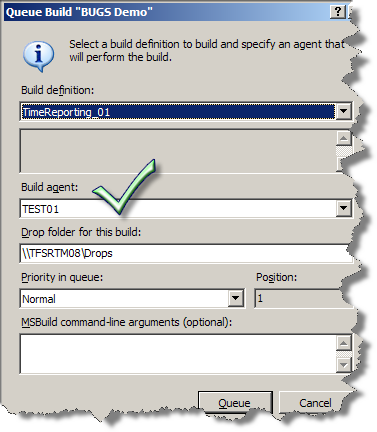
As the developers are done and have checked in their code and binding files, they are ready to create a Build Type. They do this through the Team Explorer add-in, after which they’ll make a small modification to the build script (as described in the Mikaels introductory post).  After this – all they have to do is to “Queue New Build” and choose the Build Agent running on the TEST1 machine. No parameters required.

image


The solution will then be Compiled, Added to GAC and Deployed to BizTalk. The last step would be to Import the bindings files to create the ports etc.


Scenario 2 – Deploying to Test for the second time


If the structure of the solution has not changed since the last build, – the developer would just Build the solution as described in Scenario 1, where it is first being Undeployed and Removed from the GAC before it’s being redeployed.


However, if the structure of the solution has changed, there might be an issue. For example, let’s say the developer originally had two projects, one “orchestration project” and a “schema project” (referenced by the first one), and then decided to do some refactoring to consolidate the two projects into one. Deploying this updated solution will cause an conflict since the “schema assembly” is no longer part of the bindings file, and will therefore not be removed.


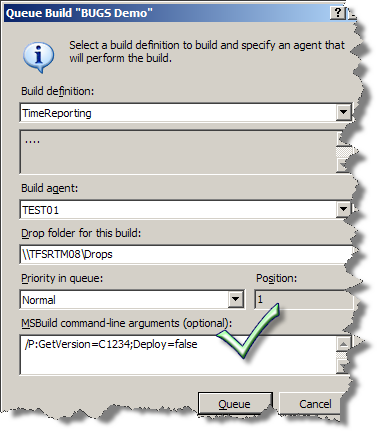
This can be resolved by undeploying the previous label or changeset using the following parameters:


/P:GetVersion=C1234;Deploy=false (using changeset)


/P:GetVersion=LTimeReporting_20090310.1;Deploy=false (using label)

image


When the solution is undeployed, the developer can building the solution again. This time, without any parameters. Just like we did in scenario 1.


Scenario 3 – Deploying to Production


Same configuration described in Scenario 1 and 2 applies to building to the Production environment. Although there is no need to create additional Build Types, you would however need to select a different Build Agent – the one running on the PROD1 machine instead of the one on TEST1.


However, the scenario is a bit different since you also need to add the assemblies to the GAC on the PROD2 machine. To accomplish this you could just run the build agent on both machines and thus run the full build/undeploy/deploy sequence on both machines. That’s however a undesirable scenario. Originally we did this using another form or parameterization where we would use a gac_only flag on PROD2. However Mikael recently made an update to use PsExec after at tip from Kent Weare about how to use PsExec to remotely copy and install assemblies to the GAC. This enables you to run the build only on one machine. All that is needed is to make some modifications to the Build script (TFSBuild.proj). Alternatively, if all solutions are deployed to the same environments, you could do this change to the Blogical.BizTalk.CustomTasks.targets file located in the TeamBuildTypes folder (again; see webcast or read Mikaels introductory blog post).


Download version 1.1 of the Blogical.Shared.Tools.BizTalkBuildTasks (latest at the time of writing).


Installation


The Zip file includes the Custom Tasks library and the CustomTask.target file.


  1. Save the Blogical.Shared.Tools.BizTalkBuildTasks.dll file to preferred directory on each server running the Build Agent. You can use a network share.

  2. Edit the Blogical.BizTalk.CustomTasks.targets file (line 40). Set the <Blogical_CustomTasks> to the directory where you saved the Blogical.Shared.Tools.BizTalkBuildTasks.dll.

  3. Check in the Blogical.BizTalk.CustomTasks.targets file to the TeamBuildTypes folder in you TFS project.

  4. Download and install PsExec. You need to complete this step on each of the servers running the build agent.

  5. Edit the Blogical.BizTalk.CustomTasks.targets file (line 43). Set the <PsExecPath> to the path where you installed PsExec.


Blogging, Conference, TechDays09, Twitter, WCF

Twitterized

Since all the cool kids are hanging out at Twitter, I am too. I’m slightly late to join the party, but at least I made it.


With the upcomming TechDays I meaned to keep it updated with my experiences during the conference, however my Xperia X1 smartphone has become broken just in time, and my loaner is a 3 year old sonyericsson with no internet capabilities, so we’ll see how that goes. My alias is JoHed.


Although you should expect my Twitter space to update much more often then this blog, We’re also just starting up two new BizTalk projects, as well as doing some really interesting internal work, so I’m sure I’ll continue to have lots to write about here as well.


Another announcement worthy of being mentioned in the blog as well as on Twitter is that not only did I recently pass my WCF exam (70-503), I also did so in time before begining to teach the WCF course I had scheduled to start this week. It’s a multi-week engagement taking place in the evenings, with the goal being that people will have a try at the certification, so we’ll see how that works out. I have high hopes.

BizTalk Server 2009, TFS, Webcast

Webcast on BizTalk Server and Team Foundation Server

I haven’t blogged about it, though Mikael has mentioned it, but in conjunction with the BizTalk User Group Sweden meeting I released a webcast about how to use BizTalk Server 2009 Beta 1 together with Team Foundation Server 2008 to automate build and deployment of your BizTalk Server based solutions, it’s on channel9, check it out. The slides from the usergroup meeting, dealing with the samt topic as well as the news around BizTalk Server 2009 Beta are here. Also Mikael has an article, detailing the solution, and making available the downloadable code.

BizTalk, Maintenance

Cleanup BizTalk Servers MgmtDb

I’ve previously blogged about cleaning (emptying) the MsgBox database, something that can be useful in some scenarios, like development and test. While looking for something else the other day I found information about an equally useful procedure, again mainly in an development environment. Speaking for myself I can say that there has been a number of time where I have just wanted to start from a clean slate with my development BizTalk Server installation. Just remove all ports and other deployed artifacts and start from a clean slate. Do NOT run this in production, and be careful that this is REALLY what you want even when running it in another environment.


According to the documentation:
In the BizTalk Management (BizTalkMgmtDb) database, there’s a stored procedure named dbo.adm_cleanupmgmtdb. If you do run this stored procedure, all the entries in the database will be deleted.


It was documented in this article, which wasn’t really on topic with the other content of the page: http://msdn.microsoft.com/en-us/library/aa561960.aspx


Nostalgic off-topic link: For some reason I always come to think about the starting sequence for “Anslagstavlan” when talking about clean slates. This link is completely irrelevant to BizTalk, it’s swedish television from the 80’s.

Azure, BizTalk, General, Learning, Presentation, TechDays09, Usergroup

Upcoming speaking engagements

I’ve been blessed with quite an active speaking schedule over the next couple of months. I’m happy to have been trusted with the talks, and look forward to giving them.


  • The 10th of February is the BizTalk User Group Sweden, and a talk about the new features of BizTalk Server 2009, geared towards BizTalk developers wanting to get the low-down of the new stuff. I’m (hopefully) co-presenting this talk with Mikael Håkansson. The slots for the talk is full, but we have a waiting list that is also an overflow list. If the overflow is of a sufficient size the talk will be repeated the week after.

  • The 11th of February I’m giving an Introduction to REST talk, as part of an WCF seminary at an corporate internal gathering.

  • The 6th of March I’m giving a talk about Windows Azure for Informator in Stockholm, see details (in swedish) and sign up here.

  • The 17-18 of March is TechDays 2009 Sweden. I was excited about this event way back in April of 2008, and am glad to able to present a session about BizTalk Server 2009, aimed at .NET Developers curious about BizTalk as well as BizTalk developers interested in the new features. I’m co-presenting this session with Mikael Håkansson. Our talk is at 14:30 on Tuesday, don’t miss it! Also a thanks to Alan Smith for making this one happen.

2.svenska_bloggknapp150x130


TechDays 2009 will among also be visited by the BizTalk User Group Sweden for which we will have a booth at TechDays. Stop by to say hi, learn what BizTalk Server is and can do for you, or get the chance to get our view on BizTalk Server and related questions you are having. The goal is to keep the booth manned at all times, so there will always be someone there. Hopefully someone who will be quite busy 😉


 Finally, I’m currently set to be holding a Windows Communication Foundation (WCF) custom onsite course delivery, sketched to be running one day per week through March. Should be interesting.